Developer Tools · Researched comparison

6 AI Tools for Web App Development Options Ranked for 2026

TaskReports may earn a fee from some links on this page, and some placements are paid and labelled. Neither one decides the order. See our disclosure.

The short answer

Our first pick is Cursor, best for professional AI coding. For a different need, Bolt.new covers chat to website or app and Replit covers no-code app building. The remaining 3 options are covered below with prices and limits.

On this page

Key takeaways

  • Cursor takes the first slot, best suited to professional AI coding.
  • Check the limits for Bolt.new before you commit: higher levels cost more than the $30 shown range recommends for heavy use.
  • Lovable fits plain-language products.
  • Cursor and Lovable: pricing is by quote only, so plan time for a sales conversation.

Quick comparison

ToolIdeal forFree planWatch out for
------------
CursorProfessional AI codingNoAgent autonomy needs review habits
Bolt.newChat to website or appYesAI-generated code needs review
ReplitNo-code app buildingYesPlatform lock-in for hosting
v0Prompt to full-stack appYesBest paired with Vercel hosting
GitHub CopilotEveryday AI coding helpYesAI credits cost $0.01 each beyond allowances
LovablePlain-language productsNoAI-generated apps need review before production use

How we chose

Selection started from tools commonly considered for AI tools for web app development, then narrowed to 6 that have clear pricing information or a clear quote process. Seat minimums, billing terms and add-ons can move the real cost, so the starting prices here are a guide and not a quote. The ranking is editorial: typical fit first, then clear pricing, then free access. If your needs are unusual, read the profiles rather than relying on position.

★ Best overall

Cursor

Professional AI coding

  • Model choice across OpenAI, Anthropic, Gemini
  • SpaceXAI and Cursor
PriceSee website
See Cursor pricing

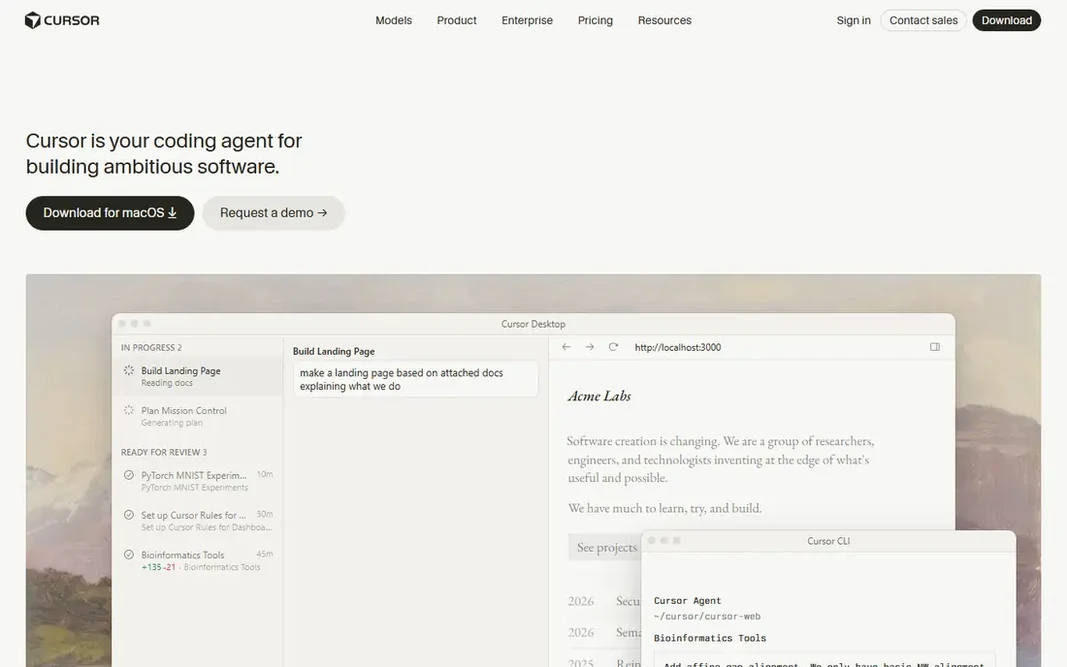
In short, Cursor is for professional AI coding. Cursor is an AI coding agent for building ambitious software, where agents use their own computers to build, test and demo features end to end for review. It runs in the terminal, collaborates in Slack, reviews PRs in GitHub, and lets teams hand work to AI teammates that sign in to tools and return finished work. More specifically, pricing was not shown on the homepage, so check the site. Check the vendor site for Cursor pricing; none is listed in this comparison. Cursor has no free plan. Trade-offs to know: No free plan confirmed on the homepage.

Price: See website

Free plan: No

Website: cursor.com

Watch out for

  • Pricing must be checked on the site
2

Bolt.new

Chat to website or app
Free

Bolt.new works best for chat to website or app. Bolt.new lets users build stunning apps and websites by chatting with AI, starting from a prompt or a template. Main advantages: databases and integrations built in; Deals with projects 1,000 times bigger than before. What to check first: AI-generated code needs review; Design control is looser than hand-coded apps. Worth adding: bolt Cloud hands enterprise-grade backend infrastructure, including hosting, databases and integrations, inside one interface with no additional accounts. The homepage displays a price range of $0 to $30 and invites users to start building at no cost. Bolt.new starts at: Free. Bolt.new offers a free plan.

Free plan: Yes

Website: bolt.new

Strengths

  • Refactoring and iteration
  • Start building at no cost

Watch out for

  • Higher levels cost more than the $30 shown range recommends for heavy use

3

Replit

No-code app building
Free

Where Replit fits: no-code app building. For non-coders who want a complete app with backend included, Replit is the best system. On cost, Replit starts like this: Free. Replit has a free plan. Watch-outs: premium levels needed for heavier use. Strengths: Agent writes production-ready code; 100+ integrations including OpenAI and Stripe.

Free plan: Yes

Website: replit.com

Strengths

  • Hosting and monitoring with zero setup
  • Intelligent model routing at 65% lower average cost than the previous Max Mode

Watch out for

  • System lock-in for hosting
4

v0

Prompt to full-stack app
Free

v0 makes the most sense for prompt to full-stack app. v0 turns a prompt into a working full-stack app in minutes, with GitHub sync, one-click Vercel deployment, design mode, and agentic behavior by default, plus an iOS app for building on the go. Limits to weigh: Complicated apps still need code review. Best features of v0: Working full-stack apps in minutes; Agentic by default. v0 starts at: Free. Free access exists with v0.

Free plan: Yes

Website: v0.dev

Strengths

  • IOS app
  • Prompt, build

Watch out for

  • Best paired with Vercel hosting
5

GitHub Copilot

Everyday AI coding help
Free

GitHub Copilot serves Everyday AI coding help. GitHub Copilot transforms the developer experience with contextualized assistance throughout the software development lifecycle, from inline suggestions and chat in the IDE to code explanations and answers to docs in GitHub. Copilot Free is a free pricing level with restricted functionality, including 2,000 code completions a month and a restricted monthly allowance of GitHub AI Credits for chat and agent features. It plugs into VS Code, Visual Studio, JetBrains IDEs, Neovim and terminals, and GitHub reports users up to 55% more productive at writing code without sacrifice to quality. What you pay to start with GitHub Copilot: Free. GitHub Copilot has a free plan. Drawbacks to consider: Code suggestions need review for quality and licensing.

Free plan: Yes

Website: github.com/features/copilot

Strengths

  • Business and Enterprise levels
  • World's most widely adopted AI developer tool per vendor

Watch out for

  • AI credits cost $0.01 each beyond allowances
6

Lovable

Plain-language products
See website

Think of Lovable for plain-language products. Lovable brings a new product, internal tool or whole company to life from a plain-language description, building production-grade software in live and handling end-to-end infrastructure from hosting and authentication to payments and integrations. Limits to weigh: No free plan confirmed on the homepage. Beyond that, pricing was not shown on the homepage, so check the site. Lovable shows no starting price here, so confirm the cost on the vendor site. Lovable does not include a free plan.

Free plan: No

Website: lovable.dev

Strengths

  • Businesses run real firms on it
  • Scion Group deployed 100+ apps in under four months

Watch out for

  • Pricing must be checked on the site

FAQ

Which tool is a good match for an existing codebase?

For most readers this guide would start with Cursor, built for professional AI coding. Bolt.new is the alternative for chat to website or app, and Replit for no-code app building. The right answer depends on budget and workflow.

How are the tools for AI tools for web app development ordered?

Cursor sits first and Lovable last because the order follows typical fit for AI tools for web app development, then price clarity and free access. It is a judgement call, so read each profile for fit and limits.

Can AI tools build a complete production app?

They can build working full-stack apps, but production use still needs code review, testing, security checks and real user feedback. Treat AI output as a capable first draft, not a finished product.

Do these tools publish their prices?

Not all of them. Cursor and Lovable publish no starting price, so expect a quote request for those. The rest, Bolt.new included, show a starting price, though seats and billing terms still change the final cost.

Which options for AI tools for web app development have a free plan?

On this list, Bolt.new, Replit, v0 and GitHub Copilot include a free plan. Caps on seats, usage or features are common, so test the free plan against your real workload.

Is Cursor the right pick for everyone comparing AI tools for web app development?

No single tool suits every team. Cursor comes first because it fits professional AI coding, while Bolt.new suits chat to website or app and Replit suits no-code app building. Match the tool to your own size, budget and workflow before deciding.