
Data and Analytics · Researched comparison

Power BI Alternatives in 2026: 6 Platforms Compared

TaskReports may earn a fee from some links on this page, and some placements are paid and labelled. Neither one decides the order. See our disclosure.

The short answer

If you need search-style questions in plain language, ThoughtSpot is the first tool to look at here. Alternatives: Zoho Analytics for small teams on a budget, and Tableau for refined interactive dashboards. The remaining 3 options are covered below with prices and limits.

On this page

Key takeaways

  • ThoughtSpot takes the first slot, best suited to search-style questions in plain language.
  • Sisense is the one to check for embedded analytics for products.
  • Only 2 of the 6 tools have a free plan (Zoho Analytics, Looker Studio), so check the caps.
  • ThoughtSpot comes with a trade-off: needs a well-modeled data layer to shine.
  • Starting prices begin at $15 per user per month with Tableau.

Quick comparison

ToolIdeal forWatch out forStarting priceFree plan
---------------
ThoughtSpotSearch-style questions in plain languageEnterprise features are quoted$25 per user per monthFree trial
Zoho AnalyticsSmall teams on a budgetBest value inside the Zoho ecosystem$30 per monthYes
TableauRefined interactive dashboardsCreator seats are pricey$15 per user per monthFree trial
Looker StudioFree Google-based reportingFewer advanced modeling featuresFreeYes
Qlik SenseAssociative analysis and explorationLearning curve for script-based loads$30 per user per monthFree trial
SisenseEmbedded analytics for productsQuote-only pricingSee websiteFree trial
★ Best overall

ThoughtSpot

Search-style questions in plain language

  • AI-assisted answers
  • Capable for large data sets
Price$25 per user a month
See ThoughtSpot pricing

Think of ThoughtSpot for search-style questions in plain language. ThoughtSpot lets business users type a question, for example sales by region last quarter, and get a chart back without building a dashboard first. Its AI features extend that idea, suggesting follow-up questions and explanations. From a buyer's view, for businesses where many people ask their own questions, that investment can pay off rapidly. For everyday use, higher levels and enterprise features are also quoted, so the entry price is only a starting point. ThoughtSpot pricing: $25 per user per month. Trial and free access: Free trial. Downsides: Enterprise features are quoted.

Price: $25 per user a month

Free plan: Free trial

Website: thoughtspot.com

Watch out for

  • Needs a well-modeled data layer to shine
2

Zoho Analytics

Small teams on a budget
$30 a month

Zoho Analytics was built for small teams on a budget. It will not match Tableau for deep visual analysis or Qlik for free-form exploration. Teams outside the Zoho ecosystem get less of the integration benefit. On cost, Zoho Analytics starts like this: $30 per month. Zoho Analytics includes a free tier. Trade-offs to know: Best value inside the Zoho ecosystem.

Free plan: Yes

Website: zoho.com/analytics

Strengths

  • Low entry price with a free level
  • Plenty of built-in connectors

Watch out for

  • Depth lags Tableau for complicated analysis
3

Tableau

Refined interactive dashboards
$15 per user a month

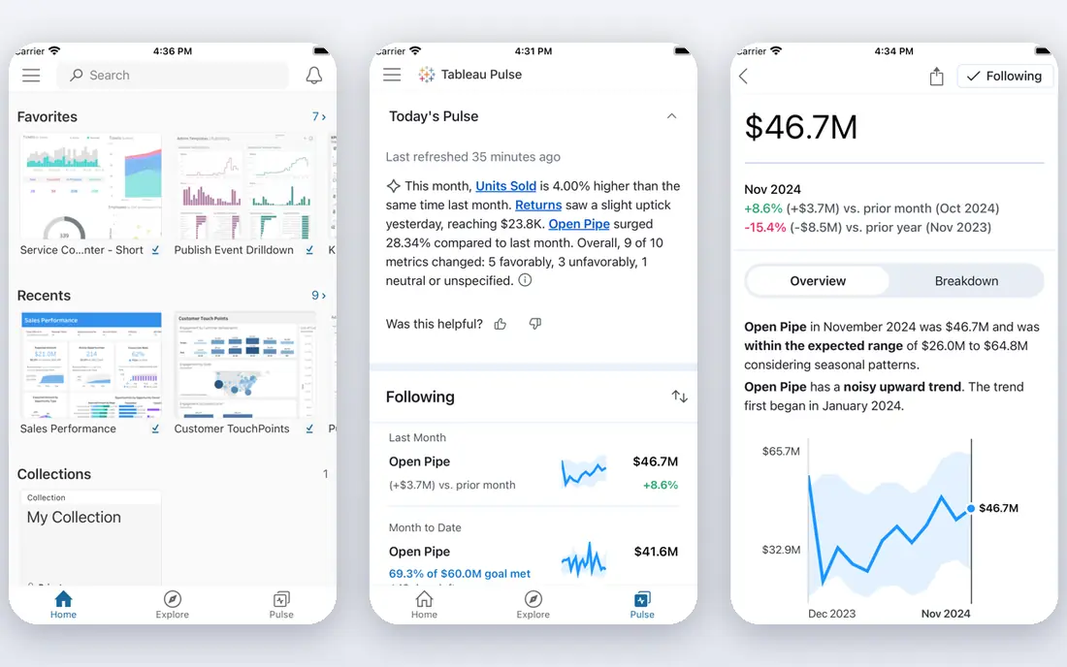
Choose Tableau for refined interactive dashboards. Tableau is the most obvious replacement when dashboard quality is the priority. Its drag-and-drop analysis makes it simple to build views that invite readers to filter, drill down, and explore, instead of just reading a static chart. The main drawbacks: Creator seats are expensive. The community, training material, and connector library are deep, which helps new analysts get productive without a long ramp. Beyond that, licensing is where teams need care. Viewer seats start low, but people who build and publish dashboards need higher-priced creator seats. The total relies on how numerous builders compared with readers you have. The starting price for Tableau: $15 per user per month. Free plan details: Free trial.

Free plan: Free trial

Website: tableau.com

Strengths

  • Capable visual analysis and interactivity
  • Large community and learning resources

Watch out for

  • Viewer and explorer levels add complexity to licensing
4

Looker Studio

Free Google-based reporting
Free

Looker Studio serves free Google-based reporting. Data modeling, governance, and complex calculations are thinner than in Tableau or Qlik, and very large or messy data sets can slow reports down. It also makes most sense inside a Google-centered workflow. The main drawbacks: Performance can slow on very large data sets. It links cleanly to Google Sheets, Google Analytics, BigQuery, and numerous marketing sources, and reports can be shared with a link. In daily use, advanced needs present its limits. For a small business that already lives in Google tools, a handy dashboard can be live in an afternoon without a budget discussion. Looker Studio starts at: Free. You can start on Looker Studio without paying.

Free plan: Yes

Website: lookerstudio.google.com

Strengths

  • Free for most reporting
  • Simple Google Sheets and Analytics connections

Watch out for

  • Fewer advanced modeling features
5

Qlik Sense

Associative analysis and exploration
$30 per user a month

In short, Qlik Sense is for associative analysis and exploration. Qlik Sense takes a different approach to exploration. That makes it a capable pick for analysts who explore data freely instead of reading fixed reports. Where it is weaker: Ramp-up time for script-based loads. In daily use, once running, it rewards curious users more than most tools here. More specifically, buyers should ask for a clear quote that matches their user mix, since Qlik sells both per-user and capacity choices and the published entry price does not tell the entire story. Qlik Sense cost at the entry level: $30 per user per month. As for free access: Free trial.

Free plan: Free trial

Website: qlik.com

Strengths

  • Capable self-service exploration
  • Decent mobile apps

Watch out for

  • Pricing levels and capacity choices can confuse buyers
6

Sisense

Embedded analytics for products
See website

Where Sisense fits: embedded analytics for products. Pricing is quoted instead of published, so budget planning needs a sales conversation and a clear scope. The main drawbacks: not a fast trial. It also copes with large volumes and varied sources, which suits products that grow rapidly. Worth adding: implementation is also heavier than signing up for a self-service tool, notably for embedded use with custom security rules. Sisense does not show a starting price in this comparison, so check the vendor site for current pricing. Free options: Free trial.

Free plan: Free trial

Website: sisense.com

Strengths

  • Takes care of large data volumes
  • Adaptable data preparation

Watch out for

  • Quote-only pricing

FAQ

Is ThoughtSpot the right pick for everyone comparing Power BI?

No single tool suits every team. ThoughtSpot comes first because it fits search-style questions in plain language, while Zoho Analytics suits small teams on a budget and Tableau suits polished interactive dashboards. Match the tool to your own size, budget and workflow before deciding.

Do these tools publish their prices?

Not all of them. Sisense publishes no starting price, so expect a quote request for it. The rest, ThoughtSpot included, show a starting price, though seats and billing terms still change the final cost.

Which options for Power BI have a free plan?

On this list, Zoho Analytics and Looker Studio include a free plan. Caps on seats, usage or features are common, so test the free plan against your real workload. Several others offer a trial instead.

What is the cheapest option for Power BI in this list?

On published monthly entry prices, Tableau is the lowest here at $15 per user per month. Entry price is only part of the cost, because seats, add-ons and billing terms can change the total.