How we rank
HR and Workforce · Researched comparison

Best Attendance Tracking Software for Call Centers in 2026

TaskReports may earn a fee from some links on this page, and some placements are paid and labelled. Neither one decides the order. See our disclosure.

The short answer

Homebase suits small call centers that want free clock-in records and basic scheduling before paying for anything. Connecteam is a better fit if you want attendance, scheduling and team communication in one mobile app. When I Work is the pick when shift scheduling and swap requests matter more than timekeeping depth. Each has limits on free users or features, so check current terms.

On this page

Key takeaways

  • Homebase is the first pick for small call centers that need free clock-in records and shift scheduling.
  • Connecteam and When I Work both put attendance and scheduling in a mobile app for agents.
  • Deputy handles shift swapping and compliance rules for multi-shift contact center floors.
  • Most tools here price per user per month, so confirm the current rate on each vendor page.

Quick comparison

ToolBest fitStarting price
HomebaseSmall call centers needing free clock-in and schedulingSee vendor pricing page
ConnecteamCall centers wanting attendance and scheduling in one appSee vendor pricing page

When I WorkShift scheduling with swap requests for agent teamsSee vendor pricing page
DeputyMulti-shift call centers with compliance rulesSee vendor pricing page
SlingSmall call centers needing free scheduling and time clockSee vendor pricing page
ClockifyCall centers tracking agent hours on a budgetSee vendor pricing page
QuickBooks TimeCall centers already using QuickBooks for payrollSee vendor pricing page

How we chose

We picked tools that record real clock-in or attendance data and support shift scheduling for agent teams. Criteria were fit for call center use, published entry pricing, free access, and main limits such as user caps or missing features. Details come from vendor websites and public documentation. Prices and plan limits change, so confirm current terms on each vendor site before buying.

Best overall

Homebase

Small call centers needing free clock-in and scheduling

  • Free plan with time clock and scheduling
  • Mobile app for agents
PriceSee vendor pricing page
See Homebase pricing
joinhomebase.comHomepage, Nov 2026
Homebase homepage

Homebase gives call centers a time clock, shift schedules and timesheets in one place. Agents clock in from a phone or a shared device, and managers see hours by person and location. The free plan covers one location with core scheduling and time tracking, which fits a single-site contact center with a small team. Paid plans add more locations, advanced scheduling and HR features. The free tier has limits on how many locations and team members you can manage, so a large multi-site operation will need to pay. It is a reasonable starting point for a small call center that wants attendance records without a contract. Larger centers with complex adherence rules should look at tools built around shift compliance.

Price: See vendor pricing page

Free plan: Yes

Website: joinhomebase.com

Watch out for

  • Free plan caps the number of locations
  • Advanced HR tools cost extra
2

Connecteam

Call centers wanting attendance and scheduling in one app
See vendor pricing page
connecteam.comHomepage, Nov 2026
Connecteam homepage

Connecteam combines a time clock, shift scheduling and team communication in a mobile-first app. Agents clock in and out from their phone, and managers see who is on shift and who is late. That mix suits call centers where supervisors coordinate agents by phone or chat through the day. The free plan covers a small number of users with core features, and paid tiers add more users and modules such as forms and task management. Because features are split across plans, check which attendance and scheduling tools sit in each tier before you commit. It fits teams that want one app for time and communication, not a full workforce management suite.

Free plan: Yes

Website: connecteam.com

Strengths

  • Time clock plus scheduling and team chat
  • Built for mobile frontline teams

Watch out for

  • Free plan limits users and features
  • Some modules cost extra
3

When I Work

Shift scheduling with swap requests for agent teams
See vendor pricing page
wheniwork.comHomepage, Nov 2026
When I Work homepage

When I Work focuses on shift scheduling, and that is where it helps call centers most. Managers build schedules, agents get them on their phone, and swap and time-off requests run through the app. Attendance tracking ties to the schedule, so you can see who clocked in for a shift and who did not. There is no free plan, only a trial, so budget for a per-user subscription. Timekeeping and attendance features sit in the paid tiers, and the entry tier has fewer tools than the higher ones. It suits contact centers where scheduling changes often and agents need to swap shifts without calling a supervisor. Teams that mainly want a free time clock should start elsewhere.

Free plan: Free trial (14 days)

Website: wheniwork.com

Strengths

  • Strong shift scheduling and swap requests
  • Mobile app for agents and managers

Watch out for

  • No free plan after the trial
  • Timekeeping sits in higher tiers
4

Deputy

Multi-shift call centers with compliance rules
See vendor pricing page
deputy.comHomepage, Nov 2026
Deputy homepage

Deputy pairs shift scheduling with time and attendance, and it handles rules around breaks, overtime and shift compliance. That matters in call centers that run multiple shifts and must follow labor rules on rest breaks and hours. Agents clock in from an app or a shared device, and managers review attendance against the schedule. There is a free trial but no permanent free plan, and pricing scales with the number of team members. Setup takes more effort than a simple time clock because you define rules and locations. It fits larger contact centers with several shifts and a need to track compliance, not a small team that just wants basic clock-in records.

Free plan: Free trial (31 days)

Website: deputy.com

Strengths

  • Shift scheduling with compliance and award rules
  • Time and attendance in one system

Watch out for

  • No permanent free plan
  • Pricing scales with team size
5

Sling

Small call centers needing free scheduling and time clock
See vendor pricing page
getsling.comHomepage, Nov 2026
Sling homepage

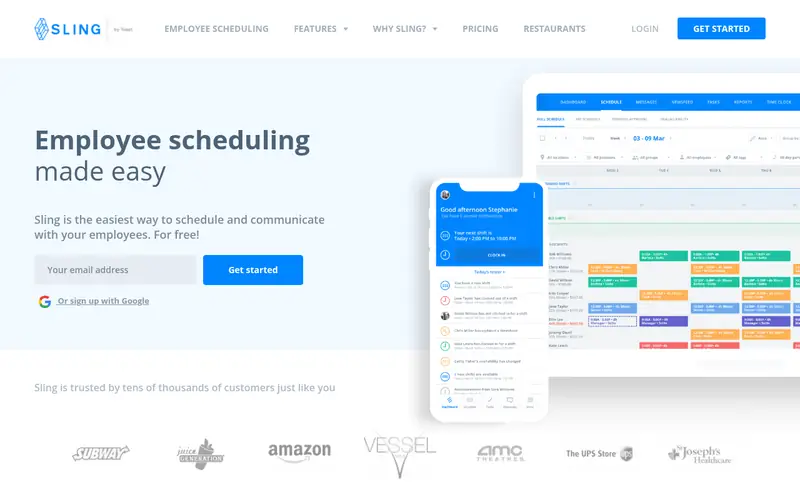
Sling offers shift scheduling, a time clock and team messaging. Managers build schedules, agents get reminders, and clock-in records tie back to shifts. The free plan includes core scheduling and time tracking for a small team, which suits a single call center site getting started with attendance records. Paid plans add more features and remove limits. Reporting and integrations are lighter than in larger workforce management tools, so a contact center that needs detailed adherence reporting may outgrow it. It is a practical free option for a small team that wants schedules and clock-ins in one app without a contract.

Free plan: Yes

Website: getsling.com

Strengths

  • Free plan with scheduling and time clock
  • Shift reminders and swap requests

Watch out for

  • Free plan limits features and users
  • Reporting is basic on lower tiers
6

Clockify

Call centers tracking agent hours on a budget
See vendor pricing page
clockify.meHomepage, Nov 2026
Clockify homepage

Clockify is a time tracking tool with a free plan that allows unlimited users on basic time tracking. For a call center, that means agents can clock in and out and managers can pull timesheet reports by person and project. It is a low-cost way to record hours when scheduling is handled elsewhere. Scheduling and attendance rules are thinner than in tools built for shift work, so you may need to set up projects or tags to track shifts. It suits a contact center that mainly needs time records and reports, not complex shift compliance. Teams that need swap requests and break rules should pair it with a scheduling tool or choose a shift-focused product.

Free plan: Yes

Website: clockify.me

Strengths

  • Free plan with unlimited users for time tracking
  • Simple clock-in and timesheet reports

Watch out for

  • Scheduling is limited compared with dedicated tools
  • Attendance rules need manual setup
7

QuickBooks Time

Call centers already using QuickBooks for payroll
See vendor pricing page
quickbooks.intuit.comHomepage, Nov 2026
QuickBooks Time homepage

QuickBooks Time records clock-ins and timesheets and moves hours into payroll, which helps call centers that already run payroll in QuickBooks. Agents clock in from a phone or computer, and managers approve timesheets before they reach payroll. Job codes and locations let you split hours across teams or sites. There is a free trial but no free plan, and the price is per user per month. The value is highest for teams already in the QuickBooks ecosystem; others may find it costs more than a standalone time clock. It fits a call center that wants attendance records tied directly to payroll and already uses Intuit products.

Free plan: Free trial (30 days)

Website: quickbooks.intuit.com/time-tracking

Strengths

  • Time tracking that feeds payroll
  • Mobile clock-in with GPS and job codes

Watch out for

  • No free plan after the trial
  • Best value inside the QuickBooks ecosystem

Which attendance tracking software for call centers should I use if I run a small team with no budget?

Start with Homebase, whose free plan covers clock-in records and scheduling for a small single-site team. If you need attendance and team chat in one app, Connecteam is the better fit. If shift swaps are the main pain, When I Work handles scheduling well but needs a paid plan after the trial. If you already run payroll in QuickBooks, QuickBooks Time keeps hours and payroll together.

Is Homebase better than Connecteam for attendance tracking software for call centers?

Homebase is the better fit for a small call center that wants free clock-in and scheduling with minimal setup. Connecteam is better when you want attendance, scheduling and team communication in one mobile app. Homebase's free plan is limited by location, while Connecteam's free plan is limited by users and features. Check both free tiers against your team size.

Pre-purchase checklist

  • Confirm the tool records real clock-in and clock-out times, not just schedules.
  • Check how many users and locations the free plan allows before you rely on it.
  • Verify shift scheduling, swap requests and break rules match how your floor runs.
  • Confirm timesheets export to your payroll system or integrate with it.
  • Read the per-user price and any module fees on the vendor pricing page.

FAQ

What is the best attendance tracking software for call centers?

Homebase is a strong starting point for small call centers because its free plan includes a time clock and scheduling. Connecteam and When I Work are good alternatives when you need scheduling and team communication in one app. The right pick depends on team size, shift complexity and whether you need payroll integration.

Do call centers need separate attendance and scheduling tools?

Not always. Tools like Homebase, Connecteam, Deputy and Sling combine clock-in records with shift scheduling, so one system covers both. Separate tools make sense when you need deep workforce management reporting or already run scheduling in another platform. Combining them usually reduces manual work for supervisors.

Is there free attendance tracking software for call centers?

Yes. Homebase, Connecteam, Sling and Clockify all offer free plans with time tracking or clock-in features. Free plans have limits on users, locations or features, so check the caps against your team. When I Work, Deputy and QuickBooks Time offer free trials rather than permanent free plans.

Can attendance software track agent shifts and breaks?

Most tools here tie clock-ins to shifts and let managers review attendance against the schedule. Deputy adds compliance rules for breaks and overtime, which helps multi-shift call centers. Simpler tools like Clockify record hours but need manual setup for shift rules. Confirm break tracking before you buy.

Does attendance tracking software connect to payroll?

Some do. QuickBooks Time moves approved timesheets into QuickBooks payroll, and Homebase and Deputy offer payroll integrations on paid plans. Clockify and When I Work export timesheets that you can import into payroll software. Check the integration list on the vendor site for your payroll provider.