How we rank
HR and Workforce · Researched comparison

Best Attendance Tracking Software for Concrete Contractors in 2026

TaskReports may earn a fee from some links on this page, and some placements are paid and labelled. Neither one decides the order. See our disclosure.

The short answer

ClockShark is the first pick for most concrete contractors because it combines mobile clock-in, GPS and job costing in one app built for field crews. QuickBooks Time is the better fit if you already run payroll in QuickBooks. Homebase is the low-cost choice for a small crew that needs scheduling and time clocks more than heavy job costing.

On this page

Key takeaways

  • ClockShark and QuickBooks Time both pair mobile clock-in with GPS and job costing, which fits crews moving between pour sites.
  • Homebase has a free plan for one location with up to 20 employees, which suits small concrete outfits.
  • Most tools here charge per user per month, so a 15-person crew pays roughly 15 times the listed seat price.
  • Only some plans include GPS tracking or geofencing; check the plan tier before you commit.

Quick comparison

ToolBest fitStarting price
ClockSharkField crews that move between job sitesSee vendor pricing page
QuickBooks TimeContractors already using QuickBooks for payrollSee vendor pricing page

HomebaseSmall concrete crews that need scheduling and time clocksSee vendor pricing page
ConnecteamCrews that want time clock plus team communicationSee vendor pricing page
HubstaffTracking hours with GPS and activity dataSee vendor pricing page
JibbleLow-cost clock-in with GPS and facial recognitionSee vendor pricing page
TimeeroGPS route tracking for crews on the moveSee vendor pricing page

How we chose

We picked tools that record real clock-in and attendance data, not just schedules. Criteria were fit for field crews that move between job sites, entry price and free access, and the main limits of each plan. Sources are vendor websites and public documentation. Prices change, so confirm the current rate on the vendor site before you buy.

Best overall

ClockShark

Field crews that move between job sites

  • Mobile clock-in with GPS and geofencing
  • job and task costing on time entries
PriceSee vendor pricing page
See ClockShark pricing
ClockSharkHomepage image unavailable

ClockShark is built for construction and field service crews. Employees clock in from a phone, and the entry can record GPS location, the job, and the task. For concrete work, that means a pour crew's hours can be tied to a specific site and cost code. Geofencing can flag clock-ins made outside the job boundary. Schedule views show who is assigned where, and timesheets export to payroll. The vendor sells it on a per-user monthly basis, and the exact rate depends on the plan and billing term, so check the pricing page. GPS and geofencing are not on every tier. Skip it if you only need a simple time clock and do not care about job costing.

Price: See vendor pricing page

Free plan: Free trial (14 days)

Website: clockshark.com

Watch out for

  • Per-user pricing adds up for large crews
  • GPS features depend on the plan tier
2

QuickBooks Time

Contractors already using QuickBooks for payroll
See vendor pricing page
quickbooks.intuit.comHomepage, Nov 2026
QuickBooks Time homepage

QuickBooks Time (formerly TSheets) is a time tracking app that connects to QuickBooks payroll and accounting. Crews clock in from a mobile app, and the entry can carry a customer, service item, or job. GPS points can be attached to clock-ins, and managers can see who is on the clock on a map. Timesheets sync to payroll so hours do not get re-keyed. Pricing is per user per month, with a base fee plus a per-user rate, and the numbers change, so confirm on the vendor page. It suits concrete contractors who already pay for QuickBooks. If you use another payroll system, the integration value drops.

Free plan: Free trial (30 days)

Website: quickbooks.intuit.com/time-tracking

Strengths

  • Timesheets flow into QuickBooks payroll
  • Mobile app with GPS and job tracking

Watch out for

  • Best value only inside the QuickBooks ecosystem
  • Advanced features cost extra per user

3

Homebase

Small concrete crews that need scheduling and time clocks
See vendor pricing page
joinhomebase.comHomepage, Nov 2026
Homebase homepage

Homebase offers a free plan for a single location with up to 20 employees. That covers scheduling, a time clock, and team messaging. Employees can clock in from a shared device or their phone, and hours feed into timesheets. For a small concrete outfit with one crew and one yard, the free tier can cover basic attendance. Paid plans add more controls, such as geofencing and advanced reporting, and the price depends on the plan. Confirm current limits on the vendor site before you rely on the free tier. Skip it if you run multiple locations or need deep job costing.

Free plan: Yes

Website: joinhomebase.com

Strengths

  • Free plan for one location with up to 20 employees
  • Scheduling, time clock and messaging in one app

Watch out for

  • Free plan limits features and locations
  • Advanced controls require a paid plan
4

Connecteam

Crews that want time clock plus team communication
See vendor pricing page
connecteam.comHomepage, Nov 2026
Connecteam homepage

Connecteam is an app for deskless teams that combines a time clock, scheduling, checklists, and chat. Concrete crews can clock in from a phone, and the entry can include a job or location. The vendor offers a free plan for small teams, with paid tiers that add features and raise user limits. The free tier is limited, so check the current cap on the pricing page. It fits contractors who want attendance and daily communication in one place, such as sending a pour schedule to the crew. It is less specialized for construction job costing than ClockShark. Skip it if you need detailed cost-code reporting.

Free plan: Yes

Website: connecteam.com

Strengths

  • Free plan for small teams
  • Time clock, scheduling and chat in one app

Watch out for

  • Free plan caps users and features
  • Some modules cost extra
5

Hubstaff

Tracking hours with GPS and activity data
See vendor pricing page
hubstaff.comHomepage, Nov 2026
Hubstaff homepage

Hubstaff records time with GPS and optional activity monitoring. Field employees clock in from a mobile app, and the entry can carry a project and task. Geofences can limit where clock-in is allowed. Reports show hours by project and by person, which helps when a concrete crew splits time across several sites. Pricing is per user per month, and some features cost extra, so check the vendor page for current rates. The activity tracking is more than many construction crews need, and it can raise privacy questions. It suits contractors who want detailed time data and are comfortable with monitoring.

Free plan: Free trial (14 days)

Website: hubstaff.com

Strengths

  • GPS tracking and geofenced clock-in
  • Detailed timesheets and reporting

Watch out for

  • Per-user pricing with add-on costs
  • Activity tracking can feel heavy for some crews
6

Jibble

Low-cost clock-in with GPS and facial recognition
See vendor pricing page
jibble.ioHomepage, Nov 2026
Jibble homepage

Jibble offers a free plan for unlimited users with core time tracking, which is unusual among these tools. Crews can clock in from a mobile app, and the entry can include GPS location and a selfie for verification. Paid plans add features such as schedules, reports, and integrations, and the rate is per user per month. For a concrete contractor with a large crew and a tight budget, the free tier can cover basic attendance. It has less construction-specific job costing than ClockShark. Confirm the free plan limits on the vendor site, since they can change.

Free plan: Yes

Website: jibble.io

Strengths

  • Free plan for unlimited users with core time tracking
  • Mobile clock-in with GPS and selfie verification

Watch out for

  • Advanced features require paid plans
  • Less construction-specific job costing
7

Timeero

GPS route tracking for crews on the move
See vendor pricing page
timeero.comHomepage, Nov 2026
Timeero homepage

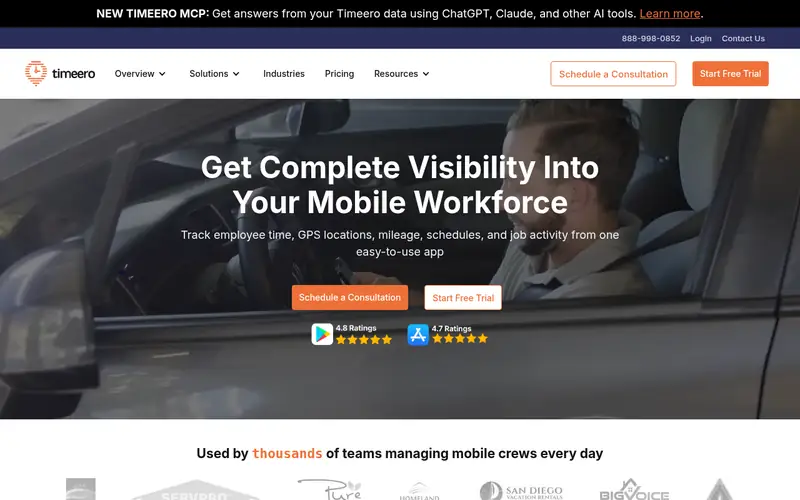
Timeero focuses on GPS time tracking, including route history and mileage. For concrete contractors, that helps when crews drive between a yard and multiple job sites in a day. Employees clock in from a mobile app, and the system records location and distance. Geofences can trigger clock-in or clock-out at a site. Pricing is per user per month, with tiers that add features, so check the vendor page for current rates. It suits contractors who need to verify travel time and mileage. If you only need a simple time clock, the GPS features may be more than you need.

Free plan: Free trial (14 days)

Website: timeero.com

Strengths

  • GPS tracking with route history
  • Geofencing and mileage tracking

Watch out for

  • Per-user pricing
  • Route features may be more than some crews need

Which attendance tracking software for concrete contractors should I use if I already run payroll in QuickBooks?

QuickBooks Time is the direct answer, because timesheets sync to QuickBooks payroll without re-keying. If your crew is small and budget is tight, Homebase covers scheduling and a time clock on its free plan. If you need GPS and job costing outside QuickBooks, ClockShark is the better fit. If you want a free tier for a large crew, Jibble is worth a look. Match the tool to your payroll system and crew size first.

Is ClockShark better than QuickBooks Time for attendance tracking software for concrete contractors?

ClockShark is the better fit if you want construction-specific job costing and geofencing without depending on QuickBooks. QuickBooks Time is better if you already run payroll in QuickBooks and want timesheets to flow there. Both offer mobile clock-in with GPS. ClockShark leans toward field service and construction, while QuickBooks Time leans toward accounting integration. Check each vendor's current pricing before deciding.

Pre-purchase checklist

  • Confirm the plan includes GPS or geofencing if you need to verify clock-in location.
  • Check the per-user price against your crew size, including seasonal hires.
  • Confirm the free plan limits, such as user caps and locations, before relying on it.
  • Check whether timesheets export to your payroll provider.
  • Ask whether job or cost-code tracking is included on the plan you are buying.

FAQ

What is the best attendance tracking software for concrete contractors?

ClockShark is a strong pick for most concrete crews because it combines mobile clock-in, GPS, and job costing. QuickBooks Time suits contractors already on QuickBooks payroll. Homebase and Jibble offer free plans for small or budget-focused crews. The right choice depends on crew size, payroll system, and whether you need GPS.

Do these apps work offline at job sites with no signal?

Some field time tracking apps allow clock-in without a signal and sync later. ClockShark and QuickBooks Time both publish offline clock-in options on their mobile apps. Confirm the current offline behavior on the vendor's help pages, because it can vary by app version and plan.

How much does attendance tracking software cost for a concrete crew?

Most tools here charge per user per month, often with a base fee. A 15-person crew pays roughly 15 times the seat price. Homebase and Jibble have free plans with limits. Exact rates change, so check each vendor's pricing page for current numbers.

Can I track hours by job site?

Yes. ClockShark, QuickBooks Time, Hubstaff, and Timeero all let a time entry carry a job or project. That lets you report hours by site, which helps with job costing on concrete pours. Check that the feature is on your plan tier.

Do these tools handle payroll?

QuickBooks Time syncs directly to QuickBooks payroll. ClockShark and others export timesheets that you can import into payroll software. Check the export formats and integrations on the vendor site before you commit.