How we rank
HR and Workforce · Researched comparison

Best Attendance Tracking Software for Franchises in 2026

TaskReports may earn a fee from some links on this page, and some placements are paid and labelled. Neither one decides the order. See our disclosure.

The short answer

Homebase is the first pick for most franchises with hourly staff. It combines scheduling, a time clock and timesheets, and its free plan covers one location. Clockify is a lower-cost alternative for owners who mainly need time records and unlimited users. Connecteam suits franchises that want mobile clock-in with location checks. Larger franchise groups that need attendance tied to payroll should look at Paylocity.

On this page

Key takeaways

  • Homebase is the strongest fit for hourly franchise staff because its free plan covers scheduling and time clocks for one location.
  • Clockify has a free plan with unlimited users, which suits franchise owners who want to test time tracking before paying.
  • Multi-location franchises should check per-location pricing, since most tools charge per location or per user.
  • Paylocity and similar payroll suites cost more but combine attendance data with payroll and HR records.

Quick comparison

ToolBest fitStarting price
HomebaseHourly franchise teams that need scheduling and a time clockSee vendor pricing page
ClockifyFranchise owners who want free time tracking for unlimited usersSee vendor pricing page

ConnecteamMobile franchises that need clock-in with location checksSee vendor pricing page
When I WorkFranchises that schedule shifts and track attendance togetherSee vendor pricing page
DeputyMulti-location franchises that need shift and attendance rulesSee vendor pricing page
PaylocityLarger franchise groups that need attendance tied to payrollSee vendor pricing page
QuickBooks TimeFranchises already using QuickBooks for payrollSee vendor pricing page

How we chose

We picked tools that record real clock-in or attendance data and fit franchise operations, such as hourly staff, multiple locations and shift scheduling. We looked at published entry prices, free plan availability and main limits, and we noted where pricing is quoted per company. Sources are vendor websites and public documentation. Prices and plan limits change, so confirm them on the vendor site before buying.

Best overall

Homebase

Hourly franchise teams that need scheduling and a time clock

  • Free plan covers one location
  • time clock, scheduling and timesheets in one app
PriceSee vendor pricing page
See Homebase pricing
joinhomebase.comHomepage, Nov 2026
Homebase homepage

Homebase is built for hourly teams, which matches most franchise staffing. Employees clock in from a shared device or their phone, and managers see hours by location. Schedules and timesheets sit in the same account, so a franchise owner can compare scheduled and actual hours. The free plan covers one location with core scheduling and time clock features. Franchise groups with several locations need a paid plan, and the vendor pricing page lists the current tiers. Overtime and labor cost reports are part of the paid plans. Skip Homebase if you need attendance data tied directly to payroll processing for a large multi-state franchise network. It fits single-location owners and small franchise groups best.

Price: See vendor pricing page

Free plan: Yes

Website: joinhomebase.com

Watch out for

  • Free plan is limited to one location
  • advanced features need paid plans
2

Clockify

Franchise owners who want free time tracking for unlimited users
See vendor pricing page
clockify.meHomepage, Nov 2026
Clockify homepage

Clockify is a time tracking tool first. Employees start and stop a timer, and the data rolls up into reports by user, project or client. A franchise can use it to record hours worked, but it is not a dedicated shift attendance system with clock-in rules. The free plan allows unlimited users and includes basic reporting. Paid plans add features such as timesheet approvals and more detailed reports. The vendor pricing page lists the current tiers. Choose Clockify if you want a low-cost way to record hours and are comfortable managing attendance rules yourself. Skip it if you need geofenced clock-in or break enforcement.

Free plan: Yes

Website: clockify.me

Strengths

  • Free plan with unlimited users
  • simple start and stop timers

Watch out for

  • Built around project time tracking, not shift attendance
  • advanced controls are paid
3

Connecteam

Mobile franchises that need clock-in with location checks
See vendor pricing page
connecteam.comHomepage, Nov 2026
Connecteam homepage

Connecteam is designed for deskless teams, which fits restaurant, retail and service franchises. Staff clock in from a phone, and the record can include location and time. Managers see who is on shift and can review hours. The free plan covers a limited number of users, and the vendor pricing page lists the current cap and paid tiers. Paid plans add features such as geofencing and more detailed reports. This is a good fit for franchises where staff work across sites and managers are not at a desk. Skip it if your team already uses a payroll suite that includes time and attendance.

Free plan: Yes

Website: connecteam.com

Strengths

  • Mobile clock-in with location and time stamps
  • built for deskless hourly staff

Watch out for

  • Free plan limits are tied to user count
  • advanced features are paid
4

When I Work

Franchises that schedule shifts and track attendance together
See vendor pricing page
wheniwork.comHomepage, Nov 2026
When I Work homepage

When I Work focuses on shift scheduling for hourly teams. Employees clock in and out from the app, and managers compare scheduled shifts with actual attendance. This helps franchise managers spot late arrivals and no-shows. There is no free plan. The vendor offers a trial and lists paid tiers on its pricing page, charged per user. Features such as attendance reports and shift reminders are part of the paid plans. Use When I Work if scheduling and attendance need to live in one tool. Skip it if you only need a simple time clock and want to avoid per-user fees.

Free plan: Free trial (14 days)

Website: wheniwork.com

Strengths

  • Scheduling and attendance in one tool
  • employees clock in from the app

Watch out for

  • No free plan
  • pricing is per user
5

Deputy

Multi-location franchises that need shift and attendance rules
See vendor pricing page
deputy.comHomepage, Nov 2026
Deputy homepage

Deputy combines scheduling, time and attendance, and task management. Employees clock in from the app or a shared device, and managers see attendance by location. The tool supports rules for breaks and overtime. There is no free plan. The vendor offers a trial and lists pricing by team size on its pricing page. Multi-location reporting is a core part of the product, which suits franchise groups with several sites. Skip Deputy if you run one small location and need only basic clock-in. It fits franchise groups that need consistent rules across sites.

Free plan: Free trial (31 days)

Website: deputy.com

Strengths

  • Handles shift rules and attendance across locations
  • employee app for clock-in

Watch out for

  • No free plan
  • pricing depends on team size
6

Paylocity

Larger franchise groups that need attendance tied to payroll
See vendor pricing page
paylocity.comHomepage, Nov 2026
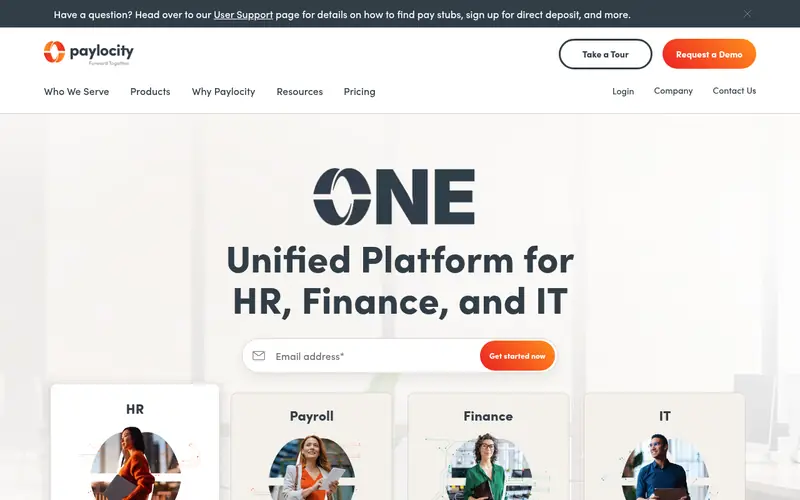
Paylocity homepage

Paylocity is a payroll and HR platform with time and attendance features. Franchise groups can record clock-ins and feed hours into payroll. Employee records, benefits and HR tasks sit in the same system. Pricing is quoted per company, and the vendor does not publish a standard entry price. There is no free plan. Setup is heavier than a standalone time clock, which matters for small franchise owners. Choose Paylocity if you are a larger franchise group that wants one system for payroll, HR and attendance. Skip it if you need a quick, low-cost time clock for a single store.

Free plan: No

Website: paylocity.com

Strengths

  • Time and attendance connected to payroll and HR
  • supports multi-location employers

Watch out for

  • No free plan
  • pricing is quoted per company
7

QuickBooks Time

Franchises already using QuickBooks for payroll
See vendor pricing page
quickbooks.intuit.comHomepage, Nov 2026
QuickBooks Time homepage

QuickBooks Time records employee hours with mobile clock-in and location stamps. Hours can flow into QuickBooks payroll, which reduces manual entry for franchises already on that platform. There is no free plan, though the vendor offers a trial. Pricing is listed on the vendor page and depends on the plan and number of users. Features such as job costing and scheduling are part of the paid tiers. Use QuickBooks Time if your franchise already runs payroll in QuickBooks. Skip it if you use a different payroll provider, since the main benefit is the connection.

Free plan: Free trial (30 days)

Website: quickbooks.intuit.com/time-tracking

Strengths

  • Time tracking connects to QuickBooks payroll
  • mobile clock-in with location

Watch out for

  • No free plan
  • best value if you already use QuickBooks

Which attendance tracking software for franchises should I use if I only have one location?

Start with Homebase. Its free plan covers one location with scheduling and a time clock, which fits a single-store owner. If you need payroll in the same system, QuickBooks Time is the better fit when you already use QuickBooks. If your staff work from phones across sites, Connecteam handles mobile clock-in with location. If you want free time tracking for unlimited users, Clockify is the simplest option.

Is Homebase better than Clockify for attendance tracking software for franchises?

Homebase is better for shift-based franchise attendance because it combines scheduling, a time clock and timesheets. Clockify is better if you want free time tracking for unlimited users and do not need shift rules. Homebase's free plan is limited to one location. Clockify records hours but is not a dedicated shift attendance system.

Pre-purchase checklist

  • Confirm whether the free plan covers one location or several, and how many users it allows.
  • Check how employees clock in: shared device, phone app or both.
  • Confirm whether location or geofence checks are included or cost extra.
  • Ask how hours export to your payroll provider.
  • Check per-location and per-user pricing before you add stores.

FAQ

What is the best attendance tracking software for franchises with hourly staff?

Homebase is a strong fit because it combines scheduling, a time clock and timesheets for hourly teams, and its free plan covers one location. Connecteam and When I Work are alternatives for mobile clock-in and shift scheduling. Confirm plan limits on each vendor site.

Do these tools offer a free plan for franchises?

Homebase and Clockify offer free plans. Connecteam has a free plan with a user limit. When I Work, Deputy and QuickBooks Time offer trials but no free plan. Paylocity has no free plan and quotes pricing per company.

Can attendance tracking software handle multiple franchise locations?

Yes. Deputy and Paylocity support multi-location attendance and reporting. Homebase's free plan covers one location, so multi-location groups need a paid plan. Check per-location pricing before you add stores.

How much does attendance tracking software for franchises cost?

Most vendors list prices on their pricing pages, and several charge per user or per location. Paylocity quotes per company. We do not list fixed numbers here because prices change. Confirm the current entry price on the vendor site.

Does attendance tracking software connect to payroll?

Some tools do. QuickBooks Time connects to QuickBooks payroll, and Paylocity combines attendance with payroll and HR. Homebase and Deputy export hours that can feed payroll. Check the integration list for your payroll provider.