How we rank
HR and Workforce · Researched comparison

Best Attendance Tracking Software for Media Companies in 2026

TaskReports may earn a fee from some links on this page, and some placements are paid and labelled. Neither one decides the order. See our disclosure.

The short answer

Homebase is the first pick for small media companies that want free scheduling and clock-in with timesheets. Deputy suits teams that need shift swap and compliance tools across multiple locations. When I Work is a good alternative for crews that need scheduling, attendance points and team messaging in one app.

On this page

Key takeaways

  • Homebase is the first pick for small media teams that need shift scheduling and clock-in at no cost.
  • Deputy, When I Work and Sling fit production crews that work shifts across studios, sets and remote locations.
  • Clockify and Hubstaff pair attendance records with billable hour tracking for client work.
  • Entry prices vary by seat and plan, so confirm current rates on each vendor's pricing page.

Quick comparison

ToolBest fitStarting price
HomebaseSmall media teams that need free scheduling and clock-inSee vendor pricing page
DeputyMulti-location media teams that need shift swaps and complianceSee vendor pricing page

When I WorkProduction crews that need scheduling, attendance points and messagingSee vendor pricing page
SlingMedia teams that want free scheduling with a simple time clockSee vendor pricing page
ClockifyMedia teams that need attendance records tied to billable client hoursSee vendor pricing page
HubstaffRemote and field media teams that need GPS and activity trackingSee vendor pricing page
QuickBooks TimeMedia firms already using QuickBooks for payroll and accountingSee vendor pricing page

How we chose

We picked tools that record real clock-in or attendance data and fit media workflows such as shift crews, field shoots and billable client hours. Criteria were fit for the use case, published entry price, free access, and main limits such as user caps or missing compliance rules. Details come from vendor websites and public documentation. Prices change, so confirm current rates on the vendor pricing page before buying.

Best overall

Homebase

Small media teams that need free scheduling and clock-in

  • Free plan covers scheduling and time clock
  • mobile clock-in with GPS
PriceSee vendor pricing page
See Homebase pricing
joinhomebase.comHomepage, Nov 2026
Homebase homepage

Homebase gives media companies a time clock, shift schedules and timesheets in one app. Employees clock in from a phone or a shared device, and managers see hours by person and location. The free plan covers one location and core scheduling and time tracking. Paid plans add hiring, onboarding and payroll features. For a small production company or agency, the free tier can be enough to track studio and office hours. Teams that run crews across several locations will hit the limits of the free plan and need to compare paid tiers. Confirm current plan details on the vendor pricing page before you commit.

Price: See vendor pricing page

Free plan: Yes

Website: joinhomebase.com

Watch out for

  • Advanced HR tools sit on paid plans
  • limited multi-location controls
2

Deputy

Multi-location media teams that need shift swaps and compliance
See vendor pricing page
deputy.comHomepage, Nov 2026
Deputy homepage

Deputy is built around shift scheduling and attendance. Staff clock in from a kiosk or mobile app, and managers approve timesheets. The system applies award and overtime rules, which helps media firms that run evening and weekend production shifts. Shift swap and open shift tools let crews cover gaps without manager back-and-forth. Deputy prices per user per month, and the entry tier covers scheduling and time and attendance. Larger teams may need higher tiers for payroll integration and advanced reporting. There is a free trial but no free plan, so small teams should check the cost at their headcount.

Free plan: Free trial (31 days)

Website: deputy.com

Strengths

  • Strong shift swap and approval workflow
  • rules for overtime and break compliance

Watch out for

  • No permanent free plan
  • pricing is per user
3

When I Work

Production crews that need scheduling, attendance points and messaging
See vendor pricing page
wheniwork.comHomepage, Nov 2026
When I Work homepage

When I Work combines shift scheduling, a time clock and team messaging. The attendance points feature lets managers track late arrivals and missed shifts against a set rule. That suits media teams with regular studio or event shifts where punctuality matters. Staff can clock in from a phone, and managers review hours before export. Pricing is per user per month, and the entry plan covers scheduling and attendance. Payroll and advanced features cost more. The trial runs 14 days, so test the mobile clock-in and points setup with your actual crew before choosing a plan.

Free plan: Free trial (14 days)

Website: wheniwork.com

Strengths

  • Attendance points track late and missed shifts
  • built-in team messaging

Watch out for

  • No free plan
  • payroll add-on costs extra
4

Sling

Media teams that want free scheduling with a simple time clock
See vendor pricing page
getsling.comHomepage, Nov 2026
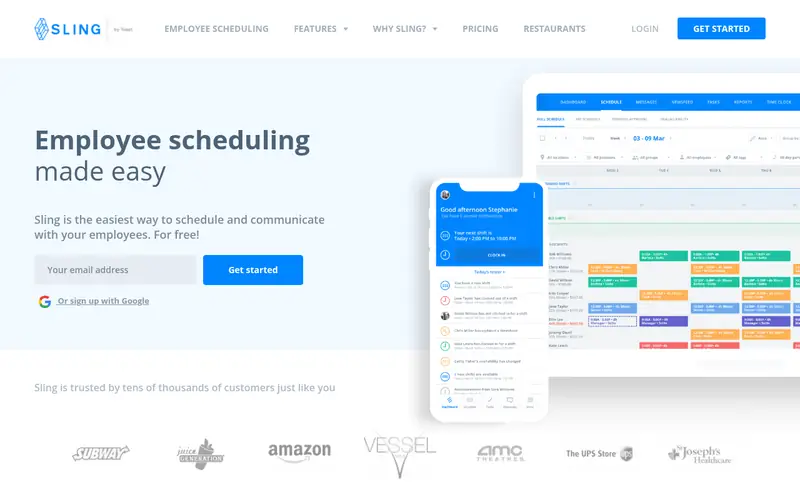
Sling homepage

Sling offers shift scheduling, a time clock and team communication. The free plan covers core scheduling and clock-in for small teams. Managers can see who is on shift and review hours in the app. Task lists and messaging help coordinate crews on set or in the studio. Paid plans add payroll, advanced reporting and more admin controls. Sling is a good fit for small media companies that want a free start and a simple interface. Teams with complex overtime rules or many locations should compare it with Deputy before deciding.

Free plan: Yes

Website: getsling.com

Strengths

  • Free plan includes scheduling and time clock
  • built-in messaging and task lists

Watch out for

  • Payroll and advanced reporting on paid tiers
  • fewer compliance rules than larger suites
5

Clockify

Media teams that need attendance records tied to billable client hours
See vendor pricing page
clockify.meHomepage, Nov 2026
Clockify homepage

Clockify is a time tracking tool that also records attendance. Staff clock in and out, and managers review timesheets and attendance reports. Because the same records feed project and client hours, it suits media companies that bill clients by time, such as agencies and production houses. The free plan covers unlimited users and core time tracking. Paid tiers add attendance controls, approvals and reporting. Clockify is not a full shift-scheduling suite, so teams that need swap workflows and compliance rules should pair it with a scheduling tool or choose Deputy.

Free plan: Yes

Website: clockify.me

Strengths

  • Free plan covers unlimited users and time tracking
  • attendance and timesheet reports

Watch out for

  • Attendance features are lighter than dedicated shift tools
  • advanced controls on paid plans
6

Hubstaff

Remote and field media teams that need GPS and activity tracking
See vendor pricing page
hubstaff.comHomepage, Nov 2026
Hubstaff homepage

Hubstaff records time with optional GPS, geofences and activity data. For media companies with field crews, freelancers or remote editors, that gives managers a record of where and when work happened. Timesheets connect to projects and client budgets, which helps with billing. Plans are priced per user per month, and the entry tier covers time tracking and limited features. Higher tiers add scheduling, activity tracking and payroll. There is a 14-day trial but no free plan. Teams that only need basic clock-in may find it more than they need.

Free plan: Free trial (14 days)

Website: hubstaff.com

Strengths

  • GPS and geofence clock-in
  • timesheets link to projects and client budgets

Watch out for

  • No free plan
  • activity tracking may not suit every team
7

QuickBooks Time

Media firms already using QuickBooks for payroll and accounting
See vendor pricing page
quickbooks.intuit.comHomepage, Nov 2026
QuickBooks Time homepage

QuickBooks Time handles mobile clock-in, GPS tracking, scheduling and timesheets. For media companies that already run payroll in QuickBooks, approved hours move into payroll without a separate export. Crews can clock in from a job site or studio, and managers see who is working and where. Pricing is per user per month, and a 30-day trial is available. The tool is strongest when paired with QuickBooks payroll and accounting. Firms using other payroll systems may get less value and should compare it with Homebase or Deputy.

Free plan: Free trial (30 days)

Website: quickbooks.intuit.com/time-tracking

Strengths

  • Mobile clock-in with GPS
  • timesheets flow into QuickBooks payroll

Watch out for

  • Best value only inside the QuickBooks ecosystem
  • no free plan

Which attendance tracking software for media companies should I use if my crew works overnight shoots?

Deputy is the best fit for overnight and weekend shoots because it applies overtime and break rules to shift records. For other situations: choose Homebase if you run a small studio and want a free start; choose Clockify if you bill clients by the hour and need attendance tied to project time; choose Hubstaff if field crews need GPS clock-in.

Is Homebase better than Deputy for attendance tracking software for media companies?

Homebase is better for small media teams that want a free plan with scheduling and clock-in. Deputy is better for multi-location teams that need shift swaps, approval workflows and overtime compliance rules. Homebase has a free plan; Deputy offers only a 31-day trial and prices per user.

Pre-purchase checklist

  • Confirm the clock-in methods your crews need: mobile, kiosk, GPS or geofence.
  • Check how the tool handles overtime, breaks and shift swaps for evening and weekend work.
  • Verify the free plan limits on users, locations and reporting before you rely on it.
  • Confirm whether attendance data exports to your payroll or billing system.
  • Ask how the tool records hours for freelancers and remote editors.

FAQ

What is the best attendance tracking software for media companies with small teams?

Homebase is a strong choice for small media teams because its free plan covers scheduling and a time clock. Sling also offers a free plan with scheduling and clock-in. Both suit studios and agencies with one location. Confirm current free plan limits on each vendor's pricing page.

Which attendance tracker works for crews that move between studios and shoot locations?

Deputy and Hubstaff fit mobile crews. Deputy handles shift swaps, approvals and compliance rules across locations. Hubstaff adds GPS and geofence clock-in for field work. Choose Deputy for scheduled studio shifts and Hubstaff when you need location records for remote or field staff.

Can attendance tracking software also track billable client hours?

Yes. Clockify and Hubstaff record attendance and link hours to projects and clients. That suits agencies and production houses that bill by time. Clockify has a free plan with unlimited users; Hubstaff offers a 14-day trial and prices per user.

Do these tools integrate with payroll?

Several do. QuickBooks Time sends approved hours into QuickBooks payroll. Homebase, Deputy and When I Work offer payroll integrations or add-ons on paid plans. Check that your payroll provider is supported before you buy.

How much does attendance tracking software for media companies cost?

Entry prices vary by vendor and are usually charged per user per month. Homebase and Sling have free plans, while Deputy, When I Work, Hubstaff and QuickBooks Time offer trials and paid tiers. Because rates change, confirm the current price on each vendor's pricing page.