How we rank
HR and Workforce · Researched comparison

Best Attendance Tracking Software for Moving Companies in 2026

TaskReports may earn a fee from some links on this page, and some placements are paid and labelled. Neither one decides the order. See our disclosure.

The short answer

Connecteam is the first pick for many moving companies because its free plan covers up to 10 users and includes a mobile time clock with GPS. Homebase suits companies that want scheduling and attendance in one free plan for a single location. QuickBooks Time is the better fit for firms already using QuickBooks for payroll.

On this page

Key takeaways

  • Connecteam offers a free plan for up to 10 users and a mobile time clock with GPS, which suits small moving crews.
  • Homebase combines shift scheduling with attendance tracking and offers a free plan for one location.
  • QuickBooks Time and Clockify are useful when moving companies already run payroll or billing on those platforms.
  • Most tools here charge per user per month, so crew size drives the total cost more than the plan tier.

Quick comparison

ToolBest fitStarting price
ConnecteamSmall moving crews that need GPS time clocksSee vendor pricing page
HomebaseSmall movers that want scheduling plus attendanceSee vendor pricing page

QuickBooks TimeMovers already running payroll in QuickBooksSee vendor pricing page
ClockifyMovers who bill clients by the hourSee vendor pricing page
HubstaffField crews that need GPS and activity recordsSee vendor pricing page
TimeeroMoving firms that want route and mileage recordsSee vendor pricing page
Buddy PunchSmall movers that want a simple time clockSee vendor pricing page
JibbleCost-sensitive movers that need basic clock-inSee vendor pricing page

How we chose

We picked tools that record real clock-in and clock-out data and fit the way moving crews work: mobile punches, job-site locations and timesheets that feed payroll or client billing. We weighed entry price, whether a free plan exists, and the main limits of each plan. The information comes from vendor websites and public documentation. Prices change, so confirm the current figure on the vendor's pricing page.

Best overall

Connecteam

Small moving crews that need GPS time clocks

  • Mobile time clock with GPS
  • free plan for up to 10 users
PriceSee vendor pricing page
See Connecteam pricing
connecteam.comHomepage, Nov 2026
Connecteam homepage

Connecteam is a workforce management app built around a mobile time clock. Moving crews can clock in and out from a phone at a job site, and the GPS stamp records where the punch happened. That matters when drivers and helpers start the day at a warehouse and finish at a customer's address. The free plan covers up to 10 users and includes the time clock. Paid tiers add scheduling, geofencing and reporting. Companies with larger crews should check the per-user cost on the pricing page before choosing a tier.

Price: See vendor pricing page

Free plan: Yes

Website: connecteam.com

Watch out for

  • Advanced features sit on paid tiers
  • admin tools take setup time
2

Homebase

Small movers that want scheduling plus attendance
See vendor pricing page
joinhomebase.comHomepage, Nov 2026
Homebase homepage

Homebase pairs employee scheduling with a time clock. A moving company can post the week's jobs, assign crews, and let staff clock in from a phone or a shared tablet at the office. Timesheets then feed into payroll. The free plan covers one location and includes scheduling and time tracking. Multi-location moving firms will need a paid plan. The payroll and HR add-ons are separate paid products, so budget for them if you want one system for everything.

Free plan: Yes

Website: joinhomebase.com

Strengths

  • Free plan for one location
  • time clock with GPS on mobile

Watch out for

  • Free plan limited to one location
  • payroll add-ons cost extra
3

QuickBooks Time

Movers already running payroll in QuickBooks
See vendor pricing page
quickbooks.intuit.comHomepage, Nov 2026
QuickBooks Time homepage

QuickBooks Time is a time tracking product from Intuit. Crews clock in from a mobile app, and the record can include GPS location and the job or customer being served. For a moving company, that links hours to specific moves. Approved timesheets export to QuickBooks Payroll, which removes a manual step for firms already on that platform. There is no free plan, but a trial is offered. Companies using different payroll software should compare the integration options before switching.

Free plan: Free trial (30 days)

Website: quickbooks.intuit.com/time-tracking

Strengths

  • Timesheets flow into QuickBooks payroll
  • GPS and job tracking on mobile

Watch out for

  • No free plan
  • best value only inside the QuickBooks ecosystem
4

Clockify

Movers who bill clients by the hour
See vendor pricing page
clockify.meHomepage, Nov 2026
Clockify homepage

Clockify is a time tracker with a free plan that supports unlimited users. Each time entry can be tagged to a client and a project, so a moving company can track hours per move and turn them into a client invoice. It handles clock-in and timesheets, but it is not a full attendance or HR system. Firms that need PTO accrual, geofencing or payroll sync should check the paid tiers or pair Clockify with another tool.

Free plan: Yes

Website: clockify.me

Strengths

  • Free plan with unlimited users
  • time entries can be tied to clients and projects

Watch out for

  • Attendance features are lighter than dedicated HR tools
  • some reports need a paid tier
5

Hubstaff

Field crews that need GPS and activity records
See vendor pricing page
hubstaff.comHomepage, Nov 2026
Hubstaff homepage

Hubstaff is built for remote and field teams. The mobile app records clock-in time with GPS, and geofences can limit punches to a job site. Moving companies can attach hours to projects so each move has its own time record. There is no free plan, only a trial. Pricing is per user per month, so a large crew of drivers and helpers will cost more than a small one. Companies that only need basic clock-in may find it more than they need.

Free plan: Free trial (14 days)

Website: hubstaff.com

Strengths

  • GPS tracking and geofenced job sites
  • timesheets link to projects

Watch out for

  • No free plan
  • per-user pricing adds up for large crews
6

Timeero

Moving firms that want route and mileage records
See vendor pricing page
timeero.comHomepage, Nov 2026
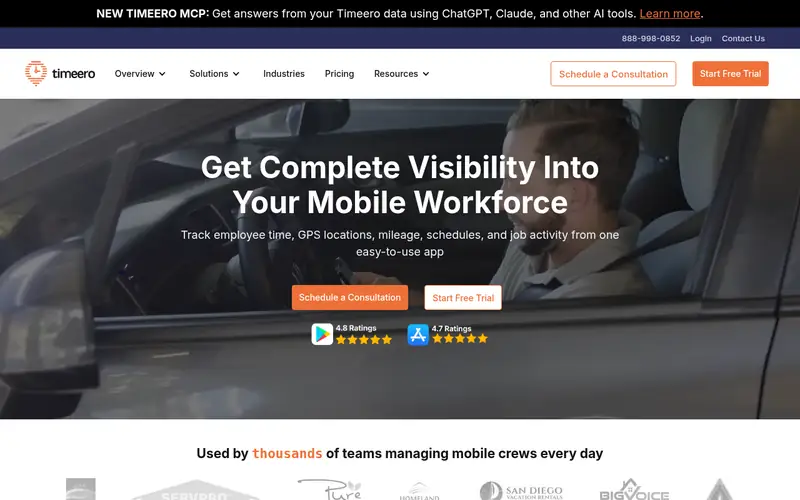
Timeero homepage

Timeero focuses on GPS time tracking for mobile teams. It records clock-in and clock-out locations, logs mileage between stops, and can restrict punches to a geofenced area. That fits moving crews who drive between a warehouse and customer addresses. The product is sold on paid plans with a trial. Teams that only need a simple time clock may prefer a lighter tool. Firms that reimburse drivers for mileage should review the mileage features closely.

Free plan: Free trial (14 days)

Website: timeero.com

Strengths

  • GPS tracking with mileage logs
  • geofenced clock-in

Watch out for

  • No free plan
  • small teams may not need the tracking depth
7

Buddy Punch

Small movers that want a simple time clock
See vendor pricing page
Buddy PunchHomepage image unavailable

Buddy Punch is a straightforward time clock. Employees punch in from a phone, a browser or a shared tablet, and the record can include a GPS location or a photo. A moving company can keep a tablet at the warehouse for crews starting the day there. It is sold on paid plans with a trial. The tool covers attendance and timesheets well but does not try to be a full HR suite. Small firms that want a simple, low-setup clock will find it easy to run.

Free plan: Free trial (14 days)

Website: buddypunch.com

Strengths

  • Simple clock-in with GPS and photo options
  • supports shared kiosk mode

Watch out for

  • No free plan
  • fewer HR features than larger suites
8

Jibble

Cost-sensitive movers that need basic clock-in
See vendor pricing page
jibble.ioHomepage, Nov 2026
Jibble homepage

Jibble offers a free plan for unlimited users on its core time tracking features. Crews can clock in from a phone or a shared kiosk, and the timesheets are visible to managers in a dashboard. Paid tiers add attendance policies, schedules and more reporting. Moving companies that just need to know who worked and when can start on the free plan. Firms that need payroll sync or detailed overtime rules should check the paid plans.

Free plan: Yes

Website: jibble.io

Strengths

  • Free plan for unlimited users on core time tracking
  • mobile and kiosk clock-in

Watch out for

  • Advanced attendance rules need a paid tier
  • fewer payroll integrations

Which attendance tracking software for moving companies should I use if I run a crew of five?

Connecteam is a good fit for a crew of five because its free plan covers up to 10 users and includes a GPS time clock. If you also need shift scheduling, Homebase offers a free plan for one location. If you bill clients by the hour, Clockify's free plan has unlimited users and client-tagged time entries. If you want a shared tablet at the warehouse, Buddy Punch and Jibble both support kiosk-style clock-in.

Is Connecteam better than Homebase for attendance tracking software for moving companies?

Connecteam is the better fit when GPS location on each punch matters most, since its mobile time clock records where the punch happened. Homebase is the better fit when you want scheduling and attendance together on a free plan for one location. Both offer free plans, so a small moving company can try either before paying.

Pre-purchase checklist

  • Confirm the free plan's user limit and which features it includes.
  • Check whether the mobile app records GPS location on each punch.
  • Verify how timesheets export to your payroll or invoicing system.
  • Ask whether geofencing can restrict punches to job sites.
  • Compare per-user pricing at your full crew size, not just the entry tier.

FAQ

What is the best attendance tracking software for moving companies with drivers on the road?

Connecteam and Timeero both record GPS location on mobile punches, which suits drivers and helpers who start and end at different addresses. Connecteam has a free plan for up to 10 users. Timeero adds mileage logs, which helps if you reimburse drivers for distance.

Do moving companies need GPS tracking in a time clock?

GPS is optional but useful. It shows where a crew clocked in, which helps when jobs start at customer addresses rather than a warehouse. Tools like Connecteam, Hubstaff and Timeero include it. Companies with fixed warehouse start points may not need it.

Can attendance software track hours per move for client billing?

Yes, if the tool supports projects or clients. Clockify lets you tag each time entry to a client and project, and Hubstaff links timesheets to projects. That makes it easier to bill hours per move.

Is there free attendance tracking software for small moving crews?

Yes. Connecteam offers a free plan for up to 10 users, Homebase offers a free plan for one location, and Jibble offers a free plan for unlimited users on core time tracking. Check each plan's limits before relying on it for payroll.

How much does attendance tracking software cost for a moving company?

Prices vary by vendor and are usually charged per user per month. This guide does not quote figures because plans change. Check each vendor's pricing page for the current rate at your crew size, and confirm what the entry tier includes.