How we rank
HR and Workforce · Researched comparison

Best Attendance Tracking Software for Security Companies in 2026

TaskReports may earn a fee from some links on this page, and some placements are paid and labelled. Neither one decides the order. See our disclosure.

The short answer

Deputy is the first pick for most security companies because it combines shift scheduling, GPS clock-in and payroll exports in one tool. QuickBooks Time suits firms already using QuickBooks for payroll. Sling is a lower-cost option for smaller guard teams that need scheduling and time records without payroll add-ons.

On this page

Key takeaways

  • Security firms need clock-in records tied to shifts and sites, plus GPS or geofence checks for guards on patrol.
  • Deputy, QuickBooks Time and Sling fit guard scheduling and time records; Homebase and Clockify cover basic clock-in at low cost.
  • Entry prices range from free tiers to per-user monthly fees, so cost depends on guard headcount and site count.
  • Confirm GPS, offline clock-in and payroll export support on the vendor site before you commit.

Quick comparison

ToolBest fitStarting price
DeputyGuard shifts with GPS clock-in and site checksSee vendor pricing page
QuickBooks TimeFirms already running payroll in QuickBooksSee vendor pricing page

SlingSmall guard teams that need scheduling plus time clockSee vendor pricing page
HomebaseSmall security firms needing schedules and time clocksSee vendor pricing page
ClockifyLow-cost time records for small guard teamsSee vendor pricing page
When I WorkShift scheduling with attendance and GPS clock-inSee vendor pricing page
ConnecteamField guards needing mobile check-ins and job updatesSee vendor pricing page

How we chose

We picked tools that record real clock-in or attendance data and support shift work, then checked fit for guard scheduling, site checks, GPS clock-in and payroll export. We looked at entry price, free access and the main limits of each plan. Sources are vendor websites and public documentation. Prices change, so confirm current rates on the vendor site before buying.

Best overall

Deputy

Guard shifts with GPS clock-in and site checks

  • Shift scheduling with GPS and geofence clock-in
  • payroll and invoicing exports
PriceSee vendor pricing page
See Deputy pricing
deputy.comHomepage, Nov 2026
Deputy homepage

Deputy is built around shift work, which matches security guard rosters. Guards clock in from a phone, and the record can include location, so a supervisor can see whether the check-in happened at the assigned site. Schedules, timesheets and shift swaps sit in one place, and hours export to payroll. Plans are tiered by feature set and priced per user, so a large guard roster costs more than a small one. The vendor publishes current rates on its pricing page. Firms that only need a simple time clock may find the scheduling layer more than they need.

Price: See vendor pricing page

Free plan: Free trial (31 days)

Website: deputy.com

Watch out for

  • Per-user pricing rises with guard headcount
  • advanced features cost more
2

QuickBooks Time

Firms already running payroll in QuickBooks
See vendor pricing page
quickbooks.intuit.comHomepage, Nov 2026
QuickBooks Time homepage

QuickBooks Time records clock-in and clock-out from a phone or kiosk, and mobile entries can capture location. For a security company, that means guard hours and site checks land in the same system that runs payroll, which cuts manual re-entry. The product is priced per user with tiered plans, and the vendor lists current rates on its site. It makes the most sense for firms already using QuickBooks Payroll. A company on a different payroll platform may prefer a tool that exports cleanly to its existing provider.

Free plan: Free trial (30 days)

Website: quickbooks.intuit.com/time-tracking

Strengths

  • GPS tracking on mobile clock-in
  • payroll sync with QuickBooks

Watch out for

  • Best value only inside the QuickBooks ecosystem
  • per-user fees add up
3

Sling

Small guard teams that need scheduling plus time clock
See vendor pricing page
getsling.comHomepage, Nov 2026
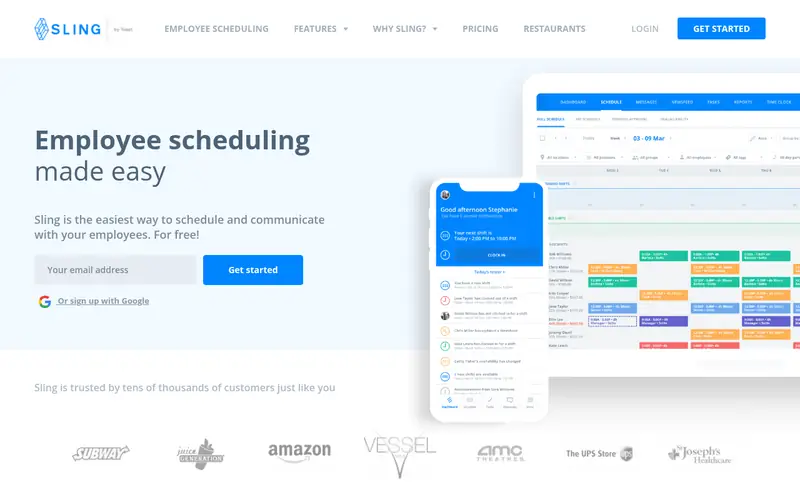
Sling homepage

Sling combines shift scheduling with a time clock, so a small security firm can build guard rosters and record attendance in one app. Guards get shift reminders, and swap requests are handled in the tool, which helps when coverage changes at short notice. There is a free plan, but the vendor limits which features it includes; GPS and some controls require a paid tier. The paid plans are priced per user, and current rates are on the vendor site. Larger firms with complex site rules should check the paid tiers before choosing.

Free plan: Yes

Website: getsling.com

Strengths

  • Free plan covers scheduling and time clock basics
  • shift reminders and swap requests

Watch out for

  • Free plan limits features
  • GPS and advanced controls sit on paid tiers
4

Homebase

Small security firms needing schedules and time clocks
See vendor pricing page
joinhomebase.comHomepage, Nov 2026
Homebase homepage

Homebase offers scheduling, a time clock and timesheets, with a free tier aimed at a single location. A small guard company with one office can track attendance without paying, and guards clock in from a phone or a shared device. Paid plans add payroll, hiring tools and more locations, priced per location or per user depending on the plan. The vendor lists current rates on its site. Firms running guards across many sites will outgrow the free tier quickly and should price the paid plans first.

Free plan: Yes

Website: joinhomebase.com

Strengths

  • Free tier for one location with scheduling and time clock
  • mobile clock-in

Watch out for

  • Free tier is limited to a single location
  • payroll and hiring cost extra
5

Clockify

Low-cost time records for small guard teams
See vendor pricing page
clockify.meHomepage, Nov 2026
Clockify homepage

Clockify is a time tracking tool with a free plan that covers unlimited users and basic timesheet records. A security company can use it to log guard hours and pull reports without a large software bill. Scheduling is lighter than in dedicated shift tools, and features such as approvals and location controls are on paid tiers. The vendor publishes current rates on its site. Firms that need tight site-level scheduling and geofence rules should compare it with Deputy before deciding.

Free plan: Yes

Website: clockify.me

Strengths

  • Free plan with unlimited users and basic time tracking
  • simple reports

Watch out for

  • Limited scheduling depth
  • GPS and approvals sit on paid tiers
6

When I Work

Shift scheduling with attendance and GPS clock-in
See vendor pricing page
wheniwork.comHomepage, Nov 2026
When I Work homepage

When I Work focuses on hourly shift scheduling, which suits guard rosters that change week to week. Guards clock in from a phone, and the record can include location. Managers see who is late or absent and can fill gaps from the schedule. There is no free plan, only a trial, and plans are priced per user per month. The vendor lists current rates on its site. It is a good fit for firms that put scheduling first; firms that mainly need payroll-ready timesheets may prefer QuickBooks Time.

Free plan: Free trial (14 days)

Website: wheniwork.com

Strengths

  • Scheduling built for shift coverage
  • GPS clock-in on mobile

Watch out for

  • No free plan
  • pricing is per user per month
7

Connecteam

Field guards needing mobile check-ins and job updates
See vendor pricing page
connecteam.comHomepage, Nov 2026
Connecteam homepage

Connecteam is built for deskless and field teams, which fits guards who work across sites. The time clock captures location, and the app can carry job updates and checklists alongside attendance records. The free plan has a user cap, and paid tiers add features such as advanced reporting. The vendor lists current rates on its site. A firm with a large guard roster should confirm the user cap and per-user cost before standardizing on it.

Free plan: Yes

Website: connecteam.com

Strengths

  • Mobile-first tools for field staff
  • time clock with location capture

Watch out for

  • Free plan caps users
  • advanced features need paid tiers

Which attendance tracking software for security companies should I use if my guards work across many sites?

Deputy is the best fit for guards spread across many sites because it pairs scheduling with GPS and geofence clock-in. If your guards mostly work alone in the field, Connecteam puts mobile check-ins and job updates in one app. If you already run payroll in QuickBooks, QuickBooks Time keeps guard hours and pay in one system. For a small team on one site, Homebase covers scheduling and a time clock on its free tier.

Is Deputy better than QuickBooks Time for attendance tracking software for security companies?

Deputy is the better fit when site-level scheduling and geofence clock-in matter most. QuickBooks Time is the better fit when payroll already runs in QuickBooks and you want guard hours to flow straight into it. Deputy puts more weight on shift scheduling and site checks. QuickBooks Time puts more weight on payroll sync. Both charge per user, so compare total cost at your guard headcount.

Pre-purchase checklist

  • Confirm the tool records GPS or geofence location on mobile clock-in if guards work off-site.
  • Check whether offline clock-in works, since guards may be in buildings with weak signal.
  • Confirm timesheets export to your payroll provider without manual re-entry.
  • Price the plan at your full guard headcount, not just supervisors.
  • Check how many locations or sites the plan allows before you commit.

FAQ

What should security companies look for in attendance tracking software?

Look for shift scheduling, mobile clock-in with location capture, offline support and payroll export. Guards often work alone at sites, so a supervisor needs a record of when and where a check-in happened. Confirm the plan covers your headcount and site count at a price you can sustain.

Does attendance tracking software for security companies include GPS clock-in?

Some do. Deputy, QuickBooks Time, When I Work and Connecteam can capture location on mobile clock-in, though the exact feature depends on the plan. Check the vendor's plan comparison before buying, since GPS is often limited to paid tiers.

Can guards clock in without a signal?

It depends on the tool. Some apps store clock-in data on the device and sync when a connection returns. Confirm offline behavior on the vendor's documentation, because guards often work in basements, garages and large buildings with weak coverage.

How much does attendance tracking software for security companies cost?

Prices vary by vendor and plan. Some tools, including Sling, Homebase and Clockify, offer free tiers with limits. Paid plans are usually priced per user per month, so cost scales with guard headcount. Confirm current rates on each vendor's pricing page.

Can these tools handle payroll for guard hours?

Several can. QuickBooks Time syncs with QuickBooks Payroll, and Deputy exports hours to payroll and invoicing. Others export timesheets as files you can import. Check that the export matches your payroll provider before you commit.