How we rank
HR and Workforce · Researched comparison

Best Attendance Tracking Software for Solar Installers in 2026

TaskReports may earn a fee from some links on this page, and some placements are paid and labelled. Neither one decides the order. See our disclosure.

The short answer

QuickBooks Time is the first pick for solar installers who need GPS-stamped clock-in at scattered job sites and a clean path to payroll. ClockShark is a good alternative when job costing and scheduling matter as much as attendance. Homebase fits small residential crews that want a free plan to start. Larger operations with complex PTO rules should look at Deputy or BambooHR.

On this page

Key takeaways

  • QuickBooks Time is the first pick for solar crews that need GPS-stamped clock-in at job sites, with a per-user monthly fee and a 30-day trial.
  • ClockShark and Connecteam suit field-heavy installers that want mobile time tracking tied to jobs and schedules.
  • Homebase offers a free plan for one location with up to 20 employees, which fits small residential solar shops.
  • Most tools here charge per user per month, so confirm current rates on each vendor pricing page before you commit.

Quick comparison

ToolBest fitStarting price
QuickBooks TimeSolar crews needing GPS-stamped clock-in at job sitesSee vendor pricing page
ClockSharkField installers who need job costing with time recordsSee vendor pricing page
ConnecteamMixed office and field teams needing scheduling plus time clockSee vendor pricing page
HomebaseSmall residential solar shops wanting a free startSee vendor pricing page
DeputyLarger solar firms with shift rules and PTO trackingSee vendor pricing page
BambooHRSolar companies wanting HR records with time trackingSee vendor pricing page
JibbleBudget-conscious crews wanting free clock-inSee vendor pricing page
HubstaffRemote and field teams needing GPS and activity recordsSee vendor pricing page

How we chose

We picked tools that support real clock-in or attendance records for field and office crews, then compared entry pricing, free access and main limits. Sources are vendor websites and public documentation. Prices change, so confirm current rates on each vendor site.

Best overall

QuickBooks Time

Solar crews needing GPS-stamped clock-in at job sites

  • GPS and geofence clock-in on mobile
  • Payroll and accounting tie-in with QuickBooks
PriceSee vendor pricing page
See QuickBooks Time pricing
quickbooks.intuit.comHomepage, Nov 2026
QuickBooks Time homepage

QuickBooks Time records when and where a worker clocks in, which matters when solar crews move between rooftops, warehouses and service calls. Geofencing can flag clock-ins outside an assigned site. Timesheets flow into payroll, and the product connects to QuickBooks accounting for job costing. The plan structure is per user per month, with higher tiers for scheduling and project tracking. The 30-day trial lets a crew test GPS clock-in before paying. Small teams that only need basic time cards may find the per-user cost hard to justify, and companies without QuickBooks may get less from the accounting link. Skip it if you need deep HR features like leave accrual rules and document management in the same system.

Price: See vendor pricing page

Free plan: Free trial (30 days)

Website: quickbooks.intuit.com/time-tracking

Watch out for

  • Per-user pricing adds up for large crews
  • Some features need higher tiers
2

ClockShark

Field installers who need job costing with time records
See vendor pricing page
ClockSharkHomepage image unavailable

ClockShark is built for field service and construction crews, which fits solar installation work. Employees clock in from a phone, and the record attaches to a specific job or task. GPS stamps show where the clock-in happened, and geofences can restrict it to a site. Scheduling tools let a supervisor assign crews to jobs and see who is on site. Job costing connects hours to a project, which helps when billing by install. The trial runs 14 days. There is no free plan, and some GPS and scheduling features sit on higher tiers, so check the plan breakdown before choosing. Skip it if your team works mostly in one warehouse and does not need job-level costing.

Free plan: Free trial (14 days)

Website: clockshark.com

Strengths

  • Mobile clock-in tied to jobs and tasks
  • Scheduling and job costing in one tool

Watch out for

  • No free plan
  • GPS features depend on plan tier
3

Connecteam

Mixed office and field teams needing scheduling plus time clock
See vendor pricing page
connecteam.comHomepage, Nov 2026
Connecteam homepage

Connecteam bundles a mobile time clock, scheduling, task lists and team messaging. For solar installers, that means a crew can clock in from a phone at a job site and see the day's schedule in the same app. Geofenced clock-in is available on paid plans. The free plan covers a small team with basic time clock and scheduling. Paid tiers add GPS, job scheduling and more admin controls. Because the app does many things, setup takes more thought than a single-purpose time clock. Skip it if you want a narrow attendance tool with no extra communication features.

Free plan: Yes

Website: connecteam.com

Strengths

  • Free plan for small teams
  • Time clock, scheduling and communication in one app

Watch out for

  • Advanced features require paid tiers
  • Interface can feel busy for simple needs
4

Homebase

Small residential solar shops wanting a free start
See vendor pricing page
joinhomebase.comHomepage, Nov 2026
Homebase homepage

Homebase offers a free plan for a single location with up to 20 employees. That fits a small residential solar installer with one crew base. Employees clock in from a phone or a shared device, and timesheets export for payroll. Paid plans add scheduling, hiring and payroll features. GPS and geofencing are available on higher tiers, so a company that needs site verification should check which plan includes it. Skip it if you run multiple locations or need GPS clock-in on the free tier.

Free plan: Yes

Website: joinhomebase.com

Strengths

  • Free plan for one location with up to 20 employees
  • Simple mobile clock-in and timesheets

Watch out for

  • Free plan limited to one location
  • Payroll and HR add-ons cost extra
5

Deputy

Larger solar firms with shift rules and PTO tracking
See vendor pricing page
deputy.comHomepage, Nov 2026
Deputy homepage

Deputy handles scheduling, time and attendance, and leave management. For solar firms with crews on shifts and formal PTO policies, it can track accruals and approve leave requests in one place. Clock-in can be tied to a location, and timesheets feed payroll. The trial runs 31 days. Pricing is per user per month, and advanced features sit on higher tiers. Smaller crews may find the setup heavier than needed. Skip it if you only need a basic time clock and no scheduling or leave rules.

Free plan: Free trial (31 days)

Website: deputy.com

Strengths

  • Strong scheduling with attendance and leave rules
  • Auto-scheduling and compliance tools

Watch out for

  • No free plan
  • Pricing is per user and can climb
6

BambooHR

Solar companies wanting HR records with time tracking
See vendor pricing page
bamboohr.comHomepage, Nov 2026
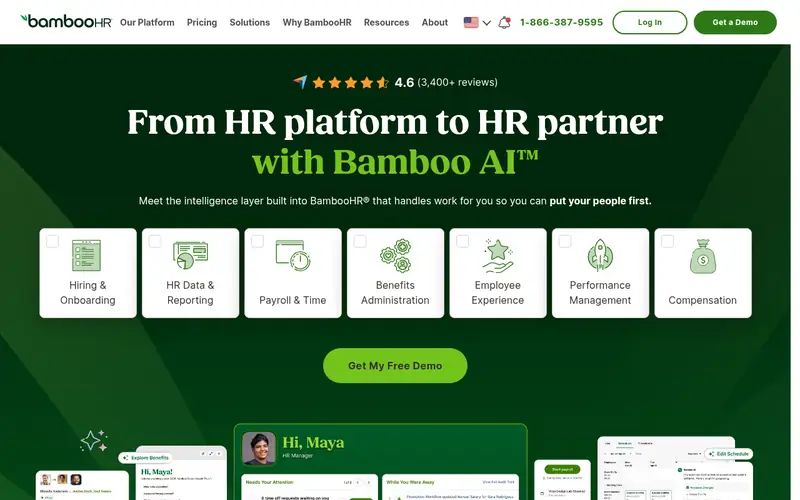
BambooHR homepage

BambooHR is an HR platform with time tracking, PTO accrual and employee records. A solar installer with office staff and field crews can keep attendance, leave balances and payroll data in one system. Mobile clock-in is available, and timesheets connect to payroll. There is no free plan, and pricing is quoted per employee per month with add-ons. That makes it a fit for companies that want HR and attendance together, not for a small crew that only needs clock-in. Skip it if you want a low-cost standalone time clock.

Free plan: No

Website: bamboohr.com

Strengths

  • Time tracking inside a full HR system
  • PTO accrual and balance tracking built in

Watch out for

  • No free plan
  • Priced for growing companies, not small crews
7

Jibble

Budget-conscious crews wanting free clock-in
See vendor pricing page
jibble.ioHomepage, Nov 2026
Jibble homepage

Jibble offers a free plan with unlimited users for basic time and attendance tracking. A solar crew can clock in from a phone and see timesheets in a dashboard. GPS and geofencing are available on paid plans. Paid tiers add scheduling, reports and integrations. Payroll integration is lighter than in dedicated payroll tools, so larger firms may pair it with a payroll system. Skip it if you need deep job costing or complex leave rules.

Free plan: Yes

Website: jibble.io

Strengths

  • Free plan with unlimited users for basic time tracking
  • Mobile and web clock-in with GPS on paid plans

Watch out for

  • Advanced features require paid tiers
  • Limited payroll depth
8

Hubstaff

Remote and field teams needing GPS and activity records
See vendor pricing page
hubstaff.comHomepage, Nov 2026
Hubstaff homepage

Hubstaff tracks time with GPS and optional activity monitoring. For solar installers, it can record clock-in locations and tie hours to projects or clients. Reports show time by project, which helps with billing. The trial runs 14 days. Pricing is per user per month, and some features need higher tiers. Activity monitoring may not suit every crew, so decide whether you need it before choosing a plan. Skip it if you want simple clock-in without monitoring features.

Free plan: Free trial (14 days)

Website: hubstaff.com

Strengths

  • GPS tracking and geofenced clock-in
  • Project and client time reports

Watch out for

  • No free plan
  • Activity monitoring can feel heavy for some crews

Which attendance tracking software for solar installers should I use if my crews work at multiple job sites?

QuickBooks Time is the best fit when crews move between job sites and you need GPS-stamped clock-in. If job costing matters most, pick ClockShark. If you run a small residential shop and want a free start, Homebase fits one location with up to 20 employees. If you need formal PTO accrual and HR records together, BambooHR is the better match.

Is QuickBooks Time better than ClockShark for attendance tracking software for solar installers?

QuickBooks Time is better when you already use QuickBooks and want payroll and accounting tied to time records. ClockShark is better when job costing and scheduling are central to how you bill installs. Both offer mobile clock-in and GPS, but ClockShark leans further into job-level tracking, while QuickBooks Time leans into payroll and accounting links.

Pre-purchase checklist

  • Confirm the tool records GPS or geofenced clock-in at job sites, not just office time.
  • Check the per-user price at your crew size, since most plans scale with headcount.
  • Verify whether a free plan exists and what limits it carries.
  • Confirm timesheets export to your payroll provider.
  • Check whether PTO accrual and leave requests are included or an add-on.

FAQ

What is the best attendance tracking software for solar installers?

QuickBooks Time is a strong first pick for GPS clock-in at job sites. ClockShark suits job costing, Homebase fits small shops with a free plan, and Deputy or BambooHR fit firms that need PTO rules and HR records.

Do solar installers need GPS clock-in?

GPS clock-in helps when crews work at scattered job sites and you need to confirm they are on location. It is optional in most tools here and often sits on paid tiers. Crews that work from one base may not need it.

Which attendance tools have a free plan?

Homebase, Connecteam and Jibble offer free plans. Homebase limits its free plan to one location with up to 20 employees. Connecteam and Jibble free tiers cover basic time tracking, with GPS and advanced features on paid plans.

Can these tools track PTO and leave?

Deputy and BambooHR include PTO accrual and leave request tracking. Other tools here focus on clock-in and timesheets, so check whether leave tracking is included or an add-on before buying.

How much does attendance tracking software cost for a solar crew?

Most tools here charge per user per month, and rates change. Confirm current prices on each vendor pricing page. Free plans from Homebase, Connecteam and Jibble can cover small teams, while paid tiers add GPS, scheduling and payroll features.