How we rank
HR and Workforce · Researched comparison

Best Photo-Verification Time Clock Apps in 2026

TaskReports may earn a fee from some links on this page, and some placements are paid and labelled. Neither one decides the order. See our disclosure.

The short answer

Buddy Punch is the first pick for small and mid-size teams that want a selfie photo on every punch with GPS and job codes. ClockShark suits field crews that need photos alongside scheduling and job costing. Homebase is the low-cost choice for a single location that wants photo punches on a free plan. All three attach the photo to the timecard entry for manager review.

On this page

Key takeaways

  • Buddy Punch and ClockShark lead this list for camera punch photos tied to a GPS location and a job code.
  • Homebase offers a free plan for one location, and QuickBooks Time starts at $20 per month plus $2 per user.
  • Most tools store the punch photo with the timecard entry, so a manager can review it next to the hours.
  • Photo capture is often an add-on or a higher-tier feature, so confirm it is in the plan you buy.

Quick comparison

ToolBest fitStarting price
Buddy PunchSmall teams wanting selfie punches with GPSSee vendor pricing page
ClockSharkField service crews needing photos plus job costingSee vendor pricing page
HomebaseSingle-location small businesses wanting a free startSee vendor pricing page
QuickBooks TimeTeams already using QuickBooks for payroll$20 per month plus $2 per user
ConnecteamMobile teams wanting time clock plus operationsSee vendor pricing page
JibbleLow-cost photo and GPS time trackingSee vendor pricing page
TimeeroRoute and field teams needing photo proofSee vendor pricing page

How we chose

We picked tools that list photo capture on clock-in or clock-out in their public documentation and that are sold as standalone products. We compared fit for the use case, published entry price, free access and the main limits on each plan. Sources are vendor websites and public pricing pages. Prices and plan limits change, so confirm the current details on the vendor site before you buy.

Best overall

Buddy Punch

Small teams wanting selfie punches with GPS

  • Photo capture on punches with GPS and job codes
  • Simple web and mobile timecards
PriceSee vendor pricing page
See Buddy Punch pricing
Buddy PunchHomepage image unavailable

Buddy Punch records a photo when an employee clocks in or out, and stores it with the punch, the GPS location and any job or task code. Managers review the photo beside the hours on the timecard and can approve or correct the entry. The vendor sells several tiers, and features such as photo capture and GPS are tied to specific plans. Pricing is quoted per user per month, so check the current plan matrix before you buy. A 14-day trial is offered. Skip Buddy Punch if you need payroll, scheduling and HR in one suite, or if you want a permanent free plan for a small crew.

Price: See vendor pricing page

Free plan: Free trial (14 days)

Website: buddypunch.com

Watch out for

  • Photo feature depends on the plan tier
  • No permanent free plan
2

ClockShark

Field service crews needing photos plus job costing
See vendor pricing page
ClockSharkHomepage image unavailable

ClockShark is built for construction and field service teams. Employees can attach a photo to a punch, and the entry records GPS, the job and the service item. That makes it easier to confirm who was on site and when. The product also covers scheduling, job costing and crew management, so the photo punch sits inside a wider field-service tool. Plans are tiered, and the features you get depend on the tier. A 14-day trial is available. Skip ClockShark if you only need basic timecards for an office team, since the field-service features add cost you may not use.

Free plan: Free trial (14 days)

Website: clockshark.com

Strengths

  • Photo punches with GPS and job costing
  • Scheduling and crew tracking in one app

Watch out for

  • Higher tiers needed for full features
  • No free plan
3

Homebase

Single-location small businesses wanting a free start
See vendor pricing page
joinhomebase.comHomepage, Nov 2026
Homebase homepage

Homebase offers a free plan for one location and includes mobile time clock punches. Employees can take a photo when they clock in or out, and the photo is saved with the shift record for the manager to review. Paid plans add scheduling, payroll and hiring tools. The free tier covers basic time tracking, so a small shop or cafe can start with photo punches at no cost. Limits apply to the number of locations and to advanced features. Skip Homebase if you run multiple locations or need detailed job costing, because those needs push you to a paid plan or a different tool.

Free plan: Yes

Website: joinhomebase.com

Strengths

  • Free plan for one location
  • Photo punches on mobile

Watch out for

  • Free plan limited to one location
  • Advanced features need paid plans
4

QuickBooks Time

Teams already using QuickBooks for payroll
$20 per month plus $2 per user
quickbooks.intuit.comHomepage, Nov 2026
QuickBooks Time homepage

QuickBooks Time lets employees attach a photo to a mobile punch, and the entry can include GPS and a job code. Because it connects to QuickBooks, approved hours can flow into payroll and invoicing. The published entry price is $20 per month plus $2 per user, per the vendor page, and a 30-day trial is offered. Photo capture is a setting you enable for the team, so confirm it is turned on for each employee group. Skip QuickBooks Time if you do not use QuickBooks and want a lower per-user cost, or if you need job costing beyond the basic job codes.

Free plan: Free trial (30 days)

Website: quickbooks.intuit.com/time-tracking

Strengths

  • Photo capture on mobile punches
  • Connects to QuickBooks payroll

Watch out for

  • Per-user cost adds up
  • Photo setting must be enabled
5

Connecteam

Mobile teams wanting time clock plus operations
See vendor pricing page
connecteam.comHomepage, Nov 2026
Connecteam homepage

Connecteam is a mobile-first operations app with a time clock that can require a photo at punch time. The entry can also record GPS, and managers review punches in the dashboard. The vendor offers a free plan for small teams, with limits on users and features, and paid tiers for larger teams and advanced tools. The app also covers tasks, forms and communication, so the time clock is one part of a broader tool. Skip Connecteam if you want a single-purpose time clock, because the wider feature set may be more than you need.

Free plan: Yes

Website: connecteam.com

Strengths

  • Free plan for small teams
  • Photo and GPS on time clock

Watch out for

  • Free plan has user and feature limits
  • Full suite needs paid tiers
6

Jibble

Low-cost photo and GPS time tracking
See vendor pricing page
jibble.ioHomepage, Nov 2026
Jibble homepage

Jibble offers time tracking with a mobile punch that can capture a photo and a GPS location. The vendor advertises a free plan for unlimited users with core time tracking, and paid plans add controls and reports. The tool is simple to set up and works on web and mobile. Photo capture is a setting you enable, and the photo is stored with the timesheet entry. Check the current free-plan limits on the vendor site before you rely on them. Skip Jibble if you need deep payroll, scheduling or job costing, since those areas are lighter than in dedicated workforce suites.

Free plan: Yes

Website: jibble.io

Strengths

  • Free plan for unlimited users
  • Photo capture on mobile punches

Watch out for

  • Advanced controls need paid plans
  • Payroll features are limited
7

Timeero

Route and field teams needing photo proof
See vendor pricing page
timeero.comHomepage, Nov 2026
Timeero homepage

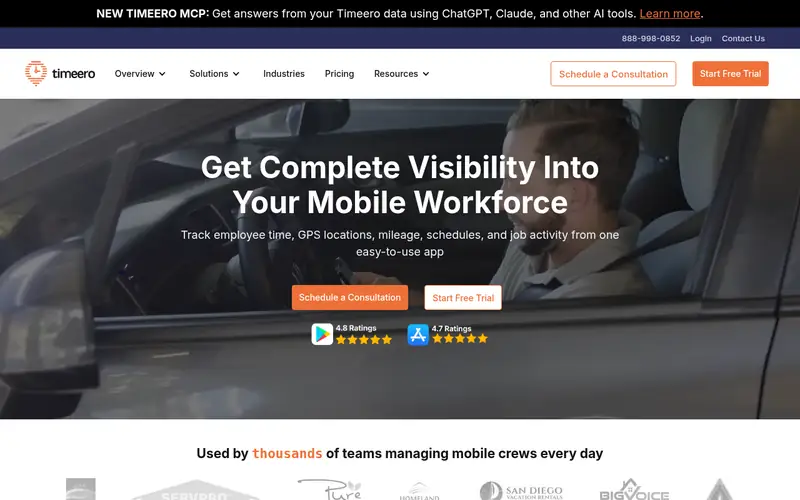
Timeero focuses on field teams and route workers. Employees can take a photo at clock-in, and the punch records GPS and time. Managers see the photo and location together, which helps confirm the visit. The product also covers mileage tracking and route history, so it fits teams that drive between jobs. Plans are tiered and priced per user, and a 14-day trial is offered. Confirm that photo capture is included in the tier you choose. Skip Timeero if your team works from one fixed site and does not need route or mileage tracking.

Free plan: Free trial (14 days)

Website: timeero.com

Strengths

  • Photo punches with GPS and route tracking
  • Mileage and job tracking

Watch out for

  • No free plan
  • Pricing quoted per user

Pre-purchase checklist

  • Confirm photo capture is included in the plan tier you are buying, not only in a higher tier.
  • Check whether the photo is stored with the timecard entry and how long it is retained.
  • Confirm GPS, job codes and geofencing are available if you need location proof.
  • Check the per-user price at your team size, since entry prices often assume a small team.
  • Review the free plan or trial limits, including user caps and feature access.

FAQ

Do photo-verification time clocks store the photo with the timecard?

Yes. In the tools listed here, the photo taken at clock-in or clock-out is saved with the punch entry, along with the time and often the GPS location. Managers can review the photo next to the hours on the timecard.

Is photo capture included in free plans?

It depends on the vendor. Homebase, Connecteam and Jibble offer free plans, but feature access and user limits vary. Check the current plan details on each vendor site, because free-plan terms change.

Can employees refuse a photo punch?

That is a policy and legal question for your business, not a software setting. Some tools let you make the photo optional or required per team. Consult local rules on employee monitoring before you require photos.

Do these apps work on a personal phone?

Most of the tools here offer a mobile app for iOS and Android, so employees can punch from a phone. Some also support a shared tablet or kiosk at a fixed site.

What is the entry price for QuickBooks Time?

The published entry price is $20 per month plus $2 per user, per the vendor page, with a 30-day trial. Confirm the current price on the QuickBooks site, since pricing can change.