How we rank
HR and Workforce · Researched comparison

Best Time Clock Software for Bowling Alleys in 2026

TaskReports may earn a fee from some links on this page, and some placements are paid and labelled. Neither one decides the order. See our disclosure.

The short answer

Homebase is the first pick for most bowling alleys. It combines shift scheduling, a time clock, and timesheet export in one tool, and its free plan suits a single location with a small crew. For larger alleys with several shifts and payroll integration needs, QuickBooks Time is a strong alternative. When I Work is a good fit if scheduling and shift swaps matter more than payroll depth.

On this page

Key takeaways

  • Homebase is the top pick for most bowling alleys because its free plan covers scheduling and time tracking for one location.
  • QuickBooks Time and When I Work both add payroll-ready timesheets and shift tools for multi-lane, multi-shift operations.
  • Entry prices range from free plans to paid plans starting around $20 per month, and most vendors bill per location or per employee.
  • Confirm free plan limits and current pricing on each vendor site before you commit.

Quick comparison

ToolBest fitStarting price
HomebaseSmall alleys that need free scheduling and a time clockSee vendor pricing page
QuickBooks TimeAlleys that already run payroll in QuickBooksSee vendor pricing page

When I WorkAlleys with complex shift schedules and swap requestsSee vendor pricing page
ClockifyBudget-conscious alleys that need simple time trackingSee vendor pricing page
DeputyMulti-department alleys that need scheduling and compliance toolsSee vendor pricing page
SlingAlleys that want free scheduling with a time clock add-onSee vendor pricing page
TimeClock PlusLarger alleys that need detailed attendance and compliance recordsSee vendor pricing page

How we chose

We picked tools that support hourly shift work, scheduling, and timesheet export, which are the core needs of a bowling alley. We looked at whether a free plan or trial exists, the published entry price where available, and the main limits of each plan. Sources are vendor websites and public documentation. Prices and plan limits change, so confirm the current details on the vendor site before you buy.

★ Best overall

Homebase

Small alleys that need free scheduling and a time clock

  • Free plan covers one location with scheduling and time tracking
  • employees clock in from a phone or a shared tablet
PriceSee vendor pricing page
See Homebase pricing
joinhomebase.comHomepage, Nov 2026
Homebase homepage

Homebase is built for hourly teams, which fits a bowling alley with counter staff, lane attendants, mechanics, and snack bar workers on rotating shifts. The time clock works from a shared tablet at the front desk or from each employee's phone. Schedules, shift notes, and timesheets live in one place, and hours can be exported for payroll. The free plan covers one location and basic scheduling and time tracking. Paid plans add payroll, hiring tools, and more advanced controls. Larger alleys with several locations or a full payroll workflow should compare the paid tiers. Confirm current limits on the vendor site.

Price: See vendor pricing page

Free plan: Yes

Website: joinhomebase.com

Watch out for

  • Payroll and advanced features sit on paid plans
  • free plan limits apply per location
2

QuickBooks Time

Alleys that already run payroll in QuickBooks
See vendor pricing page
quickbooks.intuit.comHomepage, Nov 2026
QuickBooks Time homepage

QuickBooks Time is a time tracking tool with mobile clock-in, scheduling, and timesheet approval. For a bowling alley, the job costing feature lets you separate hours for leagues, parties, and regular open bowling. GPS and geofencing help confirm staff are on site when they clock in. The product offers a free trial but no free plan. Pricing depends on the number of employees and the features you pick, so check the vendor page. Alleys that already use QuickBooks for payroll get the most from it. Those on other payroll systems may find the integration less useful.

Free plan: Free trial (30 days)

Website: quickbooks.intuit.com/time-tracking

Strengths

  • Timesheets flow into QuickBooks payroll
  • GPS and job costing help track lane and event work

Watch out for

  • No free plan
  • full value depends on using QuickBooks payroll

3

When I Work

Alleys with complex shift schedules and swap requests
See vendor pricing page
wheniwork.comHomepage, Nov 2026
When I Work homepage

When I Work focuses on scheduling for hourly teams. A bowling alley with late nights, weekend leagues, and seasonal staff can publish schedules, let employees request swaps, and track attendance. The mobile app lets staff see shifts and clock in. There is a free trial but no free plan. Pricing is per user or per plan, so confirm the current structure on the vendor site. It suits alleys where scheduling is the main pain point. If payroll export is the priority, compare it with QuickBooks Time first.

Free plan: Free trial (14 days)

Website: wheniwork.com

Strengths

  • Strong scheduling and shift-swap tools
  • employees can pick up open shifts from a phone

Watch out for

  • No free plan
  • time clock and payroll features depend on the plan tier
4

Clockify

Budget-conscious alleys that need simple time tracking
See vendor pricing page
clockify.meHomepage, Nov 2026
Clockify homepage

Clockify is a time tracking tool with a free plan that supports unlimited users on basic tracking. A bowling alley can use it to record hours for counter staff, lane attendants, and event crews. Reports can be exported for payroll. The free plan covers core time tracking but not advanced scheduling or payroll. Paid plans add more controls. It suits small alleys that mainly need to log hours and export reports. Alleys that need built-in scheduling and payroll should look at Homebase or QuickBooks Time.

Free plan: Yes

Website: clockify.me

Strengths

  • Free plan supports unlimited users and basic time tracking
  • works on web and mobile

Watch out for

  • Scheduling and payroll features are limited on the free plan
  • setup takes some planning
5

Deputy

Multi-department alleys that need scheduling and compliance tools
See vendor pricing page
deputy.comHomepage, Nov 2026
Deputy homepage

Deputy combines shift scheduling, time and attendance, and task lists. A bowling alley can set up separate departments for the front desk, lanes, kitchen, and maintenance, then schedule and track each one. The mobile app supports clock-in and shift notes. There is a free trial but no free plan. Pricing is per employee, so a large crew raises the cost. It fits alleys with several departments and a need for compliance records. Smaller alleys may find it more than they need.

Free plan: Free trial (31 days)

Website: deputy.com

Strengths

  • Scheduling, time tracking, and task management in one tool
  • supports multiple locations and departments

Watch out for

  • No free plan
  • pricing is per employee and can add up for larger crews
6

Sling

Alleys that want free scheduling with a time clock add-on
See vendor pricing page
getsling.comHomepage, Nov 2026
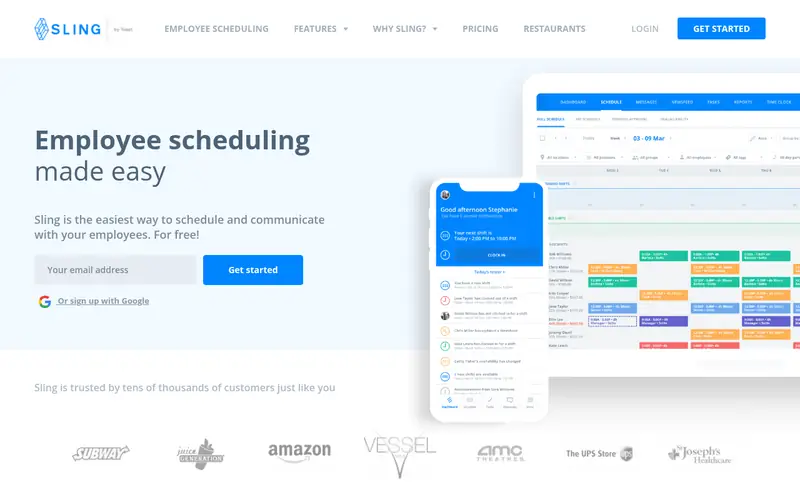
Sling homepage

Sling is a scheduling and communication tool for hourly teams. A bowling alley can build shifts, send schedule alerts, and let staff request time off. The time clock feature is available on paid plans, so check the current plan structure. The free plan covers scheduling and messaging but not the time clock. Paid plans add time tracking and more controls. It suits alleys that mainly need scheduling and communication and can add time tracking on a paid tier. Confirm current limits on the vendor site.

Free plan: Yes

Website: getsling.com

Strengths

  • Free plan covers scheduling and messaging
  • time clock is available on paid plans

Watch out for

  • Time clock is not part of the free plan
  • payroll features are limited
7

TimeClock Plus

Larger alleys that need detailed attendance and compliance records
See vendor pricing page
TimeClock PlusHomepage image unavailable

TimeClock Plus is an attendance and time tracking system for organizations with complex pay rules. A bowling alley with multiple shift types, overtime rules, and leave policies can use it to track hours and produce compliance reports. There is no free plan, and pricing is typically quoted by the vendor. It fits larger alleys or operators with several locations. Small alleys with simple hourly crews will likely find Homebase or Clockify easier to set up and cheaper to run.

Free plan: No

Website: timeclockplus.com

Strengths

  • Detailed attendance and leave tracking
  • supports complex pay rules and reporting

Watch out for

  • No free plan
  • setup and pricing require a vendor quote

Pre-purchase checklist

  • Confirm the free plan covers your number of locations and employees.
  • Check whether the time clock works on a shared tablet at the front desk and on employee phones.
  • Verify that timesheets export in a format your payroll provider accepts.
  • Ask how the tool handles split shifts, late-night shifts, and overtime rules.
  • Confirm the current price per employee or per location on the vendor site.

FAQ

What is the best time clock software for a small bowling alley?

Homebase is a common choice for a small alley because its free plan covers one location with scheduling and time tracking. Clockify is another low-cost option for simple hour logging. Compare free plan limits on each vendor site before you choose.

Can bowling alley staff clock in from a shared tablet?

Yes. Homebase and QuickBooks Time both support clock-in from a shared device such as a tablet at the front desk. Employees can also use their own phones. Check that the plan you pick includes the device options you need.

Do these tools handle late-night and weekend shifts?

Most of them do. When I Work and Deputy are built for shift-based scheduling and support late-night and weekend shifts. Confirm that your pay rules and overtime settings are supported before you commit.

Is there free time clock software for bowling alleys?

Homebase, Clockify, and Sling offer free plans, but the features differ. Homebase covers scheduling and time tracking on its free plan for one location. Clockify offers basic time tracking with unlimited users. Confirm current limits on each vendor site.

How much does time clock software cost for a bowling alley?

Prices vary by vendor and by the number of employees or locations. Some tools offer free plans, and paid plans are often quoted per employee or per location. Check the vendor pricing page for current rates, since prices change.