How we rank
HR and Workforce · Researched comparison

Best Time Clock Software for Grocery Stores in 2026

TaskReports may earn a fee from some links on this page, and some placements are paid and labelled. Neither one decides the order. See our disclosure.

The short answer

Homebase is the first pick for a single grocery store that wants a free time clock with scheduling and payroll export. QuickBooks Time is the better fit if you already run QuickBooks payroll and need job codes for departments. When I Work and Sling work well for stores that schedule many part-time and student staff and want the schedule and the clock in one place.

On this page

Key takeaways

  • Homebase suits single-location grocery stores that want a free time clock with scheduling and payroll export.
  • QuickBooks Time fits stores already running QuickBooks payroll and needing job codes for departments.
  • When I Work and Sling focus on shift scheduling with a time clock attached, which helps stores with split shifts and student staff.
  • Most tools charge per location or per employee, so confirm the multi-store price before you commit.

Quick comparison

ToolBest fitStarting price
HomebaseSingle-location grocery stores that need a free clockSee vendor pricing page
QuickBooks TimeStores already using QuickBooks payrollSee vendor pricing page
When I WorkStores scheduling many part-time and student staffSee vendor pricing page
SlingStores that want scheduling and a clock in one appSee vendor pricing page
ClockifyStores that want a low-cost or free time clockSee vendor pricing page
DeputyMulti-site grocery stores with complex shift rulesSee vendor pricing page
TimeClock PlusLarger grocery operations with compliance needsSee vendor pricing page

How we chose

We picked tools that provide a time clock with punch tracking and payroll export, then compared fit for grocery stores, entry price, free access and main limits. Sources are vendor pages and public documentation. Prices change, so confirm the current rate on the vendor site before you buy.

★ Best overall

Homebase

Single-location grocery stores that need a free clock

  • Free plan includes time clock and scheduling
  • payroll and hiring add-ons available
PriceSee vendor pricing page
See Homebase pricing
joinhomebase.comHomepage, Nov 2026
Homebase homepage

Homebase combines a time clock, employee scheduling and payroll export in one app. Staff can punch in from a shared tablet or their own phone, and managers see hours by employee and by day. For a grocery store with a mix of full-time and part-time staff, the schedule view helps match coverage to busy delivery and weekend periods. The free plan covers the basics for one location. Paid plans add payroll, hiring tools and more advanced controls. The main limit is scale: stores with several locations or a large roster will likely need a paid tier, so check the current employee and location caps on the pricing page before you rely on the free plan. Skip Homebase if you need deep labor-cost forecasting or complex multi-store reporting. It is built for small and mid-sized teams, not large chains.

Price: See vendor pricing page

Free plan: Yes

Website: joinhomebase.com

Watch out for

  • Free plan limits how many employees and locations you can manage
  • advanced features cost extra
2

QuickBooks Time

Stores already using QuickBooks payroll

See vendor pricing page
quickbooks.intuit.comHomepage, Nov 2026
QuickBooks Time homepage

QuickBooks Time is a time tracking tool with a mobile app, a shared kiosk mode and job codes. For a grocery store, job codes can separate hours by department, such as produce, deli, cashier or stocking, which makes labor reporting clearer. Timesheets flow into QuickBooks payroll when you use both products. Pricing is per employee per month, with a separate rate for payroll and for time tracking only. There is a free trial but no free plan. Stores that do not use QuickBooks payroll get less from the integration and may prefer a standalone clock. The kiosk mode works well for a shared break-room tablet where staff punch in with a PIN. Managers can approve timesheets and handle corrections before payroll runs. Confirm the current per-employee rate on the vendor pricing page.

Free plan: Free trial (30 days)

Website: quickbooks.intuit.com/time-tracking

Strengths

  • Job codes for departments and tasks
  • syncs with QuickBooks payroll

Watch out for

  • No free plan
  • full value depends on using QuickBooks

3

When I Work

Stores scheduling many part-time and student staff
See vendor pricing page
wheniwork.comHomepage, Nov 2026
When I Work homepage

When I Work is built around scheduling, which fits grocery stores that juggle many part-time shifts, student availability and last-minute swaps. Employees can request time off and swap shifts from the app, and managers approve changes. The time clock records punches and flags late or missed ones. The tool charges per employee per month, with tiers that add features such as attendance tracking and payroll export. There is a free trial but no free plan. A large roster of part-time staff raises the monthly cost, so estimate your headcount before choosing a tier. It suits stores where scheduling is the main pain point. If you only need a simple punch clock, a lighter tool may cost less.

Free plan: Free trial (14 days)

Website: wheniwork.com

Strengths

  • Strong shift scheduling and shift swapping
  • time clock with GPS and attendance controls

Watch out for

  • No free plan
  • per-employee pricing grows with a large roster
4

Sling

Stores that want scheduling and a clock in one app
See vendor pricing page
getsling.comHomepage, Nov 2026
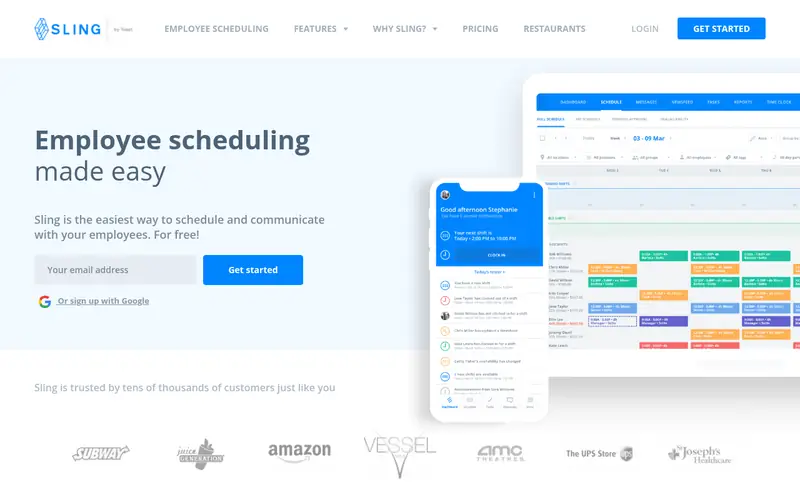
Sling homepage

Sling combines employee scheduling, a time clock and team messaging. For a grocery store, the messaging helps managers post shift changes and cover call-outs quickly. Staff can clock in from the app or a shared device, and managers review hours before payroll. The free plan covers scheduling and basic time tracking for a small team. Paid plans add features such as payroll integration, overtime controls and more detailed reporting. The free tier has limits on features and support, so check the current terms on the pricing page. Sling fits stores that want scheduling and communication in one place. Stores with complex payroll rules may need a separate payroll tool.

Free plan: Yes

Website: getsling.com

Strengths

  • Free plan covers scheduling and time clock basics
  • built-in messaging for shift changes

Watch out for

  • Advanced features and payroll add-ons cost extra
  • free plan has feature limits
5

Clockify

Stores that want a low-cost or free time clock
See vendor pricing page
clockify.meHomepage, Nov 2026
Clockify homepage

Clockify is a general time tracking tool with a free plan that supports unlimited users. A grocery store can use it as a simple punch clock: staff start and stop a timer or enter hours, and managers export timesheets. It works on web and mobile. The free plan covers basic tracking. Paid tiers add features such as timesheet approvals, scheduling and more detailed reports. Because it is a general tool, it does not handle retail-specific needs like department job codes or shift-swap workflows out of the box. Clockify suits a small store that wants a free, simple clock and can handle scheduling separately. Larger stores with complex payroll may outgrow it.

Free plan: Yes

Website: clockify.me

Strengths

  • Free plan supports unlimited users
  • simple punch and timesheet tracking

Watch out for

  • Scheduling and payroll features are limited
  • not built specifically for retail
6

Deputy

Multi-site grocery stores with complex shift rules
See vendor pricing page
deputy.comHomepage, Nov 2026
Deputy homepage

Deputy is a workforce management tool with scheduling, a time clock and payroll export. It handles multiple locations and complex pay rules, which fits grocery stores with several branches or shift rules such as overtime and weekend rates. Managers can build schedules across sites and review hours in one place. Pricing is per employee per month, with tiers that add features such as scheduling, payroll and reporting. There is a free trial but no free plan. Setup takes more effort than a simple clock, so plan time to configure locations and rules. Deputy suits stores that need multi-site control and detailed pay rules. A single small store may find it more than it needs.

Free plan: Free trial (31 days)

Website: deputy.com

Strengths

  • Handles multi-location scheduling and award-style pay rules
  • time clock with attendance controls

Watch out for

  • No free plan
  • setup takes more effort
7

TimeClock Plus

Larger grocery operations with compliance needs
See vendor pricing page
TimeClock PlusHomepage image unavailable

TimeClock Plus is a workforce time and attendance system for larger organizations. It supports multiple clock-in methods, attendance rules and compliance reporting, which fits grocery operations with many staff and strict labor rules. Managers can review exceptions such as missed punches and overtime before payroll. Pricing is not published and requires a quote. There is no free plan. The system is built for larger employers, so a single small store will likely find it heavy and costly. TimeClock Plus suits multi-site grocery operations that need detailed attendance and compliance controls. Small stores should look at lighter tools first.

Free plan: No

Website: timeclockplus.com

Strengths

  • Strong attendance and compliance controls
  • supports many clock-in methods

Watch out for

  • No free plan
  • pricing requires a quote

Pre-purchase checklist

  • Confirm how the tool handles department or job codes, so hours can be split by produce, deli, cashier and stocking.
  • Check whether the time clock works on a shared break-room tablet as well as employee phones.
  • Confirm the per-employee or per-location price at your actual headcount and number of stores.
  • Check payroll export formats and whether the tool integrates with your payroll provider.
  • Review attendance controls for missed punches, overtime and shift swaps before you commit.

FAQ

What is the best time clock software for a small grocery store?

Homebase is a strong fit for a single small store because its free plan includes a time clock and scheduling. Sling and Clockify are other low-cost options. Compare the free plan limits at your headcount before choosing.

Do these tools handle multiple grocery store locations?

Deputy and TimeClock Plus are built for multi-location operations. Homebase and When I Work offer multi-location features on paid plans. Confirm the location limits and price on each vendor pricing page.

Can staff clock in from a shared tablet?

Homebase, QuickBooks Time and Deputy support a shared kiosk or tablet mode. This suits a break-room clock where staff punch in with a PIN or badge. Check the exact method each tool supports.

Do these tools export hours to payroll?

Most tools on this list export timesheets or integrate with payroll providers. QuickBooks Time syncs with QuickBooks payroll, and Deputy and Homebase offer payroll exports. Confirm the format your payroll provider accepts.

Is there a free time clock for grocery stores?

Homebase, Sling and Clockify offer free plans with time clock basics. Free plans have limits on employees, locations or features. Check the current terms on each vendor page, since limits change.