How we rank
HR and Workforce · Researched comparison

Best Timesheet Software for Carpenters in 2026

TaskReports may earn a fee from some links on this page, and some placements are paid and labelled. Neither one decides the order. See our disclosure.

The short answer

Clockify is the first pick for most carpenters because its free plan covers unlimited users and time tracking, and the paid entry price is low. Jobber suits carpenters who want scheduling, quotes and timesheets in one tool. QuickBooks Time fits crews already running payroll or books in QuickBooks. All three track hours by job or client, which matters when you bill by project.

On this page

Key takeaways

  • Clockify has a free plan with unlimited users and a paid entry price of $3.99 per user per month.
  • QuickBooks Time suits carpenters already using QuickBooks, with a free trial and no free plan.
  • Jobber and Housecall Pro bundle timesheets with scheduling and invoicing for service crews.
  • Most tools here charge per user, so a two-person carpentry crew pays far less than a ten-person crew.

Quick comparison

ToolBest fitStarting price
ClockifyBudget-conscious carpenters who need simple job time tracking$3.99 per user per month
QuickBooks TimeCarpenters already using QuickBooks for payroll or booksSee vendor pricing page

JobberCarpentry crews that want scheduling, quotes and timesheets togetherSee vendor pricing page
Housecall ProSmall carpentry businesses handling scheduling, invoicing and hoursSee vendor pricing page
Toggl TrackCarpenters who want fast, simple time entry by jobSee vendor pricing page
HarvestCarpenters who bill clients by the hour and send invoicesSee vendor pricing page
ClockSharkConstruction and trade crews tracking hours by job siteSee vendor pricing page
HubstaffCrews that want time tracking with location and activity dataSee vendor pricing page

How we chose

We picked tools that support job-based or client-based time tracking, mobile entry for on-site work, and pricing that fits small carpentry crews. We looked at free plans and trials, entry prices, and main limits such as per-user costs and missing invoicing or scheduling. Sources are vendor documentation and public pricing pages. Prices change, so confirm current rates on the vendor site before you buy.

★ Best overall

Clockify

Budget-conscious carpenters who need simple job time tracking

  • Free plan with unlimited users
  • tracks time by project and client
Price$3.99 per user per month
See Clockify pricing
clockify.meHomepage, Nov 2026
Clockify homepage

Clockify is a time tracking tool with a free plan that covers unlimited users and unlimited tracking. For a carpenter, that means you can log hours against each job, client or task without paying per seat. Paid plans add features like timesheet approvals and invoicing, starting at $3.99 per user per month. The tool works on web and mobile, so hours can be entered from a phone on site. Reports group hours by project and client, which helps when you bill for labor on a remodel or a custom build. It does not handle scheduling, quotes or payroll on its own. Skip Clockify if you need one tool that also schedules crews and sends invoices. It is a time tracker first, and other tools here cover the full job workflow.

Price: $3.99 per user per month

Free plan: Yes

Website: clockify.me

Watch out for

  • Advanced features cost extra
  • no built-in invoicing
2

QuickBooks Time

Carpenters already using QuickBooks for payroll or books
See vendor pricing page
quickbooks.intuit.comHomepage, Nov 2026
QuickBooks Time homepage

QuickBooks Time is a time tracking product from Intuit. It tracks hours by employee, job and service item, and it syncs with QuickBooks so payroll and job costing stay in one place. Carpenters who already run their books in QuickBooks get the most from it. The product includes mobile time entry, GPS tracking on the mobile app, and scheduling. Timesheets can be approved before they reach payroll. A free trial is offered, but there is no free plan. Pricing is not a single published number, so check the vendor page for current rates. Skip it if you do not use QuickBooks, since the main advantage is the connection to Intuit's accounting and payroll tools.

Free plan: Free trial (30 days)

Website: quickbooks.intuit.com/time-tracking

Strengths

  • Connects to QuickBooks payroll and accounting
  • GPS and job tracking

Watch out for

  • Pricing varies by plan and add-ons
  • best value inside QuickBooks
3

Jobber

Carpentry crews that want scheduling, quotes and timesheets together
See vendor pricing page
JobberHomepage image unavailable

Jobber is field service software for small service businesses. For carpenters, it covers the full job flow: quotes, scheduling, job details, time tracking and invoicing. Crews clock in and out against a job from the mobile app, and hours feed into invoices. Because it is a broader platform, the price is higher than a standalone time tracker. Plans are tiered by features and user count, so check the vendor pricing page for current rates. A free trial is offered. Choose Jobber if you want one system for the office and the crew. Skip it if you only need to record hours and already have separate scheduling and invoicing tools.

Free plan: Free trial (14 days)

Website: getjobber.com

Strengths

  • Combines scheduling, quoting and time tracking
  • client and job records

Watch out for

  • Higher cost than standalone trackers
  • no free plan
4

Housecall Pro

Small carpentry businesses handling scheduling, invoicing and hours
See vendor pricing page
housecallpro.comHomepage, Nov 2026
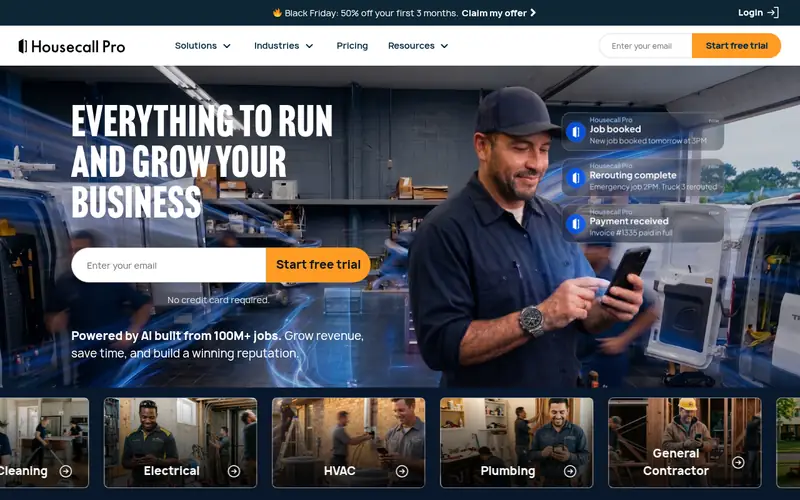
Housecall Pro homepage

Housecall Pro is field service software aimed at home service businesses. It includes scheduling, dispatch, invoicing, payments and time tracking. A carpentry business that does service work, repairs and small installs can schedule jobs and track hours in the same app. The time tracking ties to jobs, so hours can be reviewed before invoicing. The platform is built around service calls and short jobs more than long construction projects, which matters if your work runs for weeks. Pricing is tiered and published on the vendor site, so confirm current rates there. A free trial is offered. Skip it if your carpentry work is mostly long multi-week builds with detailed phase tracking.

Free plan: Free trial (14 days)

Website: housecallpro.com

Strengths

  • Scheduling, invoicing and time tracking in one app
  • mobile-friendly

Watch out for

  • Built for service calls more than long projects
  • no free plan
5

Toggl Track

Carpenters who want fast, simple time entry by job
See vendor pricing page
toggl.comHomepage, Nov 2026
Toggl Track homepage

Toggl Track is a time tracking tool built around a simple timer. A carpenter can start a timer for a job, stop it when done, and tag the entry by client or project. Reports show where hours went, which helps with billing and estimates. The free plan covers core tracking for small teams, with paid plans adding features like billable rates and more detailed reporting. Check the vendor page for current plan limits and prices. It does not schedule crews, send invoices or run payroll. Skip Toggl Track if you need those functions in the same tool, and pick Jobber or Housecall Pro instead.

Free plan: Yes

Website: toggl.com/track

Strengths

  • Simple one-click timer
  • reports by client and project

Watch out for

  • Free plan limits some features
  • no invoicing or scheduling
6

Harvest

Carpenters who bill clients by the hour and send invoices
See vendor pricing page
getharvest.comHomepage, Nov 2026
Harvest homepage

Harvest is time tracking software with built-in invoicing. For a carpenter who bills hourly, it links tracked hours to client invoices, so the hours you log become the invoice lines. Projects and clients are organized in one place, and reports show billable and non-billable time. The tool is priced per seat, so cost grows with crew size. A free trial is offered, but there is no free plan. Check the vendor pricing page for current rates. Harvest does not schedule jobs or handle field service dispatch. Choose it if billing accuracy is the main need and you already have a way to manage jobs and schedules.

Free plan: Free trial (30 days)

Website: getharvest.com

Strengths

  • Time tracking tied to invoicing
  • clear client and project reports

Watch out for

  • Per-seat pricing adds up
  • no free plan
7

ClockShark

Construction and trade crews tracking hours by job site
See vendor pricing page
ClockSharkHomepage image unavailable

ClockShark is time tracking software made for construction and field service crews. Carpenters can clock in and out at a job site from a phone, and the app records location with the entry. Hours can be assigned to jobs and tasks for job costing. The product includes scheduling and reporting, and it is designed for crews that move between sites. It is priced per user, and there is no free plan, so confirm current rates on the vendor page. Choose ClockShark if your crew works across multiple sites and you want location-stamped time records. Skip it if you work alone or only need a basic timer.

Free plan: Free trial (14 days)

Website: clockshark.com

Strengths

  • Built for field and construction crews
  • GPS and job costing

Watch out for

  • No free plan
  • priced per user
8

Hubstaff

Crews that want time tracking with location and activity data
See vendor pricing page
hubstaff.comHomepage, Nov 2026
Hubstaff homepage

Hubstaff is time tracking software with optional GPS and activity monitoring. For a carpentry business with crews in the field, it can record time against jobs and tasks and show where the work happened. The monitoring features are optional but may not fit every crew culture, so decide before rollout. The tool also supports scheduling and reporting. Pricing is tiered per user, and there is no free plan, so check the vendor page for current rates. Choose Hubstaff if you manage a distributed crew and want detailed records. Skip it if you want minimal tracking and a free option.

Free plan: Free trial (14 days)

Website: hubstaff.com

Strengths

  • Tracks time with GPS and activity data
  • supports job and task records

Watch out for

  • Activity monitoring may not suit every crew
  • no free plan

Pre-purchase checklist

  • Confirm the tool tracks hours by job or client, not just by day.
  • Check whether mobile entry works offline or on a phone with a weak signal.
  • Count the users you need and multiply by the per-user price.
  • Confirm whether invoicing, scheduling or payroll is included or extra.
  • Read the free plan limits before relying on them for a paid crew.

FAQ

What is the best timesheet software for carpenters?

Clockify is a strong starting point because its free plan covers unlimited users and job-based tracking. Jobber and Housecall Pro suit crews that want scheduling and invoicing in the same tool. QuickBooks Time fits businesses already using QuickBooks.

Do carpenters need timesheet software with job costing?

Job costing helps when you bill by project and want to see labor hours against each job. ClockShark, QuickBooks Time and Hubstaff support job or task records. If you only bill a flat rate, a simple timer like Toggl Track may be enough.

Is there free timesheet software for a small carpentry crew?

Clockify offers a free plan with unlimited users. Toggl Track has a free plan with limits on some features. Most other tools here offer a free trial but no free plan, so check the vendor page before you commit.

Can I track hours from a job site on my phone?

Yes. Clockify, QuickBooks Time, Jobber, Housecall Pro, ClockShark and Hubstaff all offer mobile time entry. Some add GPS or location records. Check that the app works where your sites are, since signal can be weak.

How much does timesheet software cost for a carpenter?

Clockify's paid entry price is $3.99 per user per month. Other tools here publish tiered pricing, so cost depends on users and features. Confirm current rates on each vendor's pricing page, since prices change.