How we rank
HR and Workforce · Researched comparison

Best Timesheet Software for Concrete Contractors in 2026

TaskReports may earn a fee from some links on this page, and some placements are paid and labelled. Neither one decides the order. See our disclosure.

The short answer

QuickBooks Time suits concrete contractors who already run QuickBooks and want crew hours tied to jobs and service items. ClockShark is a good alternative for GPS and geofenced clock-ins on poured and flatwork crews. Connecteam fits contractors who want scheduling, time clock, and job tracking in one app with a free tier for small teams.

On this page

Key takeaways

  • QuickBooks Time is the first pick for concrete crews that need mobile time capture tied to jobs and service items.
  • ClockShark and Connecteam fit contractors who want GPS or geofenced clock-ins without a full accounting suite.
  • Entry prices range from free tiers to paid per-user plans, and most vendors bill per user per month.
  • Concrete work is often billed by the hour or by the yard, so pick a tool that supports job codes and cost codes.

Quick comparison

ToolBest fitStarting price
QuickBooks TimeConcrete crews already using QuickBooksSee vendor pricing page
ClockSharkGPS and geofenced clock-ins for field crewsSee vendor pricing page
ConnecteamSmall crews that want scheduling and time clock in one appSee vendor pricing page
HubstaffContractors who want GPS and activity tracking on mobileSee vendor pricing page
TimeeroGPS mileage and route tracking for mobile crewsSee vendor pricing page
HomebaseSmall concrete businesses that need scheduling and payroll basicsSee vendor pricing page
JibbleLow-cost time clock with a free tier for small teamsSee vendor pricing page

How we chose

We picked tools that support mobile clock-in, job or project codes, and reporting that fits concrete work such as pours, flatwork, and site crews. We checked each vendor's public website and pricing page for plan structure, free access, and stated limits. We did not run hands-on tests or collect user reviews. Prices and plan limits change, so confirm current details on the vendor site before you buy.

★ Best overall

QuickBooks Time

Concrete crews already using QuickBooks

  • Ties hours to QuickBooks jobs and service items
  • mobile clock-in with GPS
PriceSee vendor pricing page
See QuickBooks Time pricing
quickbooks.intuit.comHomepage, Nov 2026
QuickBooks Time homepage

QuickBooks Time is a time tracking product from Intuit. Concrete contractors can have crews clock in from a phone, assign hours to a customer or job, and send approved timesheets to QuickBooks payroll. GPS tracking is available on mobile, which helps confirm crews were on site for a pour or a flatwork job. The product is sold as a standalone time tracking subscription and also bundles with QuickBooks Online payroll. Payroll, job costing, and invoicing live in QuickBooks, not in the time app, so the value depends on whether you already use that accounting stack. Small crews that only need a clock can find cheaper options. Skip it if you do not use QuickBooks and do not plan to.

Price: See vendor pricing page

Free plan: Free trial (30 days)

Website: quickbooks.intuit.com/time-tracking

Watch out for

  • Full job costing needs a QuickBooks plan
  • per-user pricing adds up
2

ClockShark

GPS and geofenced clock-ins for field crews
See vendor pricing page
ClockSharkHomepage image unavailable

ClockShark is built for construction and field service crews. Concrete contractors can set up geofences around a job site so a clock-in only registers when the crew is on location. Hours can be assigned to jobs, tasks, and cost codes, which helps with progress billing on larger pours. The app includes scheduling, mobile time clock, and job costing reports. Payroll is handled through integrations or an add-on rather than being native to the base plan. The trial is short, so plan a test with one crew before committing. Skip it if you need a free plan or want payroll included in the base price.

Free plan: Free trial (14 days)

Website: clockshark.com

Strengths

  • Geofenced clock-ins with GPS
  • job and task tracking for field work

Watch out for

  • No free plan
  • payroll is a separate add-on
3

Connecteam

Small crews that want scheduling and time clock in one app
See vendor pricing page
connecteam.comHomepage, Nov 2026
Connecteam homepage

Connecteam is an all-in-one app for deskless teams. For concrete contractors it covers shift scheduling, a mobile time clock, job and task assignment, and basic reporting. The free plan supports a small number of users, which can fit a single crew or a small owner-operator business. Paid tiers add features such as GPS tracking, geofencing, and more advanced time and attendance controls. The product is broader than a pure timesheet tool, so setup takes some time. It suits contractors who want one app for scheduling and hours rather than a dedicated time clock. Skip it if you need deep job costing tied to an accounting system.

Free plan: Yes

Website: connecteam.com

Strengths

  • Free tier for small teams
  • scheduling, time clock, and job tracking in one app

Watch out for

  • Advanced features sit on paid tiers
  • free tier has user limits
4

Hubstaff

Contractors who want GPS and activity tracking on mobile
See vendor pricing page
hubstaff.comHomepage, Nov 2026
Hubstaff homepage

Hubstaff is a time tracking tool with GPS and optional activity monitoring. Concrete contractors can have field staff clock in from a phone, record time against projects and tasks, and review timesheets before payroll. GPS breadcrumbs help confirm where a crew was during a shift. The product is more oriented to tracking detail than to construction job costing. It does not replace an accounting system, and the activity tracking features may be more than a concrete crew needs. It suits contractors who want detailed records for remote or multi-site work. Skip it if you want a simple clock and job codes with no monitoring features.

Free plan: Free trial (14 days)

Website: hubstaff.com

Strengths

  • GPS tracking on mobile
  • timesheets tied to projects and tasks

Watch out for

  • Activity tracking can feel heavy for crews
  • per-user pricing
5

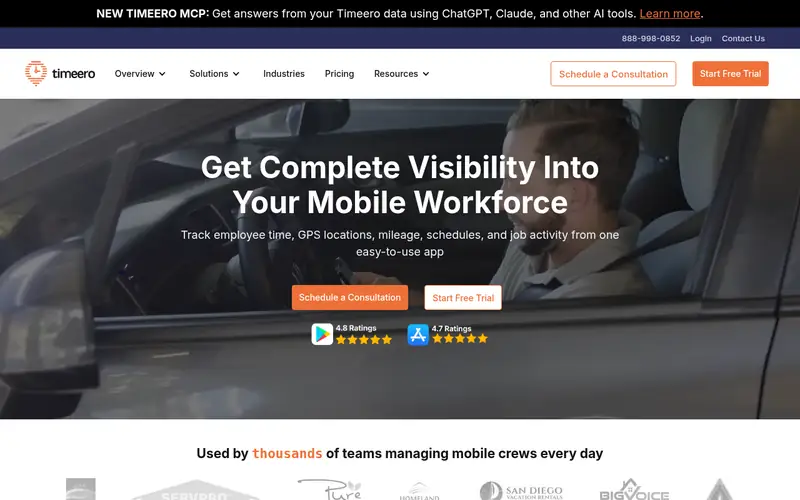
Timeero

GPS mileage and route tracking for mobile crews
See vendor pricing page
timeero.comHomepage, Nov 2026
Timeero homepage

Timeero is a time and mileage tracking app for mobile teams. Concrete contractors can use geofenced clock-ins to confirm crews arrived at a site, and mileage tracking to record travel between jobs. Timesheets can be filtered by job or client for billing. The product focuses on time and location rather than full construction job costing. Payroll and invoicing are limited compared with accounting-led tools, so most contractors pair it with another system. It suits businesses with several sites and a lot of driving between them. Skip it if you need payroll built in or a free plan.

Free plan: Free trial (14 days)

Website: timeero.com

Strengths

  • GPS tracking and mileage logs
  • geofenced clock-ins

Watch out for

  • No free plan
  • payroll and invoicing are limited
6

Homebase

Small concrete businesses that need scheduling and payroll basics
See vendor pricing page
joinhomebase.comHomepage, Nov 2026
Homebase homepage

Homebase offers scheduling, a time clock, and payroll basics for small businesses. A concrete contractor can build a crew schedule, have employees clock in from a phone or a shared device, and review hours before running payroll. The free plan covers one location with a limited feature set. Paid plans add payroll, hiring tools, and more reporting. The product is aimed at small local businesses rather than large construction firms, so job costing is basic. It suits an owner-operator or a small crew that wants scheduling and hours in one place. Skip it if you need detailed job cost codes or multi-site reporting.

Free plan: Yes

Website: joinhomebase.com

Strengths

  • Free plan for a single location
  • scheduling and time clock in one tool

Watch out for

  • Free plan limits
  • advanced payroll and hiring cost extra
7

Jibble

Low-cost time clock with a free tier for small teams
See vendor pricing page
jibble.ioHomepage, Nov 2026
Jibble homepage

Jibble is a time and attendance tool with a free tier for small teams. Concrete contractors can have crews clock in from a phone or a shared kiosk, and timesheets can be grouped by project or client. GPS and geofencing are available on paid plans. The product is simple and low cost, but it is not built for construction job costing. It does not handle progress billing or cost codes in depth. It suits a small crew that needs a basic clock and simple reports. Skip it if you need payroll, invoicing, or detailed job costing in the same tool.

Free plan: Yes

Website: jibble.io

Strengths

  • Free tier for small teams
  • mobile and kiosk clock-in

Watch out for

  • Limited job costing
  • fewer construction-specific features

Pre-purchase checklist

  • Confirm the tool supports job codes or cost codes for pours, flatwork, and site work.
  • Check whether GPS or geofenced clock-in is included or costs extra.
  • Verify the free plan user limit if you plan to start without paying.
  • Confirm payroll and invoicing are included or available as an add-on.
  • Test mobile clock-in on the phones your crews actually use before you commit.

FAQ

What is the best timesheet software for concrete contractors?

QuickBooks Time is a strong first pick for contractors already using QuickBooks, because hours tie to jobs and payroll. ClockShark and Connecteam are good alternatives for GPS clock-ins and scheduling. The right choice depends on whether you need payroll, job costing, or just a simple clock.

Do concrete contractors need GPS time tracking?

GPS helps confirm crews clocked in at the job site, which matters when you have several pours or sites in a day. It is optional for small crews that work at one location. Tools like ClockShark and Timeero include GPS or geofencing on paid plans.

Can timesheet software handle job costing for concrete work?

Some tools tie hours to jobs and cost codes, but full job costing usually lives in accounting software such as QuickBooks. Time apps feed hours into that system. Check that the tool exports to your accounting setup before you buy.

Is there free timesheet software for small concrete crews?

Yes. Connecteam, Homebase, and Jibble offer free plans with user or feature limits. Free tiers usually cover a small crew and basic clock-in. Paid plans add GPS, payroll, and reporting. Confirm the current free plan limits on each vendor site.

How much does timesheet software cost for a concrete crew?

Most vendors bill per user per month, and prices vary by plan and features. Entry prices are published on vendor pricing pages. We do not quote a single figure here because plans and prices change. Check the vendor site for current rates before you commit.