How we rank
HR and Workforce · Researched comparison

Best Timesheet Software for Data Engineers in 2026

TaskReports may earn a fee from some links on this page, and some placements are paid and labelled. Neither one decides the order. See our disclosure.

The short answer

Clockify is the best starting point for most data engineers. It has a free plan with unlimited users and projects, and paid tiers add billing rates and reporting. Harvest is the better fit for engineers who bill clients and need invoices tied to tracked hours. Toggl Track works well for solo engineers who want simple, detailed time records with a low entry price.

On this page

Key takeaways

  • Clockify is the top pick for data engineers who want a free timesheet tool with unlimited users and projects.
  • Harvest suits data engineers who bill clients by the hour and need project budgets and invoicing in one place.
  • Toggl Track and Time Doctor focus on detailed time records, while Wrike and ClickUp add timesheets to project work.
  • Entry prices range from free plans to paid tiers, and every vendor should be checked for current limits before buying.

Quick comparison

ToolBest fitStarting price
ClockifyTeams that want a free timesheet tool with no user capSee vendor pricing page
HarvestData engineers who bill clients by the hourSee vendor pricing page

Toggl TrackSolo data engineers who want simple, detailed time recordsSee vendor pricing page
Time DoctorDistributed data teams that need detailed activity recordsSee vendor pricing page
WrikeData teams that want timesheets inside project managementSee vendor pricing page
ClickUpData teams that want tracking and project work in one toolSee vendor pricing page
HubstaffTeams that need timesheets with activity and payroll linksSee vendor pricing page

How we chose

We picked tools that record hours against projects and produce timesheets or time reports, since that is what data engineers need for project and client hours. Criteria were fit for the use case, published entry price, free access, and the main limits of each plan. Sources are vendor websites and public documentation. Prices and plan limits change, so confirm them on the vendor site before buying.

Best overall

Clockify

Teams that want a free timesheet tool with no user cap

  • Free plan with unlimited users and projects
  • timesheet view with approval workflow
PriceSee vendor pricing page
See Clockify pricing
clockify.meHomepage, Nov 2026
Clockify homepage

Clockify is a time tracking tool built around a timesheet view. Data engineers can log hours against projects such as pipeline builds, data migrations or dashboard work, then submit weekly timesheets for approval. The free plan covers unlimited users and projects, which suits small data teams that need records without a per-seat cost. Paid tiers add billable rates, invoicing and more detailed reporting. The tool runs in a browser and has desktop and mobile apps. For data engineers who split time across several internal projects, the project and task structure keeps entries organized. Teams that need deep reporting or client invoicing should compare the paid tiers first, since the free plan limits those features. Skip it if you need advanced budget tracking built into the timesheet itself.

Price: See vendor pricing page

Free plan: Yes

Website: clockify.me

Watch out for

  • Billing rates and invoicing sit on paid plans
  • reports can feel basic at scale
2

Harvest

Data engineers who bill clients by the hour
See vendor pricing page
getharvest.comHomepage, Nov 2026
Harvest homepage

Harvest is a time tracking and invoicing tool aimed at teams that bill by the hour. Data engineers working as consultants or contractors can track hours against client projects, set budgets, and turn approved time into invoices. The timesheet view shows a week at a glance, and reminders help people submit on time. The plan structure is per seat, and the trial runs for 30 days. Harvest fits data engineers who need a clear link between tracked hours and client billing. It is less suited to internal teams that only need a record of hours, since the invoicing features add cost. Check the vendor pricing page for current seat prices and plan limits.

Free plan: Free trial (30 days)

Website: getharvest.com

Strengths

  • Timesheets link to project budgets and invoices
  • clean client and task structure

Watch out for

  • No free plan after the trial
  • per-seat pricing adds up for larger teams

3

Toggl Track

Solo data engineers who want simple, detailed time records
See vendor pricing page
toggl.comHomepage, Nov 2026
Toggl Track homepage

Toggl Track is a time tracking tool with a strong timer and a simple weekly timesheet. Data engineers can start a timer for a task, add entries by hand, and review hours by project or client. Reports show where time went across a week or a project, which helps when estimating future data work. The free plan covers core tracking for individuals and small teams, while paid plans add billable rates, rounding and more report options. Toggl Track does not handle invoicing, so teams that bill clients usually pair it with another tool. It suits engineers who want low-friction tracking and do not need approvals or budgets inside the same product.

Free plan: Yes

Website: toggl.com/track

Strengths

  • Fast timer and manual entry
  • clear weekly reports

Watch out for

  • Free plan limits some reporting and billable features
  • no built-in invoicing
4

Time Doctor

Distributed data teams that need detailed activity records
See vendor pricing page
timedoctor.comHomepage, Nov 2026
Time Doctor homepage

Time Doctor is a time tracking tool with detailed reporting on how work time is spent. For data engineering teams spread across time zones, it can record hours by project and task and show activity reports. Managers can review timesheets and export data for payroll or client reporting. The tool includes optional screenshots and app usage tracking, which some teams will not want. That makes it a better fit for outsourced or distributed teams that need close records than for small in-house groups. There is a 14-day trial and no free plan. Confirm current per-user pricing and feature limits on the vendor site before choosing it.

Free plan: Free trial (14 days)

Website: timedoctor.com

Strengths

  • Detailed time and activity reports
  • screenshots and app usage options

Watch out for

  • No free plan after the trial
  • monitoring features may not suit every team
5

Wrike

Data teams that want timesheets inside project management
See vendor pricing page
wrike.comHomepage, Nov 2026
Wrike homepage

Wrike is a project management platform with built-in timesheets. Data engineers can log hours against tasks in a project plan, so time records stay close to the work itself. That helps when a data team runs several projects at once and needs to see effort against each one. The free plan covers basic task and project work for a small team, but timesheet and approval features sit on paid tiers. Wrike suits teams that already plan work in a project tool and want hours recorded in the same place. It is a heavier choice for engineers who only need a simple weekly timesheet, and the plan structure should be checked on the vendor pricing page.

Free plan: Yes

Website: wrike.com

Strengths

  • Timesheets sit next to tasks and project plans
  • approval workflows on paid plans

Watch out for

  • Timesheet features vary by plan
  • full reporting needs a higher tier
6

ClickUp

Data teams that want tracking and project work in one tool
See vendor pricing page
clickup.comHomepage, Nov 2026
ClickUp homepage

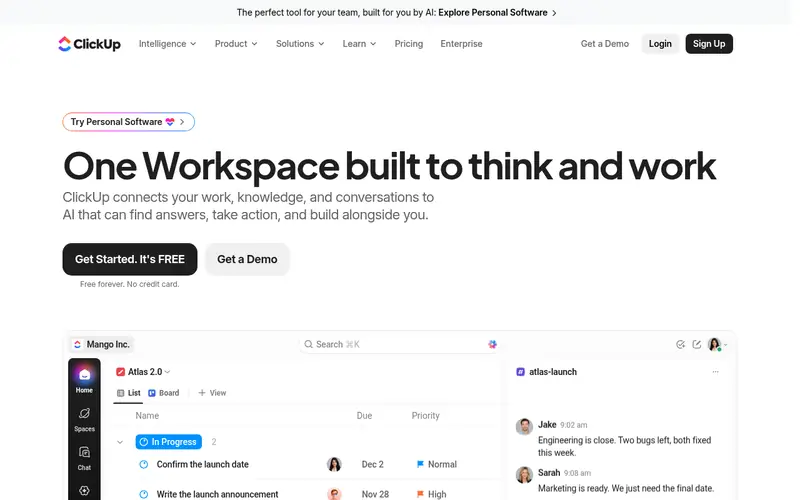
ClickUp is a work management platform that includes time tracking and timesheets. Data engineers can start a timer on a task, add time manually, and review hours in a timesheet view. Because tasks, docs and dashboards live in the same tool, time records sit next to the project they belong to. The free plan covers core tasks and basic time tracking for a small team. Paid plans add more reporting, dashboards and automation. ClickUp fits data teams that want one tool for planning and hours, but the wide feature set takes time to set up. Teams that only need timesheets may find it more than they need.

Free plan: Yes

Website: clickup.com

Strengths

  • Time tracking built into tasks and lists
  • many views for project data

Watch out for

  • Feature set can feel large
  • advanced time reporting needs paid plans
7

Hubstaff

Teams that need timesheets with activity and payroll links
See vendor pricing page
hubstaff.comHomepage, Nov 2026
Hubstaff homepage

Hubstaff is a time tracking tool with timesheets, activity tracking and payroll features. Data engineers can log hours by project and task, and managers can review and approve timesheets before they feed payroll or client invoices. That suits teams that need a record of hours tied to pay. The tool offers optional activity tracking and screenshots, which some teams will not want. There is a 14-day trial and no free plan. Hubstaff is a reasonable fit for teams that bill clients or pay contractors by the hour, and less of a fit for internal data teams that only need a simple record. Check current pricing on the vendor site.

Free plan: Free trial (14 days)

Website: hubstaff.com

Strengths

  • Timesheets connect to payroll and invoicing
  • activity tracking options

Watch out for

  • No free plan after the trial
  • monitoring features are optional but present

Which timesheet software for data engineers should I use if I bill clients by the hour?

Harvest is the clearest fit if you bill clients by the hour, because tracked time links to project budgets and invoices. If you want a free tool with unlimited users, choose Clockify. If you are a solo engineer who wants simple tracking, choose Toggl Track. If you need timesheets inside a project management tool, choose Wrike or ClickUp. If you need payroll links and activity records for a distributed team, choose Hubstaff or Time Doctor.

Is Clockify better than Harvest for timesheet software for data engineers?

Clockify is better if you want a free plan with unlimited users and projects. Harvest is better if you bill clients and need tracked hours to become invoices. Clockify puts billing rates and invoicing on paid plans, while Harvest builds invoicing into the product from the start. Both record hours by project, so the choice comes down to budget and whether client billing is central to your work.

Pre-purchase checklist

  • Confirm the tool records hours by project and task, not just total daily time.
  • Check whether timesheet approval is included in the plan you are considering.
  • Confirm the free plan limits, such as user caps or report access, before you commit.
  • Check whether billing rates and invoicing are needed, since many tools charge extra for them.
  • Review export options for payroll and client reporting.

FAQ

What is the best timesheet software for data engineers who need a free plan?

Clockify is the strongest free option because its free plan covers unlimited users and projects. Toggl Track and ClickUp also have free plans, but each limits some reporting or advanced features. Check the current plan details on each vendor site, since limits change.

Do data engineers need timesheet software with client invoicing?

Only if they bill clients by the hour. Harvest and Hubstaff link tracked time to invoices, which suits consultants and contractors. Internal data teams usually need project hours reporting instead, and Clockify or Toggl Track cover that at a lower cost.

Can I track time against data projects in Wrike or ClickUp?

Yes. Both tools let you log time against tasks inside a project, so hours stay tied to the work. Wrike and ClickUp put timesheets next to project plans, which helps when a data team runs several projects at once. Advanced time reporting sits on paid plans in both tools.

Which tool is best for a distributed data team that needs activity records?

Time Doctor and Hubstaff offer detailed time and activity reports, including optional screenshots. That suits outsourced or distributed teams that need close records. Both have trials rather than free plans, so confirm current pricing on the vendor site.

Are these prices final?

No. Prices and plan limits change, and several tools here list "See vendor pricing page" because the entry price was not confirmed for 2025-2026. Always check the official pricing page before you buy.