How we rank
HR and Workforce · Researched comparison

Best Timesheet Software for Demolition Contractors in 2026

TaskReports may earn a fee from some links on this page, and some placements are paid and labelled. Neither one decides the order. See our disclosure.

The short answer

QuickBooks Time suits demolition contractors who already use QuickBooks and want crew time tied to job costing. ClockShark fits companies that need scheduling and geofencing without an accounting switch. Rhumbix is a better match for heavy civil and demolition work that needs daily reports and production quantities alongside hours. All three support mobile entry, which matters when crews move between sites.

On this page

Key takeaways

  • QuickBooks Time is the first pick for demolition crews that already run QuickBooks, with mobile GPS time capture and job costing.
  • ClockShark, Rhumbix and ExakTime focus on field crews, with scheduling, geofencing and crew-level time entry.
  • Hubstaff and Time Doctor add activity tracking for office and estimating staff, not just field labor.
  • Entry prices below are the published starting tiers; confirm current numbers on each vendor page before buying.

Quick comparison

ToolBest fitStarting price
QuickBooks TimeDemolition crews already using QuickBooksSee vendor pricing page
ClockSharkField crews needing scheduling and geofencingSee vendor pricing page
RhumbixHeavy civil and demolition crews with daily reportsSee vendor pricing page
ExakTimeCrews wanting rugged time clocks and mobile entrySee vendor pricing page
HubstaffOffice and estimating staff time trackingSee vendor pricing page
Time DoctorRemote and office staff time trackingSee vendor pricing page
ConnecteamSmall crews needing scheduling and time in one appSee vendor pricing page

How we chose

We compared products on fit for demolition field work (mobile entry, job codes, geofencing, daily reports), published entry pricing, free access, and main limits such as user caps or add-on costs. Sources are vendor websites and public documentation. Prices change, so confirm current numbers on each vendor page before buying.

★ Best overall

QuickBooks Time

Demolition crews already using QuickBooks

  • Crew time flows into QuickBooks payroll and job costing
  • mobile app with GPS and job codes
PriceSee vendor pricing page
See QuickBooks Time pricing
quickbooks.intuit.comHomepage, Nov 2026
QuickBooks Time homepage

QuickBooks Time records hours by employee, job and service item, which maps to demolition job costing when the company file is in QuickBooks Online or Desktop. The mobile app supports GPS tracking and job codes so a crew can switch between a teardown site and a haul route without a paper timesheet. Payroll and invoicing pull from the same records. Plan structure runs from a base tier with limited features to premium tiers that add scheduling and approvals. The free trial is 30 days. Contractors who do not use QuickBooks should compare a standalone field tool first, because the value comes from the accounting link.

Price: See vendor pricing page

Free plan: Free trial (30 days)

Website: quickbooks.intuit.com/time-tracking

Watch out for

  • Full features need a paid tier
  • some limits on scheduling at the base level
2

ClockShark

Field crews needing scheduling and geofencing
See vendor pricing page
ClockSharkHomepage image unavailable

ClockShark is built for construction and field service crews. Employees clock in on a phone, and the app can restrict clock-in to a geofence around the job site. Time is assigned to a job or task, which supports demolition job costing and progress billing. Schedules and crew messages sit in the same app. Pricing is per user per month, with a base tier and higher tiers that add scheduling and payroll integrations. The trial runs 14 days. Small demolition outfits that only need simple time capture may find the higher tiers more than they need, but the geofence feature is a real fit for multi-site work.

Free plan: Free trial (14 days)

Website: clockshark.com

Strengths

  • Geofenced clock-in tied to job sites
  • scheduling and crew messaging in one app

Watch out for

  • Payroll add-ons cost extra
  • no free tier after the trial
3

Rhumbix

Heavy civil and demolition crews with daily reports
See vendor pricing page
rhumbix.comHomepage, Nov 2026
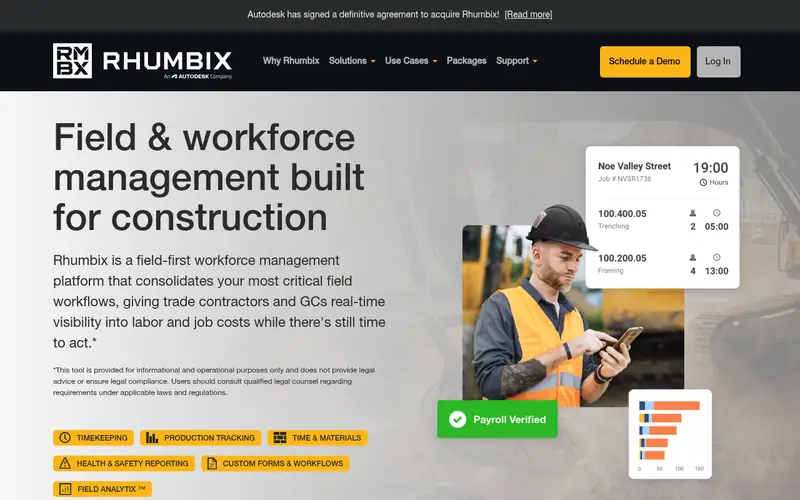
Rhumbix homepage

Rhumbix combines time tracking with daily reports and production tracking for construction and demolition work. Crews enter hours and quantities on a mobile device, and the data rolls into project cost and progress views. That combination suits demolition jobs where labor hours need to line up with tonnage hauled or square footage removed. The product is sold to contractors and field operations teams, and pricing is quoted rather than published. There is no free plan. Smaller demolition companies that only need clock-in and payroll export may find it heavier than needed, but firms tracking production against hours get a closer fit.

Free plan: No

Website: rhumbix.com

Strengths

  • Time and production quantities captured together
  • daily field reports tied to projects

Watch out for

  • No free plan
  • aimed at larger field operations
4

ExakTime

Crews wanting rugged time clocks and mobile entry
See vendor pricing page
ExakTimeHomepage image unavailable

ExakTime, part of Arcoro, offers physical time clocks built for job sites along with a mobile app. Workers can clock in at a trailer or on a phone, and hours are tagged to job and cost codes. That suits demolition sites where phones are impractical or where a fixed clock point is preferred. Pricing is quoted and depends on hardware and user counts, so there is no published entry price. There is no free plan. Companies that want a simple app-only tool may prefer ClockShark, while firms with multiple yards and a need for fixed clock points should look at ExakTime.

Free plan: No

Website: exaktime.com

Strengths

  • Rugged physical time clocks plus mobile app
  • job and cost code capture

Watch out for

  • No free plan
  • hardware adds cost
5

Hubstaff

Office and estimating staff time tracking
See vendor pricing page
hubstaff.comHomepage, Nov 2026
Hubstaff homepage

Hubstaff tracks time by project and task and can add activity and screenshot data for desk-based work. For a demolition contractor, that fits estimators, project managers and office staff rather than crews on site. Time can be tied to client projects for billing. Plans are per user per month, with a free trial of 14 days and no permanent free tier. Field crews would be better served by a geofence-based tool. Use Hubstaff for the office side and a field tool for the crew side if both are needed.

Free plan: Free trial (14 days)

Website: hubstaff.com

Strengths

  • Tracks time across projects and tasks with optional activity data
  • supports payroll and invoicing

Watch out for

  • Activity tracking suits desk work more than field crews
  • no free tier after trial
6

Time Doctor

Remote and office staff time tracking
See vendor pricing page
timedoctor.comHomepage, Nov 2026
Time Doctor homepage

Time Doctor records time by project and task and produces detailed reports on where time went. It is aimed at remote and office teams, so it fits demolition back-office functions such as estimating, procurement and billing rather than site labor. Pricing is per user per month with a 14-day trial and no free plan. Contractors who need crew clock-in at job sites should not use Time Doctor for that purpose. It is a reasonable add-on for staff who never visit a site.

Free plan: Free trial (14 days)

Website: timedoctor.com

Strengths

  • Detailed time and activity reporting
  • supports project and client billing

Watch out for

  • Not built for field crews or job-site geofencing
  • no free tier
7

Connecteam

Small crews needing scheduling and time in one app
See vendor pricing page
connecteam.comHomepage, Nov 2026
Connecteam homepage

Connecteam offers a free plan for small businesses, with paid tiers that add time tracking, scheduling and payroll features. For a small demolition crew, the app can handle clock-in, job assignment and crew communication from a phone. The free plan has limits on users and features, and the exact limits should be checked on the vendor page. Larger demolition firms with payroll integration needs will likely need a paid tier or a dedicated time and attendance product.

Free plan: Yes

Website: connecteam.com

Strengths

  • Free plan for small teams
  • scheduling, time clock and communication in one app

Watch out for

  • Advanced time and payroll features sit on paid tiers
  • free plan has user limits

Pre-purchase checklist

  • Confirm the app works offline or with weak signal at demolition sites.
  • Check that time can be tagged to job and cost codes for job costing.
  • Ask whether geofencing or GPS is included or an add-on.
  • Confirm payroll export works with your payroll provider.
  • Check user minimums and per-user pricing at your crew size.

FAQ

What is the best timesheet software for demolition contractors?

QuickBooks Time is a strong first pick for firms already on QuickBooks. ClockShark and Rhumbix are alternatives for field-heavy crews. The right choice depends on whether you need accounting integration, geofencing or production tracking.

Do demolition crews need GPS or geofencing?

GPS and geofencing help confirm that clock-ins happen at the job site. They are useful when crews move between demolition sites and haul routes. Not every product includes them, so check the plan details before buying.

Can these tools handle job costing?

QuickBooks Time, ClockShark, Rhumbix and ExakTime support job or cost code tagging. That lets hours roll into job cost reports. Confirm the export format matches your accounting or estimating system.

Is there free timesheet software for small demolition crews?

Connecteam offers a free plan with user and feature limits. Most other products offer a trial only. Check the current limits on the vendor page before relying on a free plan.

How much does timesheet software cost for a demolition contractor?

Published entry prices vary and many vendors quote instead of listing a price. Most charge per user per month. Confirm the current price and any add-on costs on the vendor page.