How we rank
HR and Workforce · Researched comparison

Best Timesheet Software for Dental Labs in 2026

TaskReports may earn a fee from some links on this page, and some placements are paid and labelled. Neither one decides the order. See our disclosure.

The short answer

Clockify is the first pick for most dental labs because its free plan covers unlimited users and basic time tracking. Harvest suits labs that bill dentists and clinics and want invoices tied to hours. QuickBooks Time fits labs that need payroll and scheduling in one place. Each option below tracks hours by client, case or department, which matches how dental labs record work.

On this page

Key takeaways

  • Clockify offers a free plan for unlimited users and suits labs that want a low-cost start.
  • Harvest starts at $12 per seat per month and combines timesheets with client invoicing.
  • QuickBooks Time starts at $20 per month plus $8 per user and connects hours to payroll.
  • Most picks here track hours by client, case or department, which fits dental lab workflows.

Quick comparison

ToolBest fitStarting price
ClockifyLabs that want a free start with unlimited usersSee vendor pricing page
HarvestLabs that bill dentists and clinics by the hour$12 per seat per month

QuickBooks TimeLabs that need payroll and scheduling with timesheets$20 per month plus $8 per user per month
Toggl TrackSmall labs that want simple, fast time entriesSee vendor pricing page
HubstaffLabs that want activity tracking and timesheets togetherSee vendor pricing page
TimeCampLabs that want automatic time capture by taskSee vendor pricing page
ClickTimeLabs that need detailed timesheet approvalsSee vendor pricing page

How we chose

We picked tools that track hours by client, case or department, which fits dental lab work. We checked published entry prices, free plans and main limits on vendor pages and public documentation. We did not run hands-on tests or collect user reviews. Prices change, so confirm current pricing on each vendor site before buying.

Best overall

Clockify

Labs that want a free start with unlimited users

  • Free plan for unlimited users
  • tracks hours by client and project
PriceSee vendor pricing page
See Clockify pricing
clockify.meHomepage, Nov 2026
Clockify homepage

Clockify is a time tracking tool with a free plan that covers unlimited users and unlimited tracking. For a dental lab, that means technicians and office staff can log hours against a case, a client clinic or a department without a per-seat cost. Timesheets can be reviewed and approved, and reports can be filtered by client or project. Paid tiers add features such as scheduling, admin controls and more detailed reporting. The free plan is the main draw for small labs, but larger labs that need approval workflows and deeper reports should compare the paid plans on the vendor page. Labs that only need simple hour logs can start free and move up later.

Price: See vendor pricing page

Free plan: Yes

Website: clockify.me

Watch out for

  • Advanced features sit on paid tiers
  • reporting depth varies by plan
2

Harvest

Labs that bill dentists and clinics by the hour
$12 per seat per month
getharvest.comHomepage, Nov 2026
Harvest homepage

Harvest combines time tracking with invoicing. A dental lab can log hours against a client clinic or a case, then turn those hours into an invoice. Project budgets show how much time is left on a case, which helps when a crown or denture job runs long. The entry price is $12 per seat per month, billed annually, and a 30-day free trial is offered. Pricing is per seat, so a lab with many technicians should estimate the total before committing. Harvest suits labs that bill by the hour and want timesheets and invoices in one tool. Labs that only need internal hour logs may find the invoicing features unnecessary.

Free plan: Free trial (30 days)

Website: getharvest.com

Strengths

  • Timesheets tie to client invoices
  • simple project budgets

Watch out for

  • Per-seat pricing adds up
  • no free plan after the trial
3

QuickBooks Time

Labs that need payroll and scheduling with timesheets
$20 per month plus $8 per user per month
quickbooks.intuit.comHomepage, Nov 2026
QuickBooks Time homepage

QuickBooks Time tracks employee hours and connects them to payroll. A dental lab can schedule technicians by shift, track hours by job code, and send approved hours to payroll. Job and service item codes can separate case types or client work. The entry price is $20 per month plus $8 per user per month for the Premium plan, and a 30-day trial is offered. There is no free plan. The tool works best for labs already using QuickBooks for accounting, since the connection is tighter there. Labs that only need project time tracking may prefer a simpler, cheaper option.

Free plan: Free trial (30 days)

Website: quickbooks.intuit.com/time-tracking

Strengths

  • Connects hours to payroll
  • scheduling and GPS options

Watch out for

  • Per-user fees
  • best value inside QuickBooks
4

Toggl Track

Small labs that want simple, fast time entries
See vendor pricing page
toggl.comHomepage, Nov 2026
Toggl Track homepage

Toggl Track is a straightforward time tracking tool built around a start and stop timer. A dental lab can create projects for client clinics or case types and log hours as work happens. Reports show time by project, client or team member. The free plan covers a small number of users, so a growing lab will likely need a paid plan. Paid tiers add billable rates, more reports and admin features. Toggl Track suits small labs that want a simple timer and basic reports. Labs that need payroll, invoicing or detailed approval chains should look at other options on this list.

Free plan: Yes

Website: toggl.com/track

Strengths

  • Simple start and stop timer
  • free plan for small teams

Watch out for

  • Limited free seats
  • advanced reporting on paid plans
5

Hubstaff

Labs that want activity tracking and timesheets together
See vendor pricing page
hubstaff.comHomepage, Nov 2026
Hubstaff homepage

Hubstaff combines timesheets with activity tracking, scheduling and payroll features. A dental lab can track hours by project or client and review activity data for remote or production staff. Schedules and timesheets can be approved before payroll. The free plan is limited, and most labs will need a paid tier. Activity tracking is optional but may not fit a lab where technicians work with equipment and hands-on tasks. Hubstaff suits labs with remote admin staff or managers who want visibility into logged hours. Labs that only need case time tracking may find it heavier than needed.

Free plan: Not stated

Website: hubstaff.com

Strengths

  • Timesheets with activity data
  • scheduling and payroll add-ons

Watch out for

  • Activity tracking may not suit every lab
  • per-user pricing
6

TimeCamp

Labs that want automatic time capture by task
See vendor pricing page
timecamp.comHomepage, Nov 2026
TimeCamp homepage

TimeCamp tracks time automatically by task and application, and it also supports manual timesheets. A dental lab can set up projects for client clinics or case types and review time entries by team member. Reports show time by project, client or task. The free plan covers a small team, and paid tiers add billing, invoicing and more detailed reports. Automatic capture works best for computer-based work, so a lab should test whether it fits production tasks. TimeCamp suits labs that want a mix of automatic and manual tracking. Labs that need payroll should check integrations before choosing.

Free plan: Not stated

Website: timecamp.com

Strengths

  • Automatic time tracking by task
  • free plan for small teams

Watch out for

  • Automatic capture needs setup
  • paid tiers for billing features
7

ClickTime

Labs that need detailed timesheet approvals
See vendor pricing page
clicktime.comHomepage, Nov 2026
ClickTime homepage

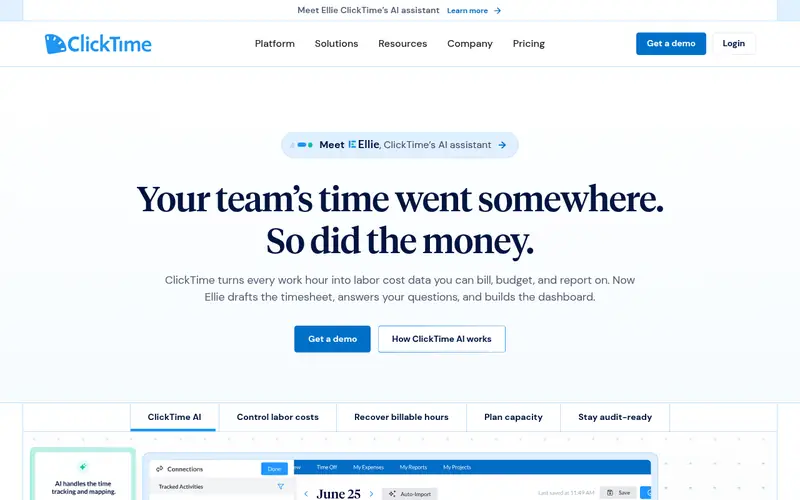
ClickTime focuses on timesheets, approvals and project reporting. A dental lab can require staff to submit timesheets, route them for approval, and report hours by client, project or case type. Budgets and utilization reports help managers see where hours go. ClickTime does not offer a free plan, and pricing is quoted per user, so a lab should request a quote. The approval chain is the main strength for labs with many technicians or multiple locations. Labs that only need a simple timer may find it more than they need. Labs that bill by the hour should confirm invoicing options on the vendor page.

Free plan: Not stated

Website: clicktime.com

Strengths

  • Strong approval workflows
  • project and client reporting

Watch out for

  • No free plan
  • pricing quoted per user

Pre-purchase checklist

  • Confirm the tool tracks hours by client, case or department, not just by employee.
  • Check whether pricing is per seat or per user and estimate the total for your team.
  • Confirm free plan limits, such as user count and report access, before relying on it.
  • Check whether timesheet approvals match your lab's review process.
  • Confirm payroll or invoicing integrations if you bill clinics or run payroll.

FAQ

What is the best timesheet software for dental labs?

Clockify is a strong first pick because its free plan covers unlimited users and basic time tracking. Harvest suits labs that bill clients by the hour. QuickBooks Time fits labs that need payroll. The right choice depends on whether you bill clients, run payroll or only log internal hours.

Do dental labs need timesheet software with client billing?

Only if the lab bills dentists or clinics by the hour. Harvest and ClickTime support client and project reporting. Labs that charge per case rather than per hour may only need internal hour logs, which simpler tools cover.

Is there free timesheet software for dental labs?

Clockify offers a free plan for unlimited users. Toggl Track and TimeCamp offer free plans with small team limits. Free plans usually lack advanced approvals and billing features, so check limits before relying on them for payroll or client invoices.

Can timesheet software track hours by case type?

Yes. Most tools here let you create projects or job codes for case types, such as crowns, dentures or implants. You can then report hours by case type or client. Set up the codes before staff start logging hours so reports stay consistent.

How much does timesheet software for dental labs cost?

Published entry prices range from free plans to about $12 per seat per month for Harvest and $20 per month plus $8 per user per month for QuickBooks Time. Other vendors quote per user. Prices change, so confirm on the vendor site.