
How we rank
HR and Workforce · Researched comparison

Best Timesheet Software for Food Banks in 2026

TaskReports may earn a fee from some links on this page, and some placements are paid and labelled. Neither one decides the order. See our disclosure.

The short answer

Clockify is the first pick for most food banks because its free plan covers unlimited users and works for both paid staff and volunteers. Homebase fits small food banks that want scheduling and shift notes in one place. QuickBooks Time suits food banks that already run payroll in QuickBooks and need job costing for grants.

On this page

Key takeaways

  • Clockify has a free plan with unlimited users and tracks volunteer and staff hours for food bank reporting.
  • QuickBooks Time starts at $20 per month plus $5 per user per month for payroll and scheduling features.
  • Homebase has a free plan for one location and suits small food banks tracking staff and volunteer shifts.
  • Most tools here bill per user, so confirm how volunteers are counted before you commit.

Quick comparison

ToolBest fitStarting price
ClockifyFood banks tracking staff and volunteer hours on a budgetSee vendor pricing page
HomebaseSmall food banks that need scheduling and time clocksSee vendor pricing page

QuickBooks TimeFood banks already using QuickBooks for payroll$20 per month plus $5 per user per month
Toggl TrackFood banks that need simple project-based hour reportsSee vendor pricing page
HarvestFood banks billing grant-funded work by projectSee vendor pricing page
ClickUpFood banks that want time tracking inside project managementSee vendor pricing page
HubstaffFood banks that need proof of hours for funded programsSee vendor pricing page

How we chose

We picked tools that track hours for staff and volunteers and produce reports a food bank can use for grants and boards. We looked at fit for the use case, entry price, free access, and main limits. Sources are vendor websites and public pricing pages. Prices and plan limits change, so confirm them on the vendor site before you buy.

Best overall

Clockify

Food banks tracking staff and volunteer hours on a budget

  • Free plan with unlimited users
  • Reports by project, client and tag
PriceSee vendor pricing page
See Clockify pricing
clockify.meHomepage, Nov 2026
Clockify homepage

Clockify is a time tracker built around projects and clients. A food bank can create a project for each program, such as pantry distribution or a grant-funded delivery route, and log hours against it. Volunteers and staff can use the web timer, the mobile app, or a timesheet grid. Reports group hours by project, tag, and user, which maps well to grant reporting. The free plan covers unlimited users and unlimited tracking, which matters when a food bank has many occasional volunteers. Paid tiers add features like invoicing, scheduling, and advanced reporting. Small food banks that only need hours and basic reports can stay on the free plan. Larger organizations that need approvals and audit trails should check the paid plans.

Price: See vendor pricing page

Free plan: Yes

Website: clockify.me

Watch out for

  • Some reporting features sit behind paid tiers
  • Mobile app needs a connection to sync
2

Homebase

Small food banks that need scheduling and time clocks
See vendor pricing page
joinhomebase.comHomepage, Nov 2026
Homebase homepage

Homebase combines scheduling, time tracking, and team communication. A food bank can build a weekly schedule for staff and regular volunteers, and workers clock in from a shared tablet or their phones. Shift notes let a volunteer coordinator leave instructions for the next shift. The free plan covers one location with core scheduling and time clock features. Paid plans add payroll, hiring, and more advanced controls. Food banks with a single site and a modest team get a lot from the free tier. Organizations with multiple distribution sites or a large volunteer pool should review the paid plans for multi-location support and permissions.

Free plan: Yes

Website: joinhomebase.com

Strengths

  • Free plan for one location
  • Built-in scheduling and shift notes

Watch out for

  • Free plan limited to one location
  • Payroll and hiring tools cost extra
3

QuickBooks Time

Food banks already using QuickBooks for payroll
$20 per month plus $5 per user per month
quickbooks.intuit.comHomepage, Nov 2026
QuickBooks Time homepage

QuickBooks Time tracks employee hours with a mobile app, a web timesheet, and a shared kiosk. Food banks can assign hours to customers and jobs, which helps separate grant-funded work from general operations. Timesheets flow into QuickBooks payroll, so staff hours do not need to be re-entered. The entry price is $20 per month plus $5 per user per month. That structure suits paid staff but gets expensive if you add every volunteer as a user. Food banks that already run payroll in QuickBooks get the most value. Others may find the per-user cost hard to justify for a volunteer-heavy workforce.

Free plan: Free trial (30 days)

Website: quickbooks.intuit.com/time-tracking

Strengths

  • Job costing for grant-funded work
  • Syncs with QuickBooks payroll

Watch out for

  • Per-user fee adds up with many volunteers
  • No free plan
4

Toggl Track

Food banks that need simple project-based hour reports
See vendor pricing page
toggl.comHomepage, Nov 2026
Toggl Track homepage

Toggl Track is a straightforward timer with project and client fields. A food bank can log hours per program and pull summary reports for board meetings or grant files. The interface is simple enough that volunteers can learn it in minutes. The free plan has limits on the number of members and how far back you can view history, so check the current limits on the vendor site. Paid plans add more members, saved reports, and billable rates. Food banks that mainly need clean hour totals by program will find it adequate. Those that need scheduling, approvals, or payroll should look elsewhere.

Free plan: Yes

Website: toggl.com/track

Strengths

  • Simple one-click timer
  • Reports by project and client

Watch out for

  • Free plan caps members and history
  • Limited scheduling features
5

Harvest

Food banks billing grant-funded work by project
See vendor pricing page
getharvest.comHomepage, Nov 2026
Harvest homepage

Harvest tracks time against projects and budgets. A food bank can set a budget for each grant or program and watch hours against it. Reports show time by project, task, and team member, which helps when a funder asks for a breakdown of staff hours. Harvest has no free plan, and pricing is per seat. That makes it a better fit for a food bank with a small paid staff and a few coordinators than for a large volunteer pool. Invoicing features are less relevant to nonprofits but do not get in the way of time tracking.

Free plan: Free trial (30 days)

Website: getharvest.com

Strengths

  • Clear project budgets and time reports
  • Invoicing built in

Watch out for

  • No free plan
  • Per-seat pricing
6

ClickUp

Food banks that want time tracking inside project management
See vendor pricing page
clickup.comHomepage, Nov 2026
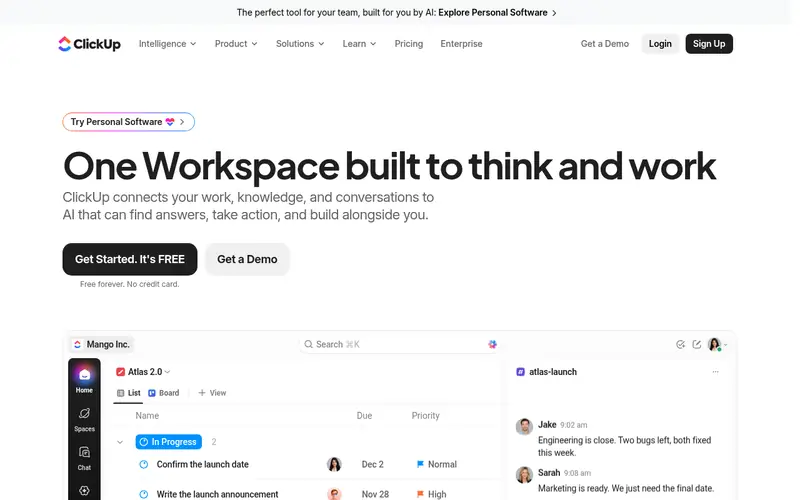
ClickUp homepage

ClickUp is a project management tool with built-in time tracking. A food bank can create a list for each program, add tasks such as a delivery run or a pantry shift, and track time against each task. Reports roll hours up by list, assignee, or tag. The free plan covers a limited number of members, so check the current cap before you plan around it. The tool is flexible but takes setup time, and the interface has many options. Food banks that already manage projects in ClickUp can keep hours in the same place. Those that only need a timesheet may find it more than they need.

Free plan: Yes

Website: clickup.com

Strengths

  • Time tracking inside tasks and lists
  • Free plan for small teams

Watch out for

  • Setup takes time
  • Interface can feel busy
7

Hubstaff

Food banks that need proof of hours for funded programs
See vendor pricing page
hubstaff.comHomepage, Nov 2026
Hubstaff homepage

Hubstaff records time with optional screenshots and activity levels. For food banks that must document staff hours on funded programs, those records can support reporting. Timesheets and reports can be exported for grant files. Hubstaff has no free plan, and the activity tracking features are aimed at remote and hourly work. Many food banks will not want that level of monitoring for volunteers. It fits organizations with paid, remote, or field staff who need documented hours. Confirm current plan limits and pricing on the vendor site.

Free plan: Free trial (14 days)

Website: hubstaff.com

Strengths

  • Timesheets with activity data and screenshots
  • Payroll and scheduling add-ons

Watch out for

  • No free plan
  • Activity tracking may not suit volunteers

Which timesheet software for food banks should I use if I have no budget?

Start with Clockify, whose free plan covers unlimited users and basic reports. If you need scheduling for one site, Homebase has a free plan for one location. If you already manage projects in ClickUp, its free plan includes time tracking for a limited number of members. If you need grant budget tracking, compare Harvest's paid plans against your funding.

Is Clockify better than QuickBooks Time for timesheet software for food banks?

Clockify is the better fit for most food banks because its free plan covers unlimited users, which suits volunteer-heavy teams. QuickBooks Time is the better fit when you already run payroll in QuickBooks and need job costing for grants. QuickBooks Time starts at $20 per month plus $5 per user per month, so cost grows with every person you add.

Pre-purchase checklist

  • Confirm how the vendor counts volunteers: per seat, per active user, or unlimited.
  • Check that reports can be filtered by program, grant, or funder.
  • Ask whether timesheets can be approved by a coordinator before export.
  • Test the mobile app and shared kiosk options for pantry and warehouse shifts.
  • Confirm data export formats for grant files and board reports.

FAQ

What is the best timesheet software for food banks with volunteers?

Clockify is a strong choice because its free plan covers unlimited users, so you can add volunteers without a per-seat cost. Homebase also works for small food banks that need scheduling and a shared time clock. Confirm current free plan limits on each vendor site before you commit.

Can food banks use timesheet software for grant reporting?

Yes. Tools like Clockify, Harvest, and QuickBooks Time let you tag hours by project or grant, then export reports. Funders often ask for hours by program, so set up a project or job for each grant from the start. Check that the export format matches what your funder requests.

Do volunteers need paid accounts?

It depends on the tool. Clockify's free plan does not charge per user, but some tools bill per seat and charge for every volunteer you add. Before you choose, ask the vendor how volunteers are counted and whether there is a free or low-cost volunteer tier.

Is there free timesheet software for small food banks?

Yes. Clockify and Homebase both offer free plans, and ClickUp includes time tracking on its free plan for a limited number of members. Free plans usually limit advanced reports, approvals, or locations. Review those limits against your reporting needs before you rely on a free tier.

What should a food bank check before buying timesheet software?

Check how volunteers are counted, whether reports can be split by grant or program, and whether a coordinator can approve timesheets. Also confirm mobile and kiosk support for warehouse and pantry shifts, plus export options for funder reports. Prices and limits change, so confirm them on the vendor site.



