How we rank
HR and Workforce · Researched comparison

Best Timesheet Software for Food Manufacturers in 2026

TaskReports may earn a fee from some links on this page, and some placements are paid and labelled. Neither one decides the order. See our disclosure.

The short answer

Homebase is the first pick for small food manufacturers that need shift scheduling and timesheets in one place, and it has a free plan for a single location. Deputy suits plants that need stronger shift and overtime rules. QuickBooks Time is the better fit if you already run payroll in QuickBooks.

On this page

Key takeaways

  • Homebase is the first pick for small food plants that need shift scheduling and timesheets in one free tool.
  • Deputy, When I Work and Sling handle shift-based hourly crews with overtime and break rules.
  • QuickBooks Time and Clockify connect time records to payroll or project billing.
  • Most tools price per user per month, so confirm the entry price on the vendor page before you commit.

Quick comparison

ToolBest fitStarting price
HomebaseSmall food plants needing scheduling and timesheetsSee vendor pricing page
DeputyShift-based production crews with overtime rulesSee vendor pricing page

When I WorkHourly teams needing simple scheduling and time clockSee vendor pricing page
SlingSmall plants wanting free scheduling and time trackingSee vendor pricing page
QuickBooks TimePlants already running payroll in QuickBooksSee vendor pricing page
ClockifyTracking labor hours by project or production runSee vendor pricing page
Toggl TrackSimple time records for small production teamsSee vendor pricing page

How we chose

We picked tools that track hours for shift-based hourly teams and connect time records to payroll, scheduling or project billing. Criteria were fit for food manufacturing crews, published entry price, free access and main limits. Sources are vendor websites and public documentation. Prices and plan limits change, so confirm them on the vendor site before buying.

Best overall

Homebase

Small food plants needing scheduling and timesheets

  • Free plan for one location
  • Combines scheduling, timesheets and hiring
PriceSee vendor pricing page
See Homebase pricing
joinhomebase.comHomepage, Nov 2026
Homebase homepage

Homebase combines shift scheduling, time clock and timesheets for hourly teams. For food manufacturers, that means production shifts can be scheduled and the hours flow into timesheets for payroll. The free plan covers one location, which suits a single small plant or a bakery. Larger operations with several sites will need a paid plan. The tool includes break tracking and overtime visibility, which matter on production lines with fixed shift patterns. Payroll and hiring tools are available on higher plans. Confirm current plan limits on the vendor page before you rely on the free tier.

Price: See vendor pricing page

Free plan: Yes

Website: joinhomebase.com

Watch out for

  • Free plan is limited to one location
  • Advanced payroll features cost extra
2

Deputy

Shift-based production crews with overtime rules
See vendor pricing page
deputy.comHomepage, Nov 2026
Deputy homepage

Deputy focuses on shift scheduling and time tracking for hourly workforces. Food manufacturers can set shift patterns, track breaks and apply overtime rules that match plant policy. Staff clock in from a mobile device or a shared kiosk on the floor. The platform handles shift swapping and unavailability requests, which helps when production lines need cover. Timesheets feed into payroll exports. There is no permanent free plan, so small plants should compare the paid tiers against their headcount.

Free plan: Free trial (31 days)

Website: deputy.com

Strengths

  • Strong shift scheduling and overtime rules
  • Mobile clock-in for floor staff

Watch out for

  • No permanent free plan
  • Pricing depends on team size
3

When I Work

Hourly teams needing simple scheduling and time clock
See vendor pricing page
wheniwork.comHomepage, Nov 2026
When I Work homepage

When I Work covers scheduling, time clock and timesheets for hourly teams. A food plant can build production shifts, let staff clock in from a kiosk or phone, and review hours before payroll. Break tracking and attendance records help with shift compliance. The tool is straightforward to set up, which suits smaller plants without a dedicated HR system. Payroll runs as a paid add-on, so budget for it if you want one system for hours and pay. Confirm the trial length and plan limits on the vendor page.

Free plan: Free trial (14 days)

Website: wheniwork.com

Strengths

  • Simple scheduling for hourly crews
  • Time clock with GPS and break tracking

Watch out for

  • Payroll is a paid add-on
  • No permanent free plan
4

Sling

Small plants wanting free scheduling and time tracking
See vendor pricing page
getsling.comHomepage, Nov 2026
Sling homepage

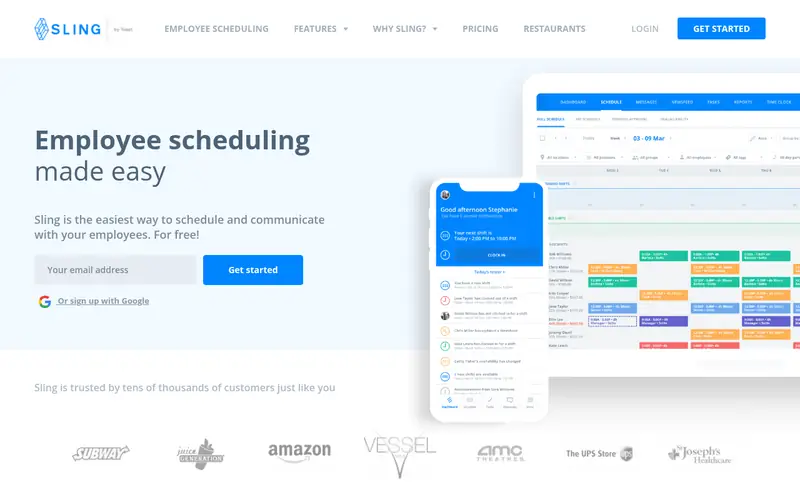
Sling offers scheduling, time clock and timesheets, with a free plan for small teams. Food manufacturers can post production shifts, let staff clock in, and track hours for payroll. Task lists and shift reminders help keep line staff informed. The free plan suits a small plant or a single production site. Payroll and advanced reporting sit on paid plans. Larger operations with complex overtime rules should check whether Sling covers their policy before switching.

Free plan: Yes

Website: getsling.com

Strengths

  • Free plan for scheduling and time clock
  • Shift reminders and task lists

Watch out for

  • Payroll features are limited
  • Best for smaller teams
5

QuickBooks Time

Plants already running payroll in QuickBooks
See vendor pricing page
quickbooks.intuit.comHomepage, Nov 2026
QuickBooks Time homepage

QuickBooks Time tracks hours for hourly staff and sends approved timesheets to QuickBooks Payroll. A food manufacturer already using QuickBooks can keep hours and pay in one system. Staff clock in from a mobile app or a shared kiosk. The tool supports break tracking and overtime, and managers can review and approve hours before payroll runs. If you do not use QuickBooks, the payroll link adds less value. Compare the per-user price against standalone time clock tools.

Free plan: Free trial (30 days)

Website: quickbooks.intuit.com/time-tracking

Strengths

  • Connects time records to QuickBooks payroll
  • Mobile and kiosk clock-in

Watch out for

  • Best value only inside the QuickBooks ecosystem
  • No permanent free plan
6

Clockify

Tracking labor hours by project or production run
See vendor pricing page
clockify.meHomepage, Nov 2026
Clockify homepage

Clockify is a time tracking tool that records hours by project, client or task. A food manufacturer can use it to track labor against production runs, client orders or maintenance work. The free plan supports unlimited users, which helps on a tight budget. The tool is lighter on shift scheduling than dedicated workforce platforms, so it suits plants that mainly need hour records rather than rosters. Paid plans add reporting and admin controls. Confirm the free plan limits on the vendor page.

Free plan: Yes

Website: clockify.me

Strengths

  • Free plan with unlimited users
  • Tracks hours by project or client

Watch out for

  • Less built for shift scheduling
  • Payroll features are limited
7

Toggl Track

Simple time records for small production teams
See vendor pricing page
toggl.comHomepage, Nov 2026
Toggl Track homepage

Toggl Track records time with start and stop timers and manual entries. A small food producer can track hours by task or production run and export the data for payroll or costing. The free plan covers a small team. It is not a shift scheduling tool, so plants with fixed rosters and overtime rules will need something else. Toggl Track suits small operations that mainly need clean hour records. Check the free plan user limit on the vendor page.

Free plan: Yes

Website: toggl.com/track

Strengths

  • Simple start and stop timers
  • Free plan for small teams

Watch out for

  • Not built for shift scheduling
  • Limited payroll features

Which timesheet software for food manufacturers should I use if I run a single small plant?

Homebase is the best fit for a single small plant because its free plan covers one location with scheduling and timesheets. If you need stronger overtime rules, look at Deputy. If payroll already runs in QuickBooks, choose QuickBooks Time. If you mainly need labor hours by production run, Clockify covers that on a free plan.

Is Homebase better than Deputy for timesheet software for food manufacturers?

Homebase is better for a single small plant that wants a free plan for scheduling and timesheets. Deputy is better for plants that need stronger shift and overtime rules and can pay for a subscription. Homebase limits the free plan to one location, while Deputy offers a trial but no permanent free plan.

Pre-purchase checklist

  • Confirm the tool handles your shift patterns, breaks and overtime rules.
  • Check whether clock-in works on a shared kiosk or floor device.
  • Verify the payroll export matches your payroll provider.
  • Confirm the per-user price at your headcount, including managers.
  • Check the free plan limits and trial length before you commit.

FAQ

What is the best timesheet software for food manufacturers?

Homebase is a strong first pick for small plants because it combines scheduling and timesheets with a free plan for one location. Deputy suits plants with complex shift and overtime rules. QuickBooks Time fits plants that already run payroll in QuickBooks.

Does Homebase have a free plan for food manufacturers?

Yes. Homebase offers a free plan that covers one location with scheduling and timesheets. Larger plants with several sites need a paid plan. Confirm the current free plan limits on the Homebase website before you rely on it.

Can these tools track overtime and breaks on production shifts?

Deputy, When I Work, Sling and QuickBooks Time support break tracking and overtime visibility for hourly staff. Set your plant policy in the tool and review hours before payroll. Check that the rules match your shift patterns during a trial.

Which tool works best if we already use QuickBooks for payroll?

QuickBooks Time is the best fit if you already run payroll in QuickBooks. Approved timesheets send hours to QuickBooks Payroll, so hours and pay stay in one system. If you do not use QuickBooks, the payroll link adds less value.

Do these tools charge per user?

Most of these tools price per user per month, so cost rises with headcount. Some offer a free plan for small teams. Confirm the per-user price at your headcount, including managers and supervisors, on the vendor pricing page.