How we rank
HR and Workforce · Researched comparison

Best Timesheet Software for Gutter Companies in 2026

TaskReports may earn a fee from some links on this page, and some placements are paid and labelled. Neither one decides the order. See our disclosure.

The short answer

QuickBooks Time suits gutter companies that want crew hours tied to jobs and payroll inside the QuickBooks ecosystem. Jobber fits companies that need scheduling, quotes and invoicing beside the timesheet. Housecall Pro is a good alternative for residential service work with dispatch and payment collection. All three track hours by job or client, which matches gutter installs, repairs and cleanings.

On this page

Key takeaways

  • QuickBooks Time is the first pick for gutter crews that already run payroll and invoicing in QuickBooks.
  • Jobber and Housecall Pro combine timesheets with scheduling and client billing for residential gutter work.
  • Entry prices range from free plans to paid plans per user per month; confirm current rates on each vendor page.
  • Most tools here track hours by job or client, which fits gutter installs, repairs and cleanings.

Quick comparison

ToolBest fitStarting price
QuickBooks TimeGutter crews already using QuickBooks for payrollSee vendor pricing page
JobberGutter firms needing scheduling, quotes and invoicingSee vendor pricing page
Housecall ProResidential gutter service firms with dispatch needsSee vendor pricing page
ClockifySmall gutter teams wanting a low-cost time logSee vendor pricing page
Toggl TrackGutter owners billing hours to multiple clientsSee vendor pricing page
HubstaffGutter crews needing GPS and activity trackingSee vendor pricing page
HarvestGutter firms that invoice time and materialsSee vendor pricing page
ConnecteamGutter teams needing scheduling and mobile time clocksSee vendor pricing page

How we chose

We selected tools that support time tracking by job or client, which is the core need for gutter companies billing installs, repairs and cleanings. We weighed fit for field crews, the published entry price, free access and the main limits of each plan. Sources are vendor websites and public documentation. Prices and plan limits change, so confirm current details on each vendor site before buying.

★ Best overall

QuickBooks Time

Gutter crews already using QuickBooks for payroll

  • Hours flow into QuickBooks payroll
  • GPS and job tracking on mobile
PriceSee vendor pricing page
See QuickBooks Time pricing
quickbooks.intuit.comHomepage, Nov 2026
QuickBooks Time homepage

QuickBooks Time records employee hours on mobile and ties them to jobs, customers and service items. For gutter companies, that means a crew can clock in at a job site, note the address and attach the work to a specific install or repair. Timesheets then move into QuickBooks payroll and invoicing, which cuts double entry for companies already on Intuit software. The plan structure separates single-user and multi-user tiers, and some features such as scheduling and GPS tracking depend on the tier. Companies that do not use QuickBooks may find the integration value lower. Confirm the current per-user rate and trial length on the vendor pricing page before you commit.

Price: See vendor pricing page

Free plan: Free trial (30 days)

Website: quickbooks.intuit.com/time-tracking

Watch out for

  • Full features need a paid plan
  • best value inside QuickBooks
2

Jobber

Gutter firms needing scheduling, quotes and invoicing
See vendor pricing page
JobberHomepage image unavailable

Jobber combines time tracking with scheduling, quoting and invoicing for service businesses. A gutter company can book a job, assign a crew, track hours on site and turn the work into an invoice from the same record. That link between hours and billing helps when you quote per job and want to see whether labor matched the estimate. Plans are tiered by user count and feature set, and the entry tier covers core scheduling and time tracking. Larger crews and companies that need more automation move to higher tiers. Check the current plan limits and trial length on the vendor site, since pricing and included users change.

Free plan: Free trial (14 days)

Website: getjobber.com

Strengths

  • Timesheets connect to jobs and invoices
  • client scheduling in one app

Watch out for

  • Per-user pricing adds up for larger crews
  • advanced features cost more
3

Housecall Pro

Residential gutter service firms with dispatch needs
See vendor pricing page
housecallpro.comHomepage, Nov 2026
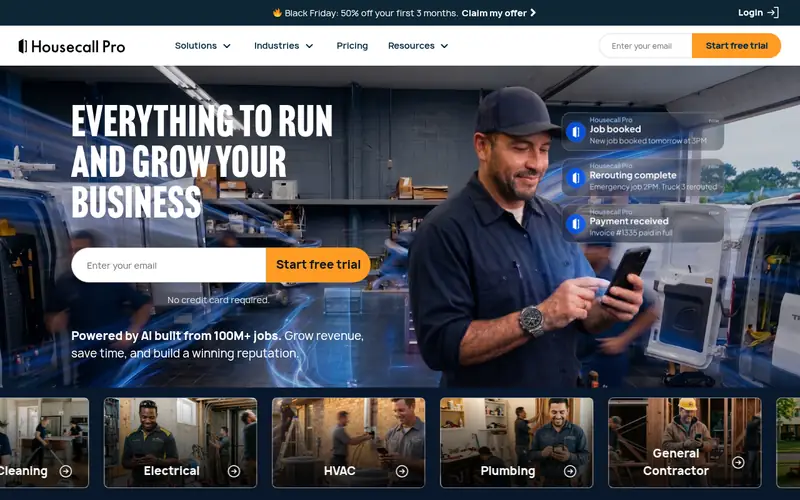
Housecall Pro homepage

Housecall Pro is built for home service companies, including gutter cleaning and repair. It offers a dispatch board, mobile job details and time tracking so office staff can see who is on which job and how long it took. Payments can be collected in the field, which helps with same-day billing for small gutter jobs. The product is sold in tiers, and some features such as advanced reporting sit on higher plans. Pricing depends on company size and the features selected, so the published entry price should be confirmed on the vendor page. Companies that mostly do large commercial contracts may find the residential focus less fitting.

Free plan: Free trial (14 days)

Website: housecallpro.com

Strengths

  • Dispatch board and mobile time tracking
  • payment collection in the app

Watch out for

  • Higher tiers needed for some features
  • pricing varies by company size
4

Clockify

Small gutter teams wanting a low-cost time log
See vendor pricing page
clockify.meHomepage, Nov 2026
Clockify homepage

Clockify is a general time tracking tool with a free plan that supports unlimited users. A small gutter company can set up projects for each job or client, have crew members log hours on mobile, and export reports for payroll or billing. It is a practical starting point when the main need is a clean record of hours per job. The free plan covers core tracking, while paid tiers add features such as invoicing, scheduling and more detailed reporting. It does not handle dispatch or field service workflows the way Jobber or Housecall Pro do. Confirm the current free plan limits and paid rates on the vendor site.

Free plan: Yes

Website: clockify.me

Strengths

  • Free plan for unlimited users
  • simple timer and manual entry

Watch out for

  • Limited job costing on free plan
  • payroll and invoicing need add-ons
5

Toggl Track

Gutter owners billing hours to multiple clients
See vendor pricing page
toggl.comHomepage, Nov 2026
Toggl Track homepage

Toggl Track focuses on simple time capture and reporting. A gutter company that bills commercial clients by the hour can create a project per client or site, run a timer on a phone, and pull a report at the end of the week. The interface is light, which makes adoption easier for crews who dislike complex apps. The free plan covers basic tracking for small teams, and paid tiers add features such as billable rates and more reporting. It does not include scheduling, dispatch or invoicing, so it works best alongside separate accounting or field service software. Check current free plan limits and pricing on the vendor page.

Free plan: Yes

Website: toggl.com/track

Strengths

  • Fast one-click timers
  • clear reports by client and project

Watch out for

  • No dispatch or job scheduling
  • free plan limits some features
6

Hubstaff

Gutter crews needing GPS and activity tracking
See vendor pricing page
hubstaff.comHomepage, Nov 2026
Hubstaff homepage

Hubstaff adds GPS location and activity monitoring to time tracking, which some gutter companies use to confirm crew locations across multiple job sites. Timesheets can be tied to projects and clients, and the data can feed payroll or invoicing through connected features. The product is priced per user, and the entry tier covers basic tracking while higher tiers add scheduling and more reporting. Activity monitoring is optional but can affect crew morale, so explain the policy before rollout. Confirm the current per-user rate and trial terms on the vendor site.

Free plan: Free trial (14 days)

Website: hubstaff.com

Strengths

  • GPS tracking and screenshots on mobile
  • payroll and invoicing add-ons

Watch out for

  • Per-user pricing
  • some teams dislike activity monitoring
7

Harvest

Gutter firms that invoice time and materials
See vendor pricing page
getharvest.comHomepage, Nov 2026
Harvest homepage

Harvest is a time tracking and invoicing tool built around billable hours. A gutter company that charges for time and materials can track hours per project, set budgets, and turn approved time into an invoice. Reports show where labor went against the estimate, which helps with repeat commercial work. Plans are priced per seat, and the entry tier covers core tracking and invoicing. It does not handle scheduling, dispatch or crew routing, so it fits companies that already have those processes elsewhere. Confirm current seat pricing and trial length on the vendor page.

Free plan: Free trial (30 days)

Website: getharvest.com

Strengths

  • Timesheets link to invoices
  • simple project budgets

Watch out for

  • No field service or dispatch tools
  • per-seat pricing
8

Connecteam

Gutter teams needing scheduling and mobile time clocks
See vendor pricing page
connecteam.comHomepage, Nov 2026
Connecteam homepage

Connecteam is an all-in-one app for deskless teams, with a mobile time clock, job scheduling and communication tools. A gutter company can schedule crews, have them clock in at the job site, and review hours by employee or job. The free plan supports a limited number of users, which suits very small operations. Paid tiers add features such as geofencing, more detailed reports and payroll integrations. The app is broad, so setup takes some planning to match your job structure. Confirm the current free plan user limit and paid rates on the vendor site.

Free plan: Yes

Website: connecteam.com

Strengths

  • Free plan for small teams
  • mobile time clock and job scheduling

Watch out for

  • Advanced features on paid tiers
  • setup takes some time

Pre-purchase checklist

  • Confirm the tool tracks hours by job, client and crew member, not just by employee.
  • Check whether mobile clock-in works offline at job sites with weak signal.
  • Verify how timesheets export to your payroll and invoicing systems.
  • Compare the per-user price against your typical crew size and season peaks.
  • Read the free plan limits and trial terms before you commit.

FAQ

What should gutter companies look for in timesheet software?

Look for job-level time tracking, mobile clock-in, and a clear path from hours to payroll or invoicing. Crews work at different addresses, so GPS or job selection helps. If you also schedule and bill from the same tool, check that those features are included in the plan you pick.

Can timesheet software handle multiple gutter crews?

Yes. Most tools here support multiple users and let you assign hours to a job, client or crew. Higher tiers usually add more reporting and admin controls. Check the per-user pricing and any user limits on the free plan before you add seasonal staff.

Do these tools include invoicing?

Some do. Jobber, Housecall Pro and Harvest connect tracked hours to invoices. QuickBooks Time feeds hours into QuickBooks for billing. Clockify, Toggl Track and Connecteam focus on tracking and reporting, so you may need separate accounting software.

Is there free timesheet software for small gutter businesses?

Clockify and Connecteam offer free plans with user limits, and Toggl Track has a free tier for basic tracking. Free plans usually lack advanced reporting, scheduling or payroll integrations. Confirm the current limits on each vendor page, since they change.

How much does timesheet software cost for a gutter company?

Prices vary by vendor and plan, and most charge per user per month. Entry tiers are lower, while scheduling, GPS and payroll features often sit on higher tiers. We list "See vendor pricing page" where the published rate should be confirmed directly, because prices change.