How we rank
HR and Workforce · Researched comparison

Best Timesheet Software for Gyms in 2026

TaskReports may earn a fee from some links on this page, and some placements are paid and labelled. Neither one decides the order. See our disclosure.

The short answer

Homebase is the best starting point for most gyms. It handles shift scheduling, clock-in and hours tracking on a free plan for one location, which fits a single-site gym with a mix of front-desk and trainer staff. If you need tighter shift-swap controls and per-user scheduling, look at When I Work. If your gym already runs on a fitness platform, Mindbody can track trainer hours and client sessions together.

On this page

Key takeaways

  • Homebase is the first pick for most gyms because its free plan covers hourly shift tracking and scheduling for one location.
  • When I Work, Deputy and QuickBooks Time all charge per user, so cost grows with every front-desk, trainer and cleaning account you add.
  • Dedicated fitness platforms like Mindbody track trainer sessions and payroll hours in one system, but they cost more than general timesheet tools.
  • Most tools here offer a free trial; only Homebase has a permanent free plan for a single location.

Quick comparison

ToolBest fitStarting price
HomebaseSingle-location gyms tracking hourly staffSee vendor pricing page
When I WorkGyms needing shift swaps and coverageSee vendor pricing page

DeputyMulti-location gyms with complex shiftsSee vendor pricing page
QuickBooks TimeGyms already using QuickBooks for payrollSee vendor pricing page
ClockifyBudget gyms tracking hours by projectSee vendor pricing page
MindbodyStudios linking trainer pay to sessionsSee vendor pricing page
JibbleSmall gyms wanting free clock-inSee vendor pricing page

How we chose

We picked tools that support the gym use case: hourly staff tracking, shift scheduling, trainer session hours and payroll export. We weighed fit for the use case, published entry price, free access and main limits. Sources are vendor homepages and public documentation. Prices and plan limits change, so confirm current details on each vendor site before buying.

Best overall

Homebase

Single-location gyms tracking hourly staff

  • Free plan for one location
  • built-in scheduling and time clock
PriceSee vendor pricing page
See Homebase pricing
joinhomebase.comHomepage, Nov 2026
Homebase homepage

Homebase covers the basics a gym needs: shift scheduling, a time clock, and hours worked for hourly staff. Front-desk workers and trainers can clock in from a phone or a shared tablet. The free plan supports one location, which suits a single gym. Paid tiers add hiring, payroll and more advanced controls. For a gym with several staff types on different pay rates, Homebase lets you set up separate roles and track hours by role. The free plan has limits on features beyond scheduling and time tracking, so payroll and compliance tools require a paid plan. Confirm current limits on the vendor site. Skip Homebase if you run multiple locations and need one account across all of them on the free tier.

Price: See vendor pricing page

Free plan: Yes

Website: joinhomebase.com

Watch out for

  • Free plan limits features
  • payroll add-ons cost extra
2

When I Work

Gyms needing shift swaps and coverage
See vendor pricing page
wheniwork.comHomepage, Nov 2026
When I Work homepage

When I Work focuses on scheduling and shift management. Staff can request swaps, pick up open shifts, and see schedules on their phones. For a gym with trainers and front-desk staff on rotating shifts, this reduces last-minute coverage gaps. Pricing is per user, so a larger staff roster raises the monthly cost. There is a free trial but no permanent free plan. Time tracking and attendance are included, and hours export for payroll. Choose When I Work if scheduling flexibility matters more than a free tier. Skip it if you want a no-cost option for a small team.

Free plan: Free trial (14 days)

Website: wheniwork.com

Strengths

  • Strong shift-swap and coverage tools
  • mobile scheduling for staff

Watch out for

  • Per-user pricing
  • no permanent free plan
3

Deputy

Multi-location gyms with complex shifts
See vendor pricing page
deputy.comHomepage, Nov 2026
Deputy homepage

Deputy is built for shift-based workplaces with multiple locations and rules around overtime and breaks. A gym chain can schedule staff across sites and track hours against each location. It supports clock-in with photo verification and geofencing. The system is more configurable than a small gym needs, and setup takes effort. Pricing is per user, and there is a 31-day free trial but no free plan. Pick Deputy if you operate more than one gym and need location-level hours reporting. A single small studio can likely use a simpler, cheaper tool.

Free plan: Free trial (31 days)

Website: deputy.com

Strengths

  • Handles multi-site scheduling
  • strong compliance and award rules

Watch out for

  • Per-user pricing
  • setup takes time
4

QuickBooks Time

Gyms already using QuickBooks for payroll
See vendor pricing page
quickbooks.intuit.comHomepage, Nov 2026
QuickBooks Time homepage

QuickBooks Time tracks hours by employee, job and location, and passes them to QuickBooks payroll. For a gym that already runs payroll in QuickBooks, this removes manual re-entry. Staff clock in from a phone, and GPS can confirm they are on site. Pricing is per user, and the free trial runs 30 days. The tool is strongest when paired with QuickBooks payroll; on its own it is a standard time tracker. Skip it if your payroll runs on a different platform and you do not need the QuickBooks link.

Free plan: Free trial (30 days)

Website: quickbooks.intuit.com/time-tracking

Strengths

  • Connects to QuickBooks payroll
  • mobile GPS clock-in

Watch out for

  • Per-user pricing
  • best value only inside QuickBooks
5

Clockify

Budget gyms tracking hours by project
See vendor pricing page
clockify.meHomepage, Nov 2026
Clockify homepage

Clockify offers a free plan with unlimited users for basic time tracking, which suits a small gym watching costs. You can track hours by staff member and by task, such as front desk, training or maintenance. Scheduling and shift management are less developed than in Homebase or When I Work. Payroll features and advanced reporting sit on paid plans. For a gym that mainly needs to log hours and export them, the free tier may be enough. Skip Clockify if you need detailed shift scheduling and swap requests.

Free plan: Yes

Website: clockify.me

Strengths

  • Free plan for unlimited users
  • simple time tracking

Watch out for

  • Scheduling is lighter
  • payroll needs add-ons
6

Mindbody

Studios linking trainer pay to sessions
See vendor pricing page
mindbodyonline.comHomepage, Nov 2026
Mindbody homepage

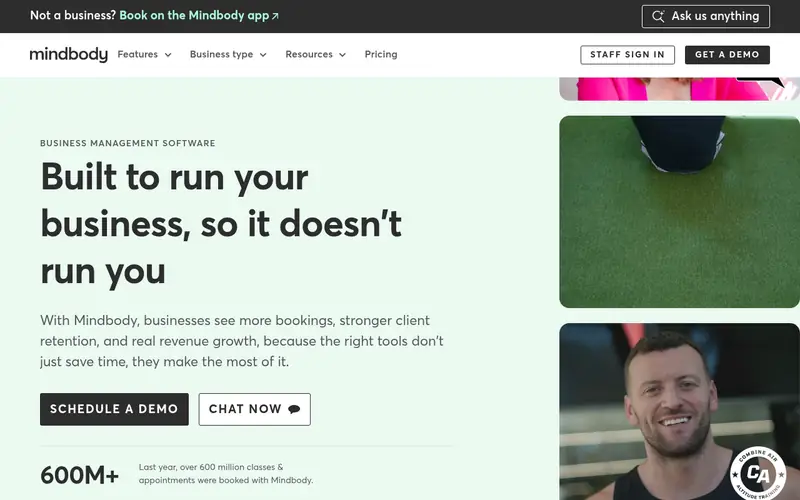
Mindbody is a fitness and wellness platform that connects bookings, memberships and staff pay. A gym can link trainer hours to the sessions they teach, which helps with commission or session-based pay. Pricing depends on the business type and features, so check the vendor pricing page. There is a trial, but no free plan. The platform is broader than timesheets, and small gyms may find it costly. Pick Mindbody if session-based trainer pay is central to your payroll. Skip it if you only need hourly clock-in.

Free plan: Free trial (varies)

Website: mindbodyonline.com

Strengths

  • Ties staff hours to booked sessions
  • widely used in fitness

Watch out for

  • Pricing tiers vary by business
  • full platform cost
7

Jibble

Small gyms wanting free clock-in
See vendor pricing page
jibble.ioHomepage, Nov 2026
Jibble homepage

Jibble provides a time clock with mobile and web clock-in, plus basic timesheet reports. Its free plan covers a small team, which fits a single gym with a handful of staff. Scheduling and payroll integrations are limited compared with Homebase or Deputy. Paid plans add features such as GPS tracking and more detailed reports. For a gym that mainly needs to record hours, the free tier is workable. Skip Jibble if you need full shift scheduling and swap management.

Free plan: Yes

Website: jibble.io

Strengths

  • Free plan for a small team
  • simple mobile clock-in

Watch out for

  • Limited scheduling
  • advanced features on paid plans

Pre-purchase checklist

  • Confirm how many staff accounts you need and whether pricing is per user.
  • Check whether the free plan covers one location or several.
  • Verify that hours export to your payroll provider in the format you need.
  • Confirm the tool handles trainer session pay if you pay by session.
  • Check mobile clock-in and GPS or geofencing if staff work across sites.

FAQ

What is the best timesheet software for a single gym?

Homebase is a strong fit for a single gym because its free plan covers scheduling and time tracking for one location. Jibble and Clockify also offer free plans for small teams. Compare the free plan limits on each vendor site before choosing.

Do gyms need per-user timesheet pricing?

Many tools, including When I Work, Deputy and QuickBooks Time, charge per user. A gym with many part-time trainers will pay more as accounts grow. Homebase, Clockify and Jibble offer free plans that avoid per-user charges up to their limits.

Can timesheet software track trainer session pay?

Mindbody links staff hours to booked sessions, which helps with session-based or commission pay. General timesheet tools track hours but may not connect them to client bookings. Check the payroll features on each vendor site.

Is there free timesheet software for gyms?

Yes. Homebase, Clockify and Jibble all offer free plans. Homebase's free plan covers one location, while Clockify and Jibble offer free tiers for small teams. Free plans have limits on scheduling, payroll and reporting, so confirm what is included.

How do I choose between a gym platform and a timesheet tool?

A gym platform like Mindbody combines member management, billing and staff hours. A standalone timesheet tool like Homebase or When I Work focuses on scheduling and hours. Choose the platform if you want one system; choose the timesheet tool if you already have management software.