
How we rank
HR and Workforce · Researched comparison

Best Timesheet Software for Handyman Businesses in 2026

TaskReports may earn a fee from some links on this page, and some placements are paid and labelled. Neither one decides the order. See our disclosure.

The short answer

QuickBooks Time is the first pick for handyman businesses that already use QuickBooks for payroll or bookkeeping, because hours flow into the same system. If you want one app for scheduling, job details and invoicing as well as hours, Housecall Pro or Jobber fit better. For a solo handyman on a tight budget, Clockify's free plan covers basic time tracking before you pay for anything.

On this page

Key takeaways

  • QuickBooks Time is the lead pick for handymen who already run payroll or books in QuickBooks, with mobile GPS clock-in and job codes.
  • Clockify has a free plan for solo handymen, and its paid tiers add timesheet approvals and invoicing.
  • Housecall Pro and Jobber combine scheduling, time tracking and invoicing, so they suit crews that want one app for jobs and hours.
  • Entry prices below come from vendor pricing pages and can change, so confirm the current rate before you buy.

Quick comparison

ToolBest fitStarting price
QuickBooks TimeHandymen already using QuickBooks for payroll and booksSee vendor pricing page
ClockifySolo handymen and small crews watching costsSee vendor pricing page

Housecall ProHandyman teams that want scheduling, hours and invoicing in one appSee vendor pricing page
JobberSmall handyman crews that schedule jobs and track timeSee vendor pricing page
Toggl TrackHandymen who want fast, simple time captureSee vendor pricing page
HubstaffHandyman teams that need GPS and activity tracking on the roadSee vendor pricing page
HarvestHandymen who bill clients by the hour and invoice from timesheetsSee vendor pricing page

How we chose

We picked tools that record hours for mobile, job-based handyman work and that a small business can actually buy. Criteria were fit for the use case, published entry price, free access, and the main limits a handyman would hit. We used vendor websites and public pricing pages as sources. We did not run hands-on tests or collect user reviews. Prices change, so confirm the current rate on the vendor site before you buy.

★ Best overall

QuickBooks Time

Handymen already using QuickBooks for payroll and books

  • Mobile clock-in with GPS and job codes
  • Hours flow into QuickBooks payroll
PriceSee vendor pricing page
See QuickBooks Time pricing
quickbooks.intuit.comHomepage, Nov 2026
QuickBooks Time homepage

QuickBooks Time, formerly TSheets, is a time tracking tool built for field and hourly workers. Handymen can clock in from a phone at a job site, attach hours to a customer or job code, and see who is on the clock on a map. Timesheets can require approval before they reach payroll. The product runs on its own or connects to QuickBooks Online and QuickBooks Payroll. That link matters for handyman businesses that already invoice and run payroll in QuickBooks, because approved hours move over without re-entry. Plan tiers add features such as scheduling and payroll support. Skip it if you do not use QuickBooks and want a single app that also handles estimates, dispatch and customer invoicing. QuickBooks Time tracks hours well but is not a full field service management system.

Price: See vendor pricing page

Free plan: Free trial (30 days)

Website: quickbooks.intuit.com/time-tracking

Watch out for

  • Full features need a paid plan
  • Best value only inside the QuickBooks ecosystem
2

Clockify

Solo handymen and small crews watching costs
See vendor pricing page
clockify.meHomepage, Nov 2026
Clockify homepage

Clockify is a time tracker with a free plan that covers unlimited users and unlimited tracking. A handyman can start a timer on a phone when arriving at a job, or enter hours manually at the end of the day. Timesheets show hours by project, client or task. Paid plans add features handyman businesses tend to want as they grow: timesheet approvals, billable rates, and reporting by client. The tool is lighter on field service features than Housecall Pro or Jobber. There is no dispatch board or customer invoicing on the free plan. Choose Clockify if time tracking is the main need and you bill or invoice elsewhere. It suits a one-person operation or a small crew that wants a low-cost way to see where hours go.

Free plan: Yes

Website: clockify.me

Strengths

  • Free plan for unlimited users
  • Simple timer and manual timesheet entry

Watch out for

  • Job costing needs paid tiers
  • No built-in invoicing on the free plan
3

Housecall Pro

Handyman teams that want scheduling, hours and invoicing in one app
See vendor pricing page
housecallpro.comHomepage, Nov 2026
Housecall Pro homepage

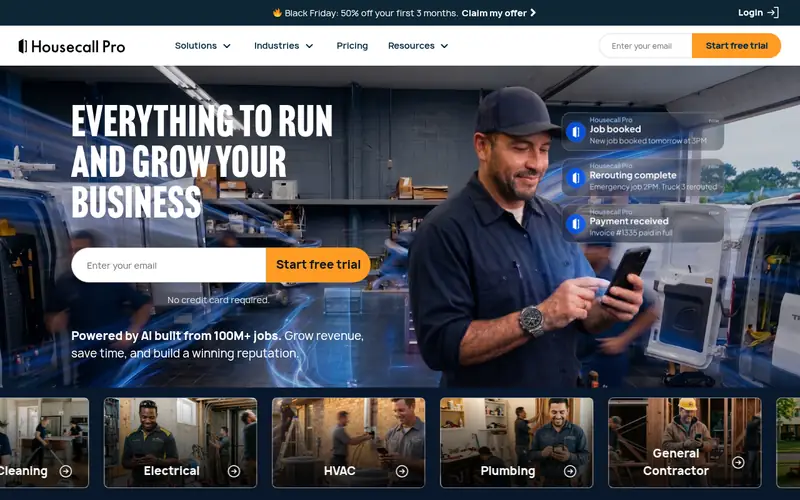
Housecall Pro is field service software for home service businesses, including handymen. It combines scheduling, job and customer records, time tracking and invoicing. A technician clocks in on the job from the mobile app, and the office sees hours against the job. Because scheduling and time tracking live in the same system, handyman businesses avoid moving hours between apps. Invoices can be built from completed jobs, and payments can be collected in the field. The trade-off is price and complexity: it costs more than a standalone timesheet tool and is priced per user on most plans. Skip it if you only need to record hours and already have invoicing handled. It fits handyman companies with several technicians and a steady flow of scheduled jobs.

Free plan: Free trial (14 days)

Website: housecallpro.com

Strengths

  • Scheduling, job details and time tracking together
  • Invoicing and payments built in

Watch out for

  • Higher cost than standalone time trackers
  • Priced per user on most plans
4

Jobber

Small handyman crews that schedule jobs and track time
See vendor pricing page
JobberHomepage image unavailable

Jobber is field service software for small service businesses. For handyman work, it covers quotes, scheduling, job visits, time tracking and invoicing. A handyman can start a timer when a visit begins, and the hours attach to the job and client. The time tracking is built for field work rather than office timesheets. It records visit start and end, and hours can feed into invoices. Jobber also handles client communication and reminders, which helps a small crew stay organized. The main limit is cost. Jobber is priced per user on its plans, so a larger crew pays more. It is a good fit for a handyman business with two to ten technicians that wants one system for jobs and hours. A solo operator who only needs a timer may find it more than needed.

Free plan: Free trial (14 days)

Website: getjobber.com

Strengths

  • Time tracking tied to jobs and visits
  • Quotes, scheduling and invoicing in one place

Watch out for

  • Per-user pricing raises cost for larger crews
  • Time tracking is part of a broader suite
5

Toggl Track

Handymen who want fast, simple time capture
See vendor pricing page
toggl.comHomepage, Nov 2026
Toggl Track homepage

Toggl Track is a time tracking tool focused on speed and simplicity. A handyman can start a timer with one tap on a phone, tag the entry with a client or job, and stop it when the work ends. Reports show hours by client and project. It does not schedule jobs, dispatch technicians or send invoices. That keeps it simple, but it means handyman businesses need other tools for those tasks. The free plan covers basic tracking for individuals and small teams, and paid plans add features such as billable rates and more reporting. Use Toggl Track if you want a low-friction timer and will handle scheduling and invoicing elsewhere. It suits a solo handyman or a small crew that bills by the hour and needs a clear record of time.

Free plan: Yes

Website: toggl.com/track

Strengths

  • One-tap timer on phone and desktop
  • Clear reports by client and project

Watch out for

  • No scheduling or invoicing
  • Free plan limits some reporting features
6

Hubstaff

Handyman teams that need GPS and activity tracking on the road
See vendor pricing page
hubstaff.comHomepage, Nov 2026
Hubstaff homepage

Hubstaff is time tracking software with GPS and activity monitoring. For handyman businesses, the GPS features let you confirm a technician arrived at a job site, and geofences can trigger clock-in when a worker reaches a location. Timesheets collect hours with location data. The activity tracking features are more than many handyman crews need, and some owners find them heavy for trusted employees. Hubstaff is priced per user, so cost rises with crew size. It also offers scheduling and project budget tools on higher plans. Consider Hubstaff if you manage a mobile crew and want location records alongside hours. A small handyman business with long-tenured staff may prefer a simpler tracker and skip the monitoring features.

Free plan: Free trial (14 days)

Website: hubstaff.com

Strengths

  • GPS tracking and geofenced job sites
  • Timesheets with screenshots and activity data

Watch out for

  • Activity tracking can feel heavy for trusted crews
  • Per-user pricing adds up
7

Harvest

Handymen who bill clients by the hour and invoice from timesheets
See vendor pricing page
getharvest.comHomepage, Nov 2026
Harvest homepage

Harvest is time tracking and invoicing software. A handyman can track hours against a client or project, then turn those hours into an invoice without retyping. Budgets show how much of a project's hours or money has been used. It is built for service businesses that bill by time, which fits handyman work such as repairs and maintenance billed hourly. It does not schedule jobs or dispatch technicians, so it works best alongside a calendar or field service tool. Harvest is priced per seat, and it has no free plan beyond the trial. Choose it if invoicing from timesheets is the priority and you do not need scheduling in the same app.

Free plan: Free trial (30 days)

Website: getharvest.com

Strengths

  • Timesheets turn into client invoices
  • Clear project and client budgets

Watch out for

  • No scheduling or dispatch
  • Priced per seat

Pre-purchase checklist

  • Confirm the app works on the phones your crew uses, including offline clock-in for job sites with weak signal.
  • Check whether hours can be tied to a customer, job or job code, not just a project name.
  • Ask how timesheets reach payroll or invoicing, and whether that needs a paid tier or an add-on.
  • Count the users you will add, since per-user pricing changes the real monthly cost.
  • Confirm the free plan or trial limits, including how many users and which reports are included.

FAQ

What is the best timesheet software for a handyman business?

QuickBooks Time is the best fit for handymen who already use QuickBooks for payroll or books. For a crew that wants scheduling and invoicing as well as hours, Housecall Pro or Jobber fit better. A solo handyman can start with Clockify's free plan.

Can handyman timesheet software track hours by job?

Yes. Most tools on this list let you attach hours to a customer, job or project. QuickBooks Time uses job codes, and Housecall Pro and Jobber tie time to scheduled jobs. That makes it easier to invoice the right client for the right hours.

Is there free timesheet software for handymen?

Clockify and Toggl Track both offer free plans for basic time tracking. Free plans usually limit reporting, approvals or invoicing features. If you need payroll or client invoicing tied to hours, expect a paid plan.

Do I need field service software or just a time tracker?

If you only need to record hours and invoice elsewhere, a time tracker such as Clockify, Toggl Track or Harvest is enough. If you also schedule jobs, dispatch technicians and invoice clients, field service software such as Housecall Pro or Jobber covers more in one app.

How much does handyman timesheet software cost?

Prices vary by plan and user count, and per-user pricing raises the cost as your crew grows. We list entry prices as "See vendor pricing page" where we could not confirm a current figure. Check each vendor's pricing page for the latest rate before you decide.


