How we rank
HR and Workforce · Researched comparison

Best Timesheet Software for HOA Management Companies in 2026

TaskReports may earn a fee from some links on this page, and some placements are paid and labelled. Neither one decides the order. See our disclosure.

The short answer

QuickBooks Time is the first pick for HOA management companies that already use QuickBooks for payroll and client billing, because hours flow into the same system. Clockify is the better choice for a small firm that wants a free start with unlimited users. Harvest suits firms that bill management fees and maintenance work by the hour and need clean client reports.

On this page

Key takeaways

  • QuickBooks Time fits HOA teams that already run payroll and client billing in QuickBooks, with a per-user monthly fee.
  • Clockify has a free plan for unlimited users and is the lowest-cost way to start tracking manager and staff hours.
  • Hubstaff adds activity tracking and screenshots, which suits firms that want proof of billable on-site work.
  • Harvest and Toggl Track focus on billable hours and client reporting, while Wrike and ClickUp add project and board work management.

Quick comparison

ToolBest fitStarting price
QuickBooks TimeHOA firms already using QuickBooks payroll and billingSee vendor pricing page
ClockifySmall HOA firms that want a free startSee vendor pricing page

HarvestFirms billing associations by the hourSee vendor pricing page
Toggl TrackManagers who need fast, simple time captureSee vendor pricing page
HubstaffFirms that want activity tracking for field staffSee vendor pricing page
WrikeHOA teams managing board projects and tasksSee vendor pricing page
ClickUpFirms that want timesheets inside a work platformSee vendor pricing page
TimeCampFirms that want automatic time captureSee vendor pricing page

How we chose

We picked tools that track employee hours and produce timesheet reports, then compared how each one handles billable client work, since HOA management firms bill associations for manager time. We looked at entry price, free plan access, and main limits, using vendor websites and public documentation. We did not run hands-on tests. Prices and plan limits change, so confirm them on the vendor site before you buy.

Best overall

QuickBooks Time

HOA firms already using QuickBooks payroll and billing

  • Hours flow into QuickBooks payroll and invoicing
  • mobile GPS and job tracking for on-site visits
PriceSee vendor pricing page
See QuickBooks Time pricing
quickbooks.intuit.comHomepage, Nov 2026
QuickBooks Time homepage

QuickBooks Time tracks employee hours by timesheet, job, and service item, then sends approved hours to QuickBooks payroll and invoices. For an HOA management company, that means a community manager's hours at a board meeting or an inspection can be tied to the association's account and billed without a second data entry step. Mobile clock-in with GPS helps when staff move between properties. The product is sold per user per month, and the exact rate depends on the plan and any QuickBooks bundle, so confirm the current price on the vendor page. The free trial runs 30 days. Teams that do not use QuickBooks for accounting will get less value from the integration and should compare standalone tools first.

Price: See vendor pricing page

Free plan: Free trial (30 days)

Website: quickbooks.intuit.com/time-tracking

Watch out for

  • Per-user pricing adds up for large teams
  • Full features need a QuickBooks plan
2

Clockify

Small HOA firms that want a free start
See vendor pricing page
clockify.meHomepage, Nov 2026
Clockify homepage

Clockify offers a free plan with unlimited users and unlimited tracking, which suits a small HOA management company that needs basic timesheets before it commits to a paid tool. Staff can log hours against projects named for each association, and managers can review timesheets by week. Paid tiers add features such as approvals, invoicing, and more detailed reports. The free plan does not include those controls, so a firm that needs formal timesheet sign-off will likely need a paid plan. Pricing is published on the vendor site and changes by tier, so check it before budgeting.

Free plan: Yes

Website: clockify.me

Strengths

  • Free plan for unlimited users
  • Simple timer and timesheet views

Watch out for

  • Advanced reporting and approvals sit on paid plans
  • No built-in payroll processing
3

Harvest

Firms billing associations by the hour
See vendor pricing page
getharvest.comHomepage, Nov 2026
Harvest homepage

Harvest is built around billable time. A community manager can log hours to an association's project, mark them billable, and turn them into an invoice. Budget tracking shows when a management agreement's allotted hours are running low, which helps before overages become a billing dispute. The tool is priced per seat per month, with a discount for annual billing. It does not handle payroll, so most HOA firms pair it with a payroll provider. Firms that only need internal time records, with no client billing, may find Harvest more than they need.

Free plan: Free trial (30 days)

Website: getharvest.com

Strengths

  • Strong billable-hours and client invoicing workflow
  • Clear project budgets and reports

Watch out for

  • Per-seat pricing
  • Limited payroll features
4

Toggl Track

Managers who need fast, simple time capture
See vendor pricing page
toggl.comHomepage, Nov 2026
Toggl Track homepage

Toggl Track is a lightweight timer and timesheet tool. A manager can start a timer when a call with a board member begins and assign it to that association's project later. Reports summarize hours by project, client, or team member. The free plan covers a limited number of users and basic features; paid plans add billable rates, approvals, and more reporting. The vendor publishes current limits and prices on its site. It suits firms that want minimal setup, not firms that need payroll or deep accounting integration.

Free plan: Yes

Website: toggl.com/track

Strengths

  • Very quick timer and one-click start
  • Free plan for small teams

Watch out for

  • Free plan caps users and features
  • Fewer HOA-specific reporting options
5

Hubstaff

Firms that want activity tracking for field staff
See vendor pricing page
hubstaff.comHomepage, Nov 2026
Hubstaff homepage

Hubstaff adds activity monitoring to time tracking. For an HOA management company with staff who visit properties, GPS and geofencing can confirm arrival at a site, and timesheets can be tied to projects for each association. This gives a record of on-site work that can support client reporting. The tool is priced per user per month, and the monitoring features raise privacy questions that firms should settle with staff before rollout. The free trial is 14 days. Companies that only need hours, not activity data, can find a simpler and cheaper option.

Free plan: Free trial (14 days)

Website: hubstaff.com

Strengths

  • Activity tracking and screenshots for remote or field work
  • GPS and geofencing on mobile

Watch out for

  • Monitoring features may not suit every team
  • Per-user pricing
6

Wrike

HOA teams managing board projects and tasks
See vendor pricing page
wrike.comHomepage, Nov 2026
Wrike homepage

Wrike combines project management with time tracking. An HOA management company can create a project for each association, assign tasks such as annual meeting prep or violation follow-up, and have staff log hours against those tasks. Timesheet reports then show where manager time goes. The free plan supports a small team with limited features. Time tracking and timesheets are more complete on paid tiers, and the vendor publishes current prices and plan limits. Firms that only need a timesheet, with no task management, will find Wrike heavier than necessary.

Free plan: Yes

Website: wrike.com

Strengths

  • Timesheets sit alongside task and project tracking
  • Free plan for small teams

Watch out for

  • Timesheet features vary by plan tier
  • Setup takes more effort
7

ClickUp

Firms that want timesheets inside a work platform
See vendor pricing page
clickup.comHomepage, Nov 2026
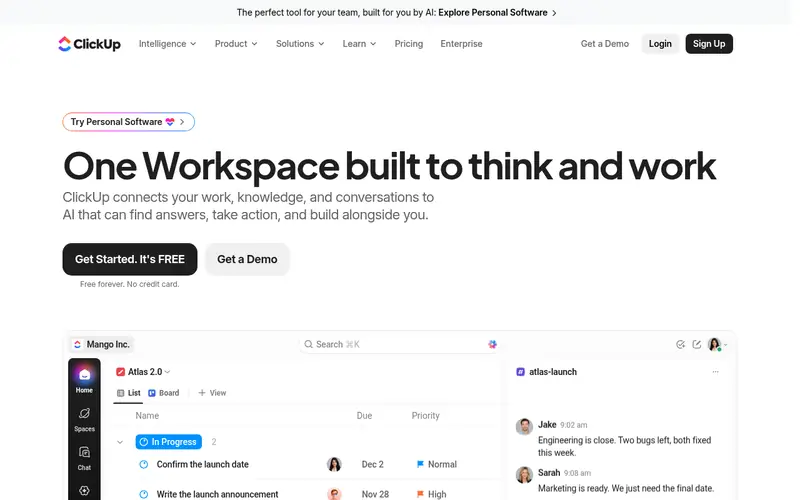
ClickUp homepage

ClickUp is a work management platform with built-in time tracking. A firm can set up a space per association, track time on tasks, and pull timesheet reports by assignee or list. That keeps board action items and the hours spent on them in one place. The free plan covers unlimited users with storage and feature limits, and time tracking has usage caps on some tiers. Paid plans raise those limits. The vendor publishes current pricing and limits. The platform is broad, so a small HOA firm should expect setup time before it is useful.

Free plan: Yes

Website: clickup.com

Strengths

  • Time tracking built into tasks and projects
  • Free plan for unlimited users on basic features

Watch out for

  • Many features to configure
  • Time tracking limits on lower tiers
8

TimeCamp

Firms that want automatic time capture
See vendor pricing page
timecamp.comHomepage, Nov 2026
TimeCamp homepage

TimeCamp records time automatically based on the applications and documents a user works in, and staff can assign that time to projects for each association. Manual timers and timesheets are also available. Reports break hours down by project, client, and team. The free plan is limited to one user, so a management company will need a paid plan for its team. Paid tiers add invoicing, approvals, and more reporting. The vendor lists current prices and limits on its site. Automatic capture is useful but needs review so hours land on the right association.

Free plan: Yes

Website: timecamp.com

Strengths

  • Automatic time recording by app and task
  • Free plan for a single user

Watch out for

  • Automatic tracking needs review
  • Advanced features on paid plans

Which timesheet software for HOA management companies should I use if I already run payroll in QuickBooks?

QuickBooks Time is the fit here, because approved hours move into QuickBooks payroll and invoices without re-entry. If you do not use QuickBooks, Clockify covers basic timesheets for free with unlimited users. If you bill associations by the hour and need client invoices, Harvest is the better match. If your staff work in the field and you want GPS records, Hubstaff adds location tracking to the timesheet.

Is QuickBooks Time better than Clockify for timesheet software for HOA management companies?

QuickBooks Time is better if your firm already uses QuickBooks for payroll and client billing, because hours flow into those systems. Clockify is better if you want a free start with unlimited users and do not need payroll integration. Clockify's free plan lacks formal approvals, so a firm that needs timesheet sign-off will likely pay for a higher tier either way.

Pre-purchase checklist

  • Confirm the tool can tag hours by association or client, so each HOA's time is separate.
  • Check whether approved hours export to your payroll or accounting system.
  • Count your users and compare the per-user cost against a flat-rate plan.
  • Review what the free plan includes, especially user caps and approvals.
  • Ask how field staff clock in, and whether mobile GPS is needed for site visits.

FAQ

What is the best timesheet software for HOA management companies?

QuickBooks Time is the strongest fit for firms already on QuickBooks, because hours flow into payroll and client invoices. Clockify is the best free starting point for small teams. Harvest suits firms that bill associations by the hour. The right pick depends on your accounting setup and how you bill clients.

Do HOA management companies need billable time tracking?

Many do. Management agreements often set an hourly rate for extra services, such as attending board meetings or coordinating repairs. Billable time tracking ties those hours to the association and supports the invoice. Firms that charge a flat monthly fee may only need internal timesheets for payroll and staffing.

Can these tools track time by association or community?

Yes, most of them can. In Clockify, Harvest, Toggl Track, and TimeCamp you create a project or client for each association and log hours against it. QuickBooks Time uses jobs and service items. Wrike and ClickUp use a project or space per association. Reports then group hours by that label.

Is there free timesheet software for a small HOA management firm?

Clockify offers a free plan with unlimited users. Toggl Track and Wrike have free plans with user or feature limits. ClickUp has a free plan with usage caps. TimeCamp's free plan is limited to one user. Free plans usually lack approvals and advanced reporting, so check the limits before relying on one.

What should an HOA management company check before buying timesheet software?

Check that hours can be tagged by association, that approved time exports to payroll or accounting, and what the free plan actually includes. Confirm the per-user price for your team size. If staff visit properties, confirm mobile clock-in and GPS. Prices change, so verify on the vendor site.