How we rank
HR and Workforce · Researched comparison

Best Timesheet Software for Locksmiths in 2026

TaskReports may earn a fee from some links on this page, and some placements are paid and labelled. Neither one decides the order. See our disclosure.

The short answer

QuickBooks Time is the first pick for locksmiths who already use QuickBooks, because mobile clock-in attaches hours to jobs and customers and flows into payroll and invoicing. Clockify is a lower-cost alternative for small crews that mainly need to record billable hours. Jobber suits locksmiths who want timesheets, dispatch, quotes and invoicing in one field service tool. All three work on phones, which matters for locksmiths who clock in at the customer's door.

On this page

Key takeaways

  • QuickBooks Time suits locksmiths who already run QuickBooks and need mobile clock-in tied to jobs.
  • Clockify offers a free plan for small crews, while Connecteam and Homebase bundle scheduling with time tracking.
  • Most tools here charge per user, so a two-van locksmith shop pays far less than a multi-crew operation.
  • Jobber and Housecall Pro combine timesheets with dispatch and invoicing built for field service work.

Quick comparison

ToolBest fitStarting price
QuickBooks TimeLocksmiths already using QuickBooks for payroll and invoicingSee vendor pricing page
ClockifySmall locksmith crews that need simple billable hour trackingSee vendor pricing page

ConnecteamLocksmith teams that want scheduling and time clock in one appSee vendor pricing page
HomebaseSmall locksmith shops that need scheduling plus payroll-ready hoursSee vendor pricing page
JobberLocksmiths who want timesheets, dispatch and invoicing togetherSee vendor pricing page
Housecall ProLocksmith businesses running dispatch, payments and time tracking in one placeSee vendor pricing page
TimeCampLocksmiths who want automatic time tracking and job reportsSee vendor pricing page

How we chose

We picked tools that support mobile time capture, job or client level tracking, and pricing that fits small service businesses. We reviewed vendor documentation and public pricing pages for each product, and we noted free plan limits only where the vendor states them. We did not test the software or collect user reviews. Prices and plan details change, so confirm current rates on the vendor site before buying.

★ Best overall

QuickBooks Time

Locksmiths already using QuickBooks for payroll and invoicing

  • Mobile clock-in tied to jobs and customers
  • Payroll and invoicing inside QuickBooks
PriceSee vendor pricing page
See QuickBooks Time pricing
quickbooks.intuit.comHomepage, Nov 2026
QuickBooks Time homepage

QuickBooks Time records hours on a phone and attaches them to a job or customer, which fits locksmiths who move between callouts all day. Timesheets flow into QuickBooks Payroll and invoicing, so a shop already on QuickBooks avoids double entry. The mobile app supports GPS and location data on time entries, which helps confirm a technician was on site. Plan structure is per user, and the entry price is published on the vendor pricing page. A free trial is offered. The main limit is that the tool is most useful inside the QuickBooks ecosystem; a locksmith using other accounting software gets less from it. Skip it if you want a standalone tool with no accounting tie-in.

Price: See vendor pricing page

Free plan: Free trial (30 days)

Website: quickbooks.intuit.com/time-tracking

Watch out for

  • Best value requires QuickBooks
  • Per-user pricing adds up for larger crews
2

Clockify

Small locksmith crews that need simple billable hour tracking
See vendor pricing page
clockify.meHomepage, Nov 2026
Clockify homepage

Clockify is a time tracking tool first. Locksmiths can start a timer at each callout, tag the entry with a customer or project, and export hours for billing. The free plan covers unlimited users on core time tracking, which suits a small shop watching costs. Paid tiers add billable rates, reporting and admin controls. The vendor pricing page lists current rates. Clockify does not handle dispatch, quotes or invoicing, so a locksmith still needs separate tools for those. It is a good fit for a one or two-van operation that mainly needs clean hour records, and a weaker fit for a shop that wants one system for the whole job.

Free plan: Yes

Website: clockify.me

Strengths

  • Free plan for unlimited users on basic time tracking
  • Simple timer and manual entry on mobile

Watch out for

  • Job costing needs a paid tier
  • No dispatch or invoicing built in
3

Connecteam

Locksmith teams that want scheduling and time clock in one app
See vendor pricing page
connecteam.comHomepage, Nov 2026
Connecteam homepage

Connecteam combines a mobile time clock with scheduling, task lists and team communication. A locksmith can assign a job to a technician, and the technician clocks in from the phone when they arrive. That gives the office a record of hours per job without paper timesheets. The free plan covers a small team on basic features, and paid tiers add more admin controls and reporting. The vendor pricing page lists current rates. The trade-off is breadth: the app carries several modules, so setup takes more time than a plain timer. Skip it if you only need hours and nothing else.

Free plan: Yes

Website: connecteam.com

Strengths

  • Mobile time clock with job scheduling
  • Free plan for small teams

Watch out for

  • Advanced features sit on paid tiers
  • Interface has many modules to learn
4

Homebase

Small locksmith shops that need scheduling plus payroll-ready hours
See vendor pricing page
joinhomebase.comHomepage, Nov 2026
Homebase homepage

Homebase offers employee scheduling and a mobile time clock, with hours that feed into payroll. For a locksmith with a few technicians, that covers the weekly routine: publish shifts, staff clock in from the phone, and the office reviews hours before payroll. The free plan covers one location on core scheduling and time clock features. Paid plans add payroll, hiring and more controls, with rates on the vendor pricing page. Homebase tracks hours by employee and shift more than by individual job, so a locksmith who needs detailed job costing may want a field service tool instead.

Free plan: Yes

Website: joinhomebase.com

Strengths

  • Free plan with scheduling and time clock
  • Hours export cleanly to payroll

Watch out for

  • Job costing is limited
  • Payroll add-ons cost extra
5

Jobber

Locksmiths who want timesheets, dispatch and invoicing together
See vendor pricing page
JobberHomepage image unavailable

Jobber is field service software with time tracking built in. A locksmith can schedule a callout, assign it to a technician, and record time against the job. When the work is done, the hours and job details carry into the quote or invoice, which cuts admin for a shop that bills per visit. Plans are tiered by feature set and user count, with current rates on the vendor pricing page. A free trial is offered, but there is no free plan. Jobber costs more than a standalone timer, so it fits a locksmith with steady callout volume who wants one system for scheduling, hours and billing. A solo operator with light admin may not need it.

Free plan: Free trial (14 days)

Website: getjobber.com

Strengths

  • Time tracking tied to jobs, quotes and invoices
  • Built for field service scheduling

Watch out for

  • Higher cost than plain time trackers
  • No free plan after the trial
6

Housecall Pro

Locksmith businesses running dispatch, payments and time tracking in one place
See vendor pricing page
housecallpro.comHomepage, Nov 2026
Housecall Pro homepage

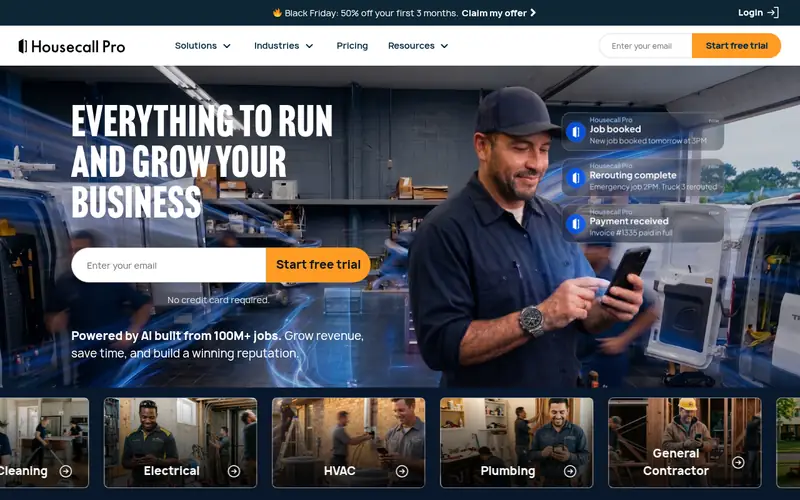
Housecall Pro is built for home service businesses, and locksmiths fit that model. Technicians use the mobile app to see jobs, record time and close out work, while the office tracks schedules and invoices from the same system. Payments can be collected in the field. Plans are tiered, and the vendor pricing page lists current rates. A free trial is available; there is no free plan. The main limit is cost and setup effort. A one-person locksmith shop may find it heavier than needed, while a shop with several technicians and a dispatcher gets more value from the combined scheduling, time and payment tools.

Free plan: Free trial (14 days)

Website: housecallpro.com

Strengths

  • Mobile app for field technicians
  • Job tracking with invoicing and payments

Watch out for

  • Priced for growing service businesses
  • Setup takes time to configure
7

TimeCamp

Locksmiths who want automatic time tracking and job reports
See vendor pricing page
timecamp.comHomepage, Nov 2026
TimeCamp homepage

TimeCamp records time automatically in the background and also supports manual timers, which can help a locksmith capture hours without stopping to start a clock. Entries can be grouped by client or project, and reports show hours per job for billing. A free plan covers basic tracking for a small team, and paid tiers add reporting and integrations. The vendor pricing page lists current rates. TimeCamp is not a dispatch or invoicing tool, so it works best as the time layer beside other software. A locksmith who needs job scheduling and customer records in the same app should look at Jobber or Housecall Pro instead.

Free plan: Yes

Website: timecamp.com

Strengths

  • Automatic tracking alongside manual timers
  • Reports by client and project

Watch out for

  • Fewer field service features
  • Mobile experience is simpler than dedicated apps

Pre-purchase checklist

  • Confirm the app works on the phones your technicians carry, including offline clock-in.
  • Check whether time entries can be tied to a specific job or customer for billing.
  • Compare per-user pricing against your current crew size and expected growth.
  • Verify how hours export to your payroll or accounting software.
  • Read the free plan limits on users, locations and reporting before you commit.

FAQ

Do locksmiths need timesheet software or field service software?

It depends on how much admin you handle. A plain timesheet tool records hours and exports them for billing. Field service software adds scheduling, quotes and invoicing, which suits shops with several technicians and steady callout volume. Many locksmiths start with a time tracker and move up as the business grows.

Can technicians clock in from a customer's location?

Yes. QuickBooks Time, Connecteam, Homebase, Jobber and Housecall Pro all offer mobile clock-in, and some record location data with the entry. That helps confirm a technician was on site. Check each vendor's app details for the exact features on your plan.

Is there free timesheet software for a small locksmith business?

Clockify, Connecteam, Homebase and TimeCamp offer free plans with limits on features or team size. The free tiers cover basic time tracking, and paid plans add reporting, payroll and admin controls. Confirm current limits on each vendor's pricing page, since free plan terms change.

How much does timesheet software cost for a locksmith?

Most tools here charge per user per month, and rates are listed on vendor pricing pages. A one-person shop pays the least, while a multi-technician business pays more as users are added. Field service tools like Jobber and Housecall Pro cost more than plain time trackers but replace several separate tools.

Can timesheet software handle job costing for locksmith callouts?

Some can. Jobber and Housecall Pro tie hours to jobs and carry them into invoices. Clockify and TimeCamp group entries by client or project for reporting. QuickBooks Time connects hours to jobs and customers inside QuickBooks. Match the tool to how you bill: per hour, per job or a mix of both.