How we rank
HR and Workforce · Researched comparison

Best Timesheet Software for Masonry Contractors in 2026

TaskReports may earn a fee from some links on this page, and some placements are paid and labelled. Neither one decides the order. See our disclosure.

The short answer

QuickBooks Time is the first pick for masonry contractors who already use QuickBooks for payroll and job costing, because hours flow into the same system. ClockShark suits crews that need GPS and job-site geofencing to confirm where hours were worked. busybusy is a strong alternative for contractors who want photo-verified time and equipment tracking alongside crew hours.

On this page

Key takeaways

  • QuickBooks Time leads for masonry crews that already run QuickBooks payroll and job costing.
  • ClockShark and busybusy focus on GPS and job-site time capture for field crews.
  • Entry prices range from free tiers for small crews to per-user monthly plans for larger operations.
  • Certified payroll and prevailing-wage support narrows the list to a few products.

Quick comparison

ToolBest fitStarting price
QuickBooks TimeMasonry crews already using QuickBooks payrollSee vendor pricing page
ClockSharkField crews needing GPS and geofenced job sitesSee vendor pricing page
busybusyCrews wanting photo-verified time and equipment logsSee vendor pricing page
HomebaseSmall masonry crews needing free scheduling and time clocksSee vendor pricing page
ConnecteamCrews wanting time clock plus team communicationSee vendor pricing page
ExakTimeMid-size crews needing rugged job-site time captureSee vendor pricing page
Timesheets.comSmall contractors wanting simple hourly trackingSee vendor pricing page

How we chose

We selected products based on fit for masonry crews: mobile time capture, job costing, payroll support, and field features such as GPS or photo verification. We also weighed entry price, free plan availability, and main limits. Sources are vendor websites and public documentation. Prices change, so confirm current rates on each vendor's pricing page before buying.

★ Best overall

QuickBooks Time

Masonry crews already using QuickBooks payroll

  • Hours flow into QuickBooks payroll and job costing
  • Mobile app with GPS and job codes
PriceSee vendor pricing page
See QuickBooks Time pricing
quickbooks.intuit.comHomepage, Nov 2026
QuickBooks Time homepage

QuickBooks Time handles crew clock-in from phones or a shared kiosk, and each entry can carry a job or customer code. For masonry contractors, that means hours can be split across multiple job sites in a day and reported by job. Because it connects to QuickBooks Online and Desktop, approved timesheets move into payroll without re-entry. Plan structure is per-user monthly billing, and the vendor publishes current rates on its pricing page. GPS and job costing features sit on higher tiers, so small crews may find the entry tier enough while larger operations need the mid or top plan. Contractors who do not use QuickBooks should compare standalone options before committing, since much of the value comes from the integration.

Price: See vendor pricing page

Free plan: Free trial (30 days)

Website: quickbooks.intuit.com/time-tracking

Watch out for

  • Full features require a paid plan
  • Best value only inside the QuickBooks ecosystem
2

ClockShark

Field crews needing GPS and geofenced job sites
See vendor pricing page
ClockSharkHomepage image unavailable

ClockShark is built for construction and field service crews, and masonry fits that profile well. Workers clock in from a mobile app, and the system can record location at clock-in and clock-out. Geofences let a supervisor confirm that a clock-in happened at the correct job site. Timesheets can be assigned to jobs and tasks, which supports job costing for masonry projects that span several addresses. Payroll exports cover common providers, and the vendor documents integrations on its site. The tradeoff is price: GPS and scheduling features sit on higher tiers, and the per-user cost adds up for larger crews. Small masonry outfits with one or two crews may find a simpler tool cheaper.

Free plan: Free trial (14 days)

Website: clockshark.com

Strengths

  • GPS tracking and geofence alerts for job sites
  • Job costing and payroll exports

Watch out for

  • GPS features cost more per user
  • No free plan after the trial
3

busybusy

Crews wanting photo-verified time and equipment logs
See vendor pricing page
busybusy.comHomepage, Nov 2026
busybusy homepage

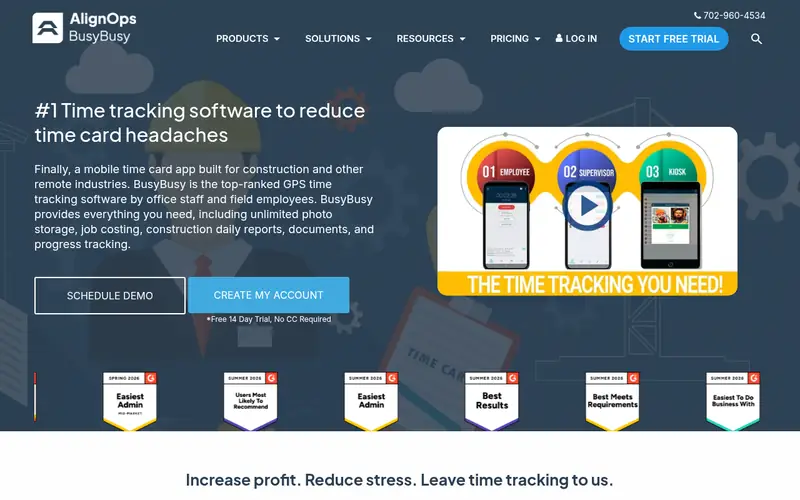
busybusy targets construction contractors, and its time clock supports photo verification so a supervisor can confirm who is on site. For masonry work, that helps with crews spread across multiple jobs and with documenting attendance. Time entries can be tied to jobs and cost codes, which feeds job costing reports. The product also tracks equipment hours, which suits masonry contractors who run mixers, lifts, or trucks and want those hours logged alongside labor. The vendor positions the app for field crews and offers a mobile-first interface. Pricing is not always listed publicly, so small contractors should request a quote and compare it against per-user plans from competitors before deciding.

Free plan: Free trial (See vendor for length)

Website: busybusy.com

Strengths

  • Photo verification on clock-in
  • Equipment and job cost tracking in one app

Watch out for

  • Feature set can feel heavy for small crews
  • Pricing is quote-based for some plans
4

Homebase

Small masonry crews needing free scheduling and time clocks
See vendor pricing page
joinhomebase.comHomepage, Nov 2026
Homebase homepage

Homebase offers a free tier that covers employee scheduling, a time clock, and basic timesheets. For a small masonry contractor with a handful of workers, that can be enough to replace paper time cards. Employees clock in from a phone or a shared device, and hours feed into timesheet reports. Paid plans add payroll, hiring, and HR features, and the vendor publishes plan details on its site. The tool is less focused on construction job costing than ClockShark or busybusy, so contractors who need to allocate hours to many job codes should check whether the job tracking meets their needs. It fits best as a low-cost starting point for crews that mainly need accurate hours and scheduling.

Free plan: Yes

Website: joinhomebase.com

Strengths

  • Free plan covers scheduling and time clock basics
  • Simple setup for small crews

Watch out for

  • Advanced payroll and HR features cost extra
  • Limited job costing depth
5

Connecteam

Crews wanting time clock plus team communication
See vendor pricing page
connecteam.comHomepage, Nov 2026
Connecteam homepage

Connecteam combines a mobile time clock, scheduling, and team communication in one app. Masonry crews can clock in from a phone, and supervisors can see who is on shift. The free plan supports a small number of users, which the vendor documents on its pricing page, making it a practical entry point for a new crew. The platform also includes forms and checklists, which can be used for daily site reports or safety checks. Job tracking exists but is not as deep as dedicated construction time tools, so contractors with complex job costing needs should compare carefully. It suits crews that value communication and simple time capture over detailed cost-code reporting.

Free plan: Yes

Website: connecteam.com

Strengths

  • Free plan for small businesses with time clock and scheduling
  • Built-in team chat and forms

Watch out for

  • Construction-specific job costing is limited
  • Advanced features require paid tiers
6

ExakTime

Mid-size crews needing rugged job-site time capture
See vendor pricing page
ExakTimeHomepage image unavailable

ExakTime, part of Arcoro, focuses on construction time and attendance. It supports mobile clock-in and rugged time clocks that can sit on a job site, which fits masonry crews who want a fixed clock rather than phones. Time can be assigned to jobs and cost codes for job costing. The system is aimed at mid-size contractors, and pricing is quote-based. There is no free plan, so smaller crews should weigh the cost against simpler per-user tools. Payroll integration and reporting are documented on the vendor site. It is a reasonable fit for a masonry business with several crews and a need for durable on-site time capture, but it is more than a two-person crew needs.

Free plan: No

Website: exaktime.com

Strengths

  • Durable clock-in options for job sites
  • Job costing and payroll integration

Watch out for

  • No free plan
  • Hardware options add cost
7

Timesheets.com

Small contractors wanting simple hourly tracking
See vendor pricing page
Timesheets.comHomepage image unavailable

Timesheets.com is a general time and expense tracking tool. Masonry contractors can use it to record hours by project and client, and to track reimbursable expenses. It supports overtime rules and exports for payroll, which covers the basics for a small office. It does not offer GPS, geofencing, or photo verification, so it fits contractors who mainly need accurate hours and project billing rather than field verification. Pricing is per user and published on the vendor site. For a masonry business with office staff and a few crews that report hours manually or through a simple clock, it can be a low-complexity option.

Free plan: Free trial (See vendor for length)

Website: timesheets.com

Strengths

  • Straightforward time and expense tracking
  • Supports project and client billing

Watch out for

  • Limited construction-specific features
  • No free plan

Pre-purchase checklist

  • Confirm the tool supports job or cost-code tracking for multiple masonry job sites.
  • Check whether GPS, geofencing, or photo verification is included or costs extra.
  • Verify payroll export formats match your payroll provider.
  • Ask whether certified payroll or prevailing-wage reporting is supported if you take public work.
  • Compare per-user pricing at your actual crew size, including seasonal peaks.

FAQ

What is the best timesheet software for masonry contractors?

QuickBooks Time is the strongest fit for contractors already using QuickBooks. ClockShark and busybusy are better when you need GPS or photo verification for field crews.

Do masonry timesheet tools include job costing?

Many do. QuickBooks Time, ClockShark, busybusy, and ExakTime let you assign hours to jobs or cost codes, which supports job costing. Simpler tools like Homebase focus on hours and scheduling.

Is there free timesheet software for small masonry crews?

Homebase and Connecteam offer free plans with limits on users and features. Check the vendor pricing page for current limits before relying on a free tier.

Can these tools handle certified payroll?

Some construction-focused tools support certified payroll reporting. Confirm with the vendor before bidding public work, since support varies by plan.

How much does timesheet software cost for a masonry crew?

Prices vary by user count and features. Many vendors publish per-user monthly rates, while others quote by request. Confirm current pricing on the vendor site.