How we rank
HR and Workforce · Researched comparison

Best Timesheet Software for Modular Builders in 2026

TaskReports may earn a fee from some links on this page, and some placements are paid and labelled. Neither one decides the order. See our disclosure.

The short answer

Clockify is the first pick for modular builders who want a free start with unlimited users and simple project time tracking. QuickBooks Time fits shops that already run QuickBooks payroll and billing. Hubstaff is the better fit for crews working across factory and site locations who need GPS and activity data on mobile.

On this page

Key takeaways

  • Clockify has a free plan for unlimited users and suits modular builders who need to start at no cost.
  • QuickBooks Time starts at $20 per month plus $40 per month for a base user, per the vendor page.
  • Hubstaff and Jibble both offer free plans, while most other tools here offer trials only.
  • Modular builders should check mobile GPS, offline entry and job costing before choosing.

Quick comparison

ToolBest fitStarting price
ClockifyFree time tracking for large factory and site crewsSee vendor pricing page
QuickBooks TimeModular shops already using QuickBooks for payroll$20 per month plus $40 per month per base user
HubstaffCrews split between factory and remote site workSee vendor pricing page
JibbleSimple clock-in for factory and site teamsSee vendor pricing page
Toggl TrackProject time tracking for design and build teamsSee vendor pricing page
HarvestBuilders who bill clients by the hourSee vendor pricing page
TimeCampAutomatic time capture for office and shop staffSee vendor pricing page
ClickTimeLarger modular firms needing approvals and cost controlsSee vendor pricing page

How we chose

We picked tools that support project time tracking, mobile entry and reporting for crews that split time between a factory and a build site. We compared entry prices, free plan availability and main limits using vendor pricing pages and public documentation. We did not run hands-on tests or collect user reviews. Prices and plan limits change, so confirm current details on each vendor site.

Best overall

Clockify

Free time tracking for large factory and site crews

  • Free plan for unlimited users
  • Timesheets and project tracking in one place
PriceSee vendor pricing page
See Clockify pricing
clockify.meHomepage, Nov 2026
Clockify homepage

Clockify works for modular builders because a single project can hold many tasks, such as panel framing, wiring and transport. Crews log hours on the web or mobile app, and managers review timesheets by project and client. The free plan covers unlimited users and basic reporting, which suits small shops tracking hours without a payroll link. Paid tiers add admin controls, invoicing and more detailed reports. The tool does not handle construction-specific payroll or certified payroll out of the box, so builders with union or prevailing wage work should check the paid plans or pair it with payroll software. Skip it if you need deep job costing tied to purchase orders.

Price: See vendor pricing page

Free plan: Yes

Website: clockify.me

Watch out for

  • Advanced features sit on paid tiers
  • Limited job costing depth
2

QuickBooks Time

Modular shops already using QuickBooks for payroll

$20 per month plus $40 per month per base user
quickbooks.intuit.comHomepage, Nov 2026
QuickBooks Time homepage

QuickBooks Time is a strong fit for modular builders who already run payroll or billing in QuickBooks. Time entries flow into payroll and invoices, which cuts manual re-entry for factory staff and site installers. Mobile GPS and job codes let supervisors confirm where hours were worked, which matters when crews split time between the plant and the build site. The vendor lists a base price of $20 per month plus $40 per month for one base user, with additional users priced separately. There is a 30-day trial but no free plan. Small shops with a handful of workers may find the cost hard to justify, and firms outside the QuickBooks ecosystem get less value from the sync.

Free plan: Free trial (30 days)

Website: quickbooks.intuit.com/time-tracking

Strengths

  • Syncs with QuickBooks payroll and invoicing
  • GPS and job tracking on mobile

Watch out for

  • Per-user pricing adds up for large crews
  • No free plan
3

Hubstaff

Crews split between factory and remote site work
See vendor pricing page
hubstaff.comHomepage, Nov 2026
Hubstaff homepage

Hubstaff tracks time with GPS, screenshots and activity levels on desktop and mobile. For modular builders, that helps when installers work at scattered sites and managers need proof of location and hours. Projects, tasks and client budgets let you separate factory labor from site labor and bill each to the right job. The free plan exists but is limited, so most teams will need a paid tier for full reporting and payroll features. The monitoring tools are heavier than some crews will accept, so discuss them with staff before rollout. It suits firms with distributed site work more than a single factory floor.

Free plan: Yes

Website: hubstaff.com

Strengths

  • GPS and activity tracking on mobile
  • Supports multiple pay rates and projects

Watch out for

  • Activity monitoring can feel intrusive
  • Free plan limits features
4

Jibble

Simple clock-in for factory and site teams
See vendor pricing page
jibble.ioHomepage, Nov 2026
Jibble homepage

Jibble is a lightweight clock-in tool with a free plan for unlimited users. Modular builders can set up clock-in points for the factory and use mobile GPS for site crews. Timesheets export to payroll or spreadsheets, which covers basic hour collection without a heavy setup. The tool is thinner on job costing and project accounting than Clockify or QuickBooks Time. It suits small and mid-size builders who mainly need accurate clock-in and out data and will handle billing elsewhere. Check the paid tiers if you need advanced reports or integrations.

Free plan: Yes

Website: jibble.io

Strengths

  • Free plan for unlimited users
  • Face recognition and GPS clock-in

Watch out for

  • Limited job costing
  • Fewer integrations than larger tools
5

Toggl Track

Project time tracking for design and build teams
See vendor pricing page
toggl.comHomepage, Nov 2026
Toggl Track homepage

Toggl Track is a straightforward timer and reporting tool. For modular builders, it works well for design, estimating and project management staff who bill time to clients or phases. Reports break hours down by project, client and tag, which helps quote future modular builds. It does not handle payroll, scheduling or job costing, so field crews need a separate clock-in tool. The free plan covers basic tracking for small teams. Larger firms will want a paid tier for more report options and admin controls. Skip it if you need one system for payroll and time.

Free plan: Yes

Website: toggl.com/track

Strengths

  • Clean, fast timer on web and mobile
  • Good project and client reports

Watch out for

  • No payroll or invoicing built in
  • Limited construction-specific features
6

Harvest

Builders who bill clients by the hour
See vendor pricing page
getharvest.comHomepage, Nov 2026
Harvest homepage

Harvest combines time tracking with invoicing and project budgets. Modular builders who bill clients for design, fabrication or installation hours can track time against a project and turn it into an invoice. Budget alerts show when a job is running over, which helps protect margins on fixed-scope builds. There is a 30-day trial but no free plan, and pricing is per seat. That makes it a better fit for smaller teams or office staff than for large field crews. It does not offer GPS or construction payroll, so pair it with a field clock-in tool if site labor is a big part of your hours.

Free plan: Free trial (30 days)

Website: getharvest.com

Strengths

  • Time tracking tied to invoicing
  • Clear project budgets and reports

Watch out for

  • No free plan
  • Per-seat pricing grows with the team
7

TimeCamp

Automatic time capture for office and shop staff
See vendor pricing page
timecamp.comHomepage, Nov 2026
TimeCamp homepage

TimeCamp records time automatically on desktop and lets staff fill gaps in timesheets. For modular builders, it suits estimators, engineers and office staff whose hours are spread across several projects. Reports cover project budgets and profitability, which helps compare actual hours to estimates on each build. The automatic capture works best for computer-based work and is less useful for factory or site crews. The free plan is limited to a small number of users, so growing teams need a paid tier. Check the vendor page for current limits before you commit.

Free plan: Yes

Website: timecamp.com

Strengths

  • Automatic activity-based time tracking
  • Budget and profitability reports

Watch out for

  • Automatic tracking can misread tasks
  • Field features are limited
8

ClickTime

Larger modular firms needing approvals and cost controls
See vendor pricing page
clicktime.comHomepage, Nov 2026
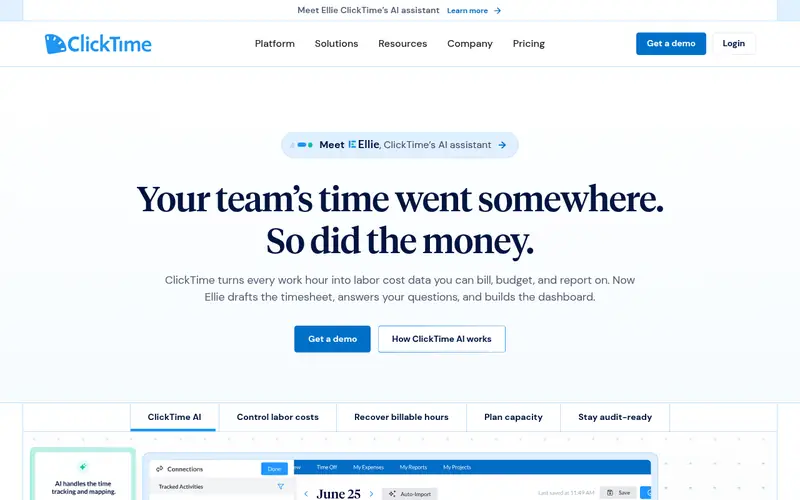
ClickTime homepage

ClickTime is built for timesheet approvals, expense tracking and project reporting. A modular builder with several crews and managers can route timesheets through approval steps, lock periods after payroll and report hours by project, client and phase. That structure suits firms with formal processes and multiple job sites. There is a 14-day trial but no free plan, and the setup takes more admin time than lighter tools. Small shops may find it heavier than they need. It fits larger builders who want control over who submits, who approves and how hours roll into job cost reports.

Free plan: Free trial (14 days)

Website: clicktime.com

Strengths

  • Strong timesheet approvals and expense tracking
  • Detailed project and client reporting

Watch out for

  • No free plan
  • Setup takes more admin effort

Which timesheet software for modular builders should I use if my crews work on scattered sites?

Start with Hubstaff, which combines mobile GPS with project time tracking. If you mainly need free clock-in, Jibble covers unlimited users on its free plan. If you already run QuickBooks, QuickBooks Time keeps payroll and job hours together. If you bill clients by the hour for design or installation, Harvest ties tracked time to invoices.

Is Clockify better than QuickBooks Time for timesheet software for modular builders?

Clockify is better if you want a free start for unlimited users and simple project tracking. QuickBooks Time is better if you already use QuickBooks and need hours to flow into payroll and invoicing. Clockify has no construction payroll features, while QuickBooks Time charges per user and has no free plan.

Pre-purchase checklist

  • Confirm the tool tracks time by project, client and phase, not just by employee.
  • Check mobile GPS and offline entry if crews work on remote sites.
  • Ask whether timesheets export to your payroll or accounting system.
  • Review free plan limits on users, projects and report history.
  • Test approval workflows if managers must sign off before payroll runs.

FAQ

What is the best timesheet software for modular builders with a free plan?

Clockify and Jibble both offer free plans. Clockify covers unlimited users with project tracking, and Jibble covers unlimited users with clock-in and GPS. Both limit advanced reports and admin features on the free tier, so check the paid plans if you need payroll exports or job costing.

Can timesheet software track hours across factory and site work?

Yes, if the tool supports multiple projects and mobile entry. Hubstaff and QuickBooks Time add GPS so you can confirm where hours were logged. Clockify and Toggl Track separate hours by project and client, which helps split factory labor from installation labor on each build.

Do modular builders need construction-specific timesheet software?

Not always. General tools like Clockify and Harvest cover project time tracking and billing. Construction-specific needs such as certified payroll, union rules or deep job costing may require a dedicated construction platform or a payroll add-on. List your payroll and reporting needs before comparing tools.

How much does timesheet software for modular builders cost?

Prices vary by user count and features. QuickBooks Time lists $20 per month plus $40 per month for a base user. Other vendors publish tiered pricing on their sites. Many offer free plans or trials, so start there and confirm current prices on the vendor page before you buy.

Can these tools handle client billing for modular projects?

Harvest and QuickBooks Time connect tracked hours to invoices. Clockify offers invoicing on paid tiers. Toggl Track and Jibble focus on tracking and reporting, so you export hours to your billing system. Match the tool to how you bill: hourly, fixed price or progress payments.