How we rank
HR and Workforce · Researched comparison

Best Timesheet Software for Pest Control Companies in 2026

TaskReports may earn a fee from some links on this page, and some placements are paid and labelled. Neither one decides the order. See our disclosure.

The short answer

Connecteam is the best starting point for most pest control companies. It offers mobile clock-in, GPS tracking and job scheduling at a low per-user price, which fits technicians who move between sites all day. QuickBooks Time is the better fit if your payroll and invoicing already run in QuickBooks. Housecall Pro or Jobber make more sense if you want timesheets tied directly to dispatch, work orders and customer billing in a single field service platform.

On this page

Key takeaways

  • Connecteam is the first pick for pest control crews that need cheap per-user time tracking with GPS and job scheduling on mobile.
  • QuickBooks Time suits firms already running payroll and invoicing in QuickBooks, with timesheets that feed job costing.
  • Housecall Pro and Jobber bundle timesheets with field service scheduling, dispatch and client billing in one tool.
  • Entry prices below are published list prices as of 2025-2026; confirm current rates on each vendor page before you buy.

Quick comparison

ToolBest fitStarting price
ConnecteamMobile crews needing cheap GPS time tracking and schedulingSee vendor pricing page
QuickBooks TimeFirms already using QuickBooks for payroll and invoicingSee vendor pricing page
Housecall ProPest control firms wanting scheduling, dispatch and billing in one toolSee vendor pricing page
JobberSmall pest control teams needing quotes, scheduling and time trackingSee vendor pricing page
ClockifyBudget-conscious firms needing simple billable hour trackingSee vendor pricing page
HubstaffFirms wanting GPS tracking and activity monitoring for field staffSee vendor pricing page
TimeCampSmall firms tracking billable hours by client and jobSee vendor pricing page

How we chose

We picked tools that support the way pest control companies track hours: mobile clock-in, job and client costing, and links to scheduling or billing. Criteria were fit for the use case, published entry price, free access, and the main limits on lower tiers. Sources are vendor websites and public documentation. Prices change, so confirm current rates on each vendor's pricing page before you buy. We did not run hands-on tests or collect user reviews.

★ Best overall

Connecteam

Mobile crews needing cheap GPS time tracking and scheduling

  • GPS clock-in on mobile
  • built-in job scheduling and task lists
PriceSee vendor pricing page
See Connecteam pricing
connecteam.comHomepage, Nov 2026
Connecteam homepage

Connecteam is built around mobile workers, which suits pest control technicians who clock in at a customer site rather than an office. Staff can start and stop shifts on a phone, and the GPS stamp records where the clock-in happened. Job scheduling and task lists let dispatchers assign treatments and inspections to the right technician. The platform splits into modules for time tracking, scheduling and communication, so a small firm can start with time tracking and add scheduling later. Pricing is per user, and the entry tier covers basic time clock and scheduling. Larger firms that need geofencing, custom reports or payroll exports should check which tier includes those features. Skip it if you need deep accounting integration out of the box.

Price: See vendor pricing page

Free plan: Free trial (14 days)

Website: connecteam.com

Watch out for

  • Advanced features sit on higher tiers
  • small free tier for very small teams
2

QuickBooks Time

Firms already using QuickBooks for payroll and invoicing

See vendor pricing page
quickbooks.intuit.comHomepage, Nov 2026
QuickBooks Time homepage

QuickBooks Time tracks hours by employee, customer and job, which maps well to pest control work where each visit is billed to a client. Technicians clock in from a mobile app, and the hours can be attached to a specific job or service call. For firms already running payroll and invoicing in QuickBooks, the timesheet data moves across without re-entry. The tool supports GPS tracking and geofencing on mobile, so managers can confirm a technician was on site. Scheduling and time-off requests are included. The main limit is that the value depends on staying in the QuickBooks stack; firms using other accounting software get less benefit. Pricing is per user per month, and the entry tier covers basic time tracking.

Free plan: Free trial (30 days)

Website: quickbooks.intuit.com/time-tracking

Strengths

  • Timesheets flow into QuickBooks payroll
  • job and customer tracking

Watch out for

  • Best value only inside the QuickBooks ecosystem
  • per-user pricing adds up
3

Housecall Pro

Pest control firms wanting scheduling, dispatch and billing in one tool
See vendor pricing page
housecallpro.comHomepage, Nov 2026
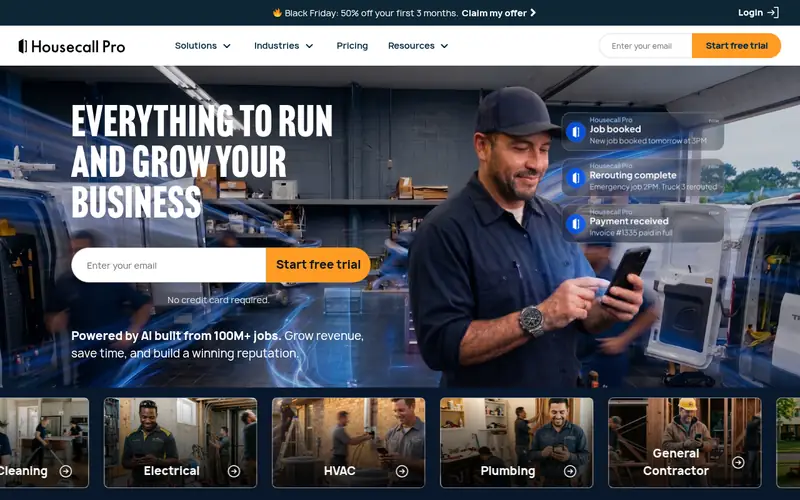
Housecall Pro homepage

Housecall Pro is a field service platform that combines scheduling, dispatch, job tracking and invoicing. For pest control companies, the useful part is that a technician's hours attach to a specific job, and that job becomes an invoice to the customer. The dispatch board shows the day's routes and lets office staff reassign visits. Time tracking is part of the job workflow rather than a separate module, so payroll hours and billable hours come from the same record. The platform is priced per company with user limits on lower tiers, which matters if you have a large technician team. It suits firms that want one system for scheduling and billing. Skip it if you only need a simple time clock and already have dispatch covered.

Free plan: Free trial (14 days)

Website: housecallpro.com

Strengths

  • Timesheets tied to jobs and invoices
  • dispatch board for routes

Watch out for

  • Higher entry cost than standalone time trackers
  • full features need upper tiers
4

Jobber

Small pest control teams needing quotes, scheduling and time tracking
See vendor pricing page
JobberHomepage image unavailable

Jobber covers quoting, scheduling, dispatching, time tracking and invoicing for small service businesses, including pest control. A technician clocks in when arriving at a property, and the time links to the visit and the client record. Office staff can see which jobs are running long and adjust the schedule. The entry plan has a user limit, so a growing crew may need to move up a tier. Time tracking is included in the core workflow rather than sold as a separate add-on. Jobber suits firms that want a single app for both field staff and office staff. It is less suited to companies that need detailed project accounting or complex payroll rules.

Free plan: Free trial (14 days)

Website: getjobber.com

Strengths

  • Clean mobile app for technicians
  • time tracking linked to visits and invoices

Watch out for

  • User limits on entry plan
  • advanced reporting on higher tiers
5

Clockify

Budget-conscious firms needing simple billable hour tracking
See vendor pricing page
clockify.meHomepage, Nov 2026
Clockify homepage

Clockify is a time tracking tool with a generous free plan that allows unlimited users on the basic tier. For a pest control company, that means technicians and office staff can log hours against clients and jobs at no cost on the entry plan. Billable rates and reports help turn hours into client invoices. The trade-off is that Clockify is not a field service platform. It does not handle dispatch, route planning or work orders. Firms that need those features should pair it with a scheduling tool or choose a platform like Jobber. Clockify fits small firms that mainly want to record hours by client and job and export them for billing.

Free plan: Yes

Website: clockify.me

Strengths

  • Free plan for unlimited users
  • billable hours and client tracking

Watch out for

  • No field service scheduling
  • GPS and job dispatch are not core features
6

Hubstaff

Firms wanting GPS tracking and activity monitoring for field staff
See vendor pricing page
hubstaff.comHomepage, Nov 2026
Hubstaff homepage

Hubstaff focuses on time tracking with GPS and location data, which can help a pest control company confirm technician locations and travel time between sites. Timesheets can be assigned to projects and clients, so billable hours are easy to separate from internal work. The platform also offers screenshots and activity monitoring, which some field teams may find excessive. Pricing is per user, and the entry tier covers basic tracking with limits on features like scheduling and payroll. It suits firms that want location-verified hours and are comfortable with per-user costs. It is not a dispatch or work order system.

Free plan: Free trial (14 days)

Website: hubstaff.com

Strengths

  • GPS and location tracking for mobile staff
  • timesheets tied to projects and clients

Watch out for

  • Per-user pricing on all paid tiers
  • monitoring features may feel heavy for some crews
7

TimeCamp

Small firms tracking billable hours by client and job
See vendor pricing page
timecamp.comHomepage, Nov 2026
TimeCamp homepage

TimeCamp records time against clients, projects and tasks, which fits pest control firms that bill by the job or the hour. The free plan covers a small number of users, enough for a very small crew or an office team. Automatic tracking can capture time on desktop, and mobile and manual entry cover field staff. The tool is lighter on field service features than Housecall Pro or Jobber. It does not handle dispatch, routes or work orders. TimeCamp suits firms that mainly need accurate billable hour records and simple reports. Larger crews and firms needing payroll integration should compare paid tiers or look at QuickBooks Time.

Free plan: Yes

Website: timecamp.com

Strengths

  • Free plan for small teams
  • automatic time tracking options

Watch out for

  • Limited field service features
  • advanced billing on paid tiers

Pre-purchase checklist

  • Confirm the tool tracks hours by client and job, not just by employee, so you can bill treatments accurately.
  • Check whether mobile clock-in includes GPS or geofencing if you need to verify technician locations.
  • Compare the per-user price against your technician count, since costs scale with crew size.
  • Verify how timesheet data reaches payroll or invoicing, and whether it needs a separate integration.
  • Read the entry-tier limits on users, scheduling and reports before assuming the base price covers your needs.

FAQ

What is the best timesheet software for pest control companies?

Connecteam is a strong first pick for mobile crews because it combines GPS clock-in with job scheduling at a low per-user price. QuickBooks Time fits firms already using QuickBooks, and Housecall Pro or Jobber suit companies that want timesheets tied to dispatch and billing.

Do pest control timesheet tools include GPS tracking?

Some do. Connecteam, QuickBooks Time and Hubstaff offer GPS or location tracking on mobile. Clockify and TimeCamp focus on manual and automatic time entry and are lighter on location features. Check the plan tier, since GPS is sometimes limited to higher tiers.

Can I track billable hours by customer and job?

Yes, most tools here support that. QuickBooks Time, Housecall Pro, Jobber, Clockify and TimeCamp let you assign hours to a client or job. That makes it easier to turn technician time into accurate invoices for each treatment or inspection visit.

Is there a free option for a small pest control company?

Clockify has a free plan for unlimited users on its basic tier, and TimeCamp has a free plan for a small number of users. Connecteam, QuickBooks Time, Housecall Pro, Jobber and Hubstaff offer free trials rather than permanent free plans. Confirm current limits on each vendor page.

Do these tools handle payroll for field technicians?

QuickBooks Time is the strongest fit if you run payroll in QuickBooks, since hours flow into payroll directly. Connecteam and Hubstaff offer payroll-related features on paid tiers. Housecall Pro and Jobber focus on job billing rather than payroll, so check integrations before relying on them for payroll.