How we rank
HR and Workforce · Researched comparison

Best Timesheet Software for Pet Sitters in 2026

TaskReports may earn a fee from some links on this page, and some placements are paid and labelled. Neither one decides the order. See our disclosure.

The short answer

Time To Pet is the first pick for pet sitters who want scheduling, visit tracking, and client billing in one place. It is built for pet care businesses rather than general office work. For a solo sitter who only needs a simple time log, Clockify offers a free plan with unlimited users. For sitters who invoice clients and want hours attached to bills, FreshBooks or Harvest are practical alternatives.

On this page

Key takeaways

  • Time To Pet is the most pet-specific pick, with scheduling, visit tracking, and client billing built for pet care businesses.
  • Clockify has a free plan for unlimited users and works well for solo sitters who only need simple time logs.
  • FreshBooks and Harvest pair time tracking with invoicing, which suits sitters who bill clients directly.
  • Most general tools track hours but not pet visits, so check whether you need scheduling and client records too.

Quick comparison

ToolBest fitStarting price
Time To PetPet sitters who need scheduling, visit notes, and client billing in one appSee vendor pricing page
ClockifySolo sitters and small teams who need a free, simple time logSee vendor pricing page
FreshBooksSitters who bill clients by the hour and want simple invoicingSee vendor pricing page
HarvestSitters who want clean time reports and client invoicingSee vendor pricing page
Toggl TrackSitters who want fast one-tap timers on phone and desktopSee vendor pricing page
HubstaffPet care teams that need timesheets plus location and activity recordsSee vendor pricing page

How we chose

We picked tools that fit two pet sitter needs: pet-specific scheduling and visit records, and general time tracking that can feed invoices or payroll. Criteria were fit for the use case, published entry price, free access, and main limits. Sources are vendor websites and public documentation. Prices and plan limits change, so confirm details on the vendor site before buying.

Best overall

Time To Pet

Pet sitters who need scheduling, visit notes, and client billing in one app

  • Built for pet care businesses
  • combines scheduling, visit tracking, and invoicing
PriceSee vendor pricing page
See Time To Pet pricing
timetopet.comHomepage, Nov 2026
Time To Pet homepage

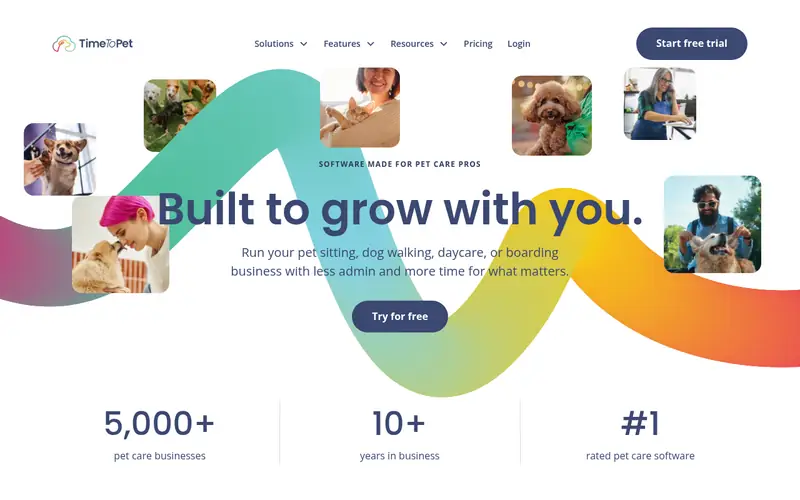
Time To Pet is designed for dog walkers, pet sitters, and pet care companies. It handles scheduling, GPS-tracked visits, visit reports, client and pet records, and invoicing. For timesheet purposes, staff clock in and out of visits, and the app records start and end times per visit. Owners can review visit history and hours per client. The plan structure is quote-based, so the entry price is not listed as a fixed number on the public site. That makes it harder to compare on price alone. A solo sitter with a handful of clients may find the feature set larger than needed. Sitters who manage several staff members and need proof of visit times are the better fit. Confirm current plan details and trial terms on the vendor site before signing up.

Price: See vendor pricing page

Free plan: Free trial (14 days)

Website: timetopet.com

Watch out for

  • Pricing is not published as a simple entry rate
  • more features than a solo sitter may need
2

Clockify

Solo sitters and small teams who need a free, simple time log

See vendor pricing page
clockify.meHomepage, Nov 2026
Clockify homepage

Clockify is a general time tracking tool. A pet sitter can create a project per client, start a timer at the beginning of a visit or walk, and stop it at the end. Reports show total hours per client and per week, which helps with billing and with tracking your own working time. The free plan covers unlimited users and basic tracking, which suits a solo sitter or a small team. Paid tiers add features such as invoicing and more detailed reporting. Clockify does not store pet records, visit notes, or schedules, so it works best as a time log that sits next to a separate scheduling method. Sitters who want one app for scheduling and visit reports should look at a pet-specific tool instead. Check the current free plan limits on the vendor site.

Free plan: Yes

Website: clockify.me

Strengths

  • Free plan supports unlimited users
  • simple start and stop timer with reports

Watch out for

  • No pet-specific scheduling or visit reports
  • client billing needs another tool
3

FreshBooks

Sitters who bill clients by the hour and want simple invoicing
See vendor pricing page
freshbooks.comHomepage, Nov 2026
FreshBooks homepage

FreshBooks is small-business accounting software with time tracking built in. A pet sitter can set up a client, track hours against that client, and add the hours to an invoice. This suits sitters who charge hourly for visits or walks and send regular bills. Lower plans limit the number of billable clients, so a sitter with many one-off clients should check the limits before choosing a tier. FreshBooks does not handle visit scheduling, pet records, or route planning. It is a billing and time tool, not a pet care operations tool. Confirm the current plan limits, entry price, and trial terms on the vendor site.

Free plan: Free trial (30 days)

Website: freshbooks.com

Strengths

  • Built-in invoicing with billable time
  • simple client and project setup

Watch out for

  • Client limits on lower plans
  • no pet care scheduling features
4

Harvest

Sitters who want clean time reports and client invoicing
See vendor pricing page
getharvest.comHomepage, Nov 2026
Harvest homepage

Harvest is time tracking and invoicing software. Users log time against clients and projects, then turn tracked hours into invoices. For a pet sitter, a project per client or per service type keeps hours organized, and reports show how much time each client takes. Harvest has no free plan, only a trial, and pricing is per seat. A solo sitter pays for one seat, which is manageable, but a growing team pays more with each added person. The tool has no scheduling, visit notes, or pet records. It fits sitters who want a focused time and billing tool and who already handle scheduling elsewhere. Check the current per-seat price and trial length on the vendor site.

Free plan: Free trial (30 days)

Website: getharvest.com

Strengths

  • Clear timesheet views and reports
  • invoicing from tracked time

Watch out for

  • No free plan
  • per-seat pricing adds up for teams
5

Toggl Track

Sitters who want fast one-tap timers on phone and desktop
See vendor pricing page
toggl.comHomepage, Nov 2026
Toggl Track homepage

Toggl Track is a time tracking tool with apps for phone, desktop, and browser. A pet sitter can start a timer when a visit begins and stop it at the end, tagging entries by client. Reports summarize hours per client and per period. The free plan suits a solo sitter who tracks time alone. Team features and more detailed reporting sit on paid plans. Toggl Track does not schedule visits or keep pet records, so it works as a standalone time log or alongside a scheduling tool. Sitters who need invoices generated from hours should check whether the paid tiers cover that or pair it with billing software. Confirm current free plan limits on the vendor site.

Free plan: Yes

Website: toggl.com/track

Strengths

  • Simple timer across devices
  • free plan for solo use

Watch out for

  • Limited free features for teams
  • no pet-specific scheduling
6

Hubstaff

Pet care teams that need timesheets plus location and activity records
See vendor pricing page
hubstaff.comHomepage, Nov 2026
Hubstaff homepage

Hubstaff is workforce management software with time tracking, timesheets, GPS location, and activity monitoring. A pet care company with several sitters can use it to confirm visit times and locations and to build payroll-ready timesheets. The location features fit mobile pet care work, where staff move between client homes. The trade-off is cost and complexity. There is no free plan, only a trial, and the monitoring features are more than a solo sitter needs. Small teams that pay staff by the hour and want location records are the better fit. Confirm the current entry price, trial length, and plan limits on the vendor site.

Free plan: Free trial (14 days)

Website: hubstaff.com

Strengths

  • Timesheets with GPS and location data
  • good for multi-staff pet care teams

Watch out for

  • No free plan
  • activity monitoring is more than solo sitters need

Pre-purchase checklist

  • Confirm the tool records start and end times per visit, not just daily totals.
  • Check whether you need pet and client records, or only a time log.
  • Compare the free plan limits against your number of clients and staff.
  • Confirm whether tracked hours can become an invoice if you bill clients.
  • Check mobile app quality, since most pet sitting work happens away from a desk.

FAQ

Do pet sitters need special timesheet software?

Not always. A general time tracker works if you only need hours per client. Pet-specific software adds scheduling, visit notes, and client records, which helps when you manage staff or many visits per day.

Can I track time per pet or per client?

Most tools track time per client or project. Pet-specific tools like Time To Pet keep pet records alongside visits. General tools usually need one project per client to separate hours.

Is there free timesheet software for pet sitters?

Clockify and Toggl Track offer free plans for solo time tracking. Free plans usually limit team features and reporting. Check current limits on each vendor site, since free plan terms change.

How do pet sitters bill clients for hours?

Track hours per client in a time tool, then create an invoice from those hours. FreshBooks and Harvest support this directly. Others need a separate invoicing tool.

What about GPS and location tracking for staff?

Hubstaff and Time To Pet record location data with visits. This helps confirm staff arrived at a client's home. Solo sitters rarely need it, and it adds cost and setup time.



