How we rank
HR and Workforce · Researched comparison

Best Timesheet Software for Shopify Developers in 2026

TaskReports may earn a fee from some links on this page, and some placements are paid and labelled. Neither one decides the order. See our disclosure.

The short answer

Harvest is the first pick for Shopify developers who bill clients by the hour, because it combines time tracking with project budgets and invoicing. Toggl Track suits developers who want simple timers and a free plan. Clockify is the low-cost choice for teams that need unlimited users on a free tier. All three track hours per client and project.

On this page

Key takeaways

  • Harvest, Toggl Track and Clockify are the strongest fits for Shopify developers who bill clients by the hour.
  • Entry prices range from free plans at Clockify and Toggl Track to paid plans at Harvest and Tempo.
  • Most tools here track hours per project and task; only some add invoicing and billable-rate reporting.
  • Confirm current prices and free plan limits on each vendor page before you commit.

Quick comparison

ToolBest fitStarting price
HarvestFreelancers and studios billing Shopify clients hourlySee vendor pricing page
Toggl TrackSolo Shopify developers who want simple timersSee vendor pricing page

ClockifyTeams that want unlimited users on a free planSee vendor pricing page
HubstaffRemote Shopify teams tracking hours with activity dataSee vendor pricing page
TempoShopify teams already working inside JiraSee vendor pricing page
EverhourTeams tracking time inside project management toolsSee vendor pricing page
Time DoctorAgencies monitoring productivity on client store projectsSee vendor pricing page
PaymoSmall Shopify studios that want tracking and invoicing togetherSee vendor pricing page

How we chose

We picked tools that record time against clients and projects, which is the core need for Shopify developers billing store work. Criteria were fit for hourly client work, entry price, free access and main plan limits. Details come from vendor websites and public documentation. Prices and free plan limits change, so confirm them on the vendor site before buying.

Best overall

Harvest

Freelancers and studios billing Shopify clients hourly

  • Built-in invoicing and project budgets
  • tracks billable hours by client and task
PriceSee vendor pricing page
See Harvest pricing
getharvest.comHomepage, Nov 2026
Harvest homepage

Harvest is a time tracking and invoicing tool aimed at agencies and freelancers. For Shopify developers, the useful part is the link between tracked hours, project budgets and client invoices. You start a timer against a client and project, and Harvest rolls those hours into reports and invoices. Harvest offers a free trial and then paid plans billed per seat. It does not have a permanent free tier. Plan features differ, so check the vendor pricing page for current rates and seat limits. Skip Harvest if you only need a bare timer and never bill clients. It fits developers who invoice for store builds, theme work, app integrations and ongoing support hours.

Price: See vendor pricing page

Free plan: Free trial (30 days)

Website: getharvest.com

Watch out for

  • No permanent free plan
  • per-seat pricing adds up for larger teams
2

Toggl Track

Solo Shopify developers who want simple timers
See vendor pricing page
toggl.comHomepage, Nov 2026
Toggl Track homepage

Toggl Track is a dedicated time tracking tool. Shopify developers can set up clients and projects, then start timers from the web app, desktop or mobile. Reports group hours by client, project and tag, which helps when you split time between store builds and maintenance. Toggl Track has a free plan for individuals and small use, with paid plans for more features. The free plan has limits on features such as billable rates and saved reports. Confirm the current limits on the vendor page. Choose Toggl Track if you want low-friction timers and do your invoicing elsewhere. Skip it if you need invoicing inside the same tool.

Free plan: Yes

Website: toggl.com/track

Strengths

  • Fast one-click timers across web and mobile
  • clean reports by client and project

Watch out for

  • Invoicing is limited compared with Harvest
  • advanced features sit on paid plans

3

Clockify

Teams that want unlimited users on a free plan
See vendor pricing page
clockify.meHomepage, Nov 2026
Clockify homepage

Clockify is a time tracker with a free plan that supports unlimited users. For a Shopify development team, that means every developer can log hours without a per-seat cost on the free tier. You can mark hours as billable and group time by client and project. Paid plans add features such as more detailed reporting and admin controls. The free plan covers core tracking but has feature limits. Check the vendor pricing page for what each tier includes. Clockify suits small studios watching costs. Skip it if you want a minimal interface or need invoicing built in.

Free plan: Yes

Website: clockify.me

Strengths

  • Free plan with unlimited users
  • tracks billable hours and project time

Watch out for

  • Interface is dense
  • some reporting features are paid
4

Hubstaff

Remote Shopify teams tracking hours with activity data
See vendor pricing page
hubstaff.comHomepage, Nov 2026
Hubstaff homepage

Hubstaff combines time tracking with optional activity monitoring, screenshots and project budgets. A Shopify development agency with remote contractors can use it to see hours logged per client project and to check progress against budgets. Hubstaff uses a paid model with a free trial. Plans are billed per user, and features vary by tier. Confirm current pricing and trial length on the vendor site. Skip Hubstaff if your team objects to monitoring features. It fits agencies that want tracked hours plus oversight of remote work.

Free plan: Free trial (14 days)

Website: hubstaff.com

Strengths

  • Time tracking with optional activity and screenshot data
  • project budgets

Watch out for

  • Activity monitoring can feel intrusive
  • no permanent free plan
5

Tempo

Shopify teams already working inside Jira
See vendor pricing page
tempo.ioHomepage, Nov 2026
Tempo homepage

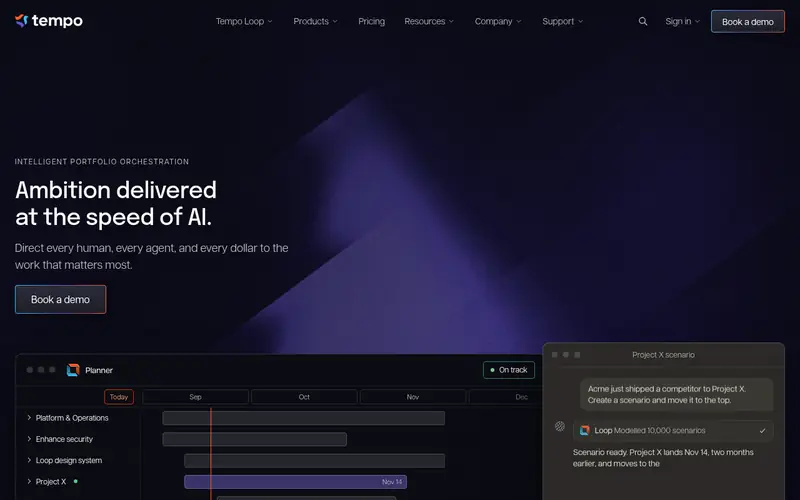
Tempo is a time tracking and timesheet app built for teams that work in Jira. A Shopify developer using Jira to manage store builds and app work can log hours directly against issues and pull timesheet reports per project. Tempo is a paid product with a free trial. Pricing depends on user count and the products you enable. Check the vendor pricing page for current rates. Choose Tempo only if Jira is central to your workflow. Skip it if you track work in other tools, since the value depends on the Jira connection.

Free plan: Free trial (30 days)

Website: tempo.io

Strengths

  • Timesheets built into Jira
  • ties hours to issues and projects

Watch out for

  • Tied to Jira
  • overkill for developers outside that stack
6

Everhour

Teams tracking time inside project management tools
See vendor pricing page
everhour.comHomepage, Nov 2026
Everhour homepage

Everhour adds time tracking and budgeting inside popular project management tools. A Shopify development team that plans work in Asana, Trello or similar tools can start timers without leaving those apps, then report hours by client and project. Everhour is paid, with a free trial. It bills per user, and some features depend on the plan and integrations. Confirm details on the vendor page. Skip Everhour if you do not use a supported project tool. It fits teams that want time tracking where their tasks already live.

Free plan: Free trial (14 days)

Website: everhour.com

Strengths

  • Embeds timers in tools like Asana and Trello
  • budget tracking per project

Watch out for

  • No permanent free plan
  • value depends on supported integrations
7

Time Doctor

Agencies monitoring productivity on client store projects
See vendor pricing page
timedoctor.comHomepage, Nov 2026
Time Doctor homepage

Time Doctor tracks time and adds productivity reporting, including optional screenshots and app usage data. A Shopify agency with distributed developers can group hours by client project and review how time is spent. Time Doctor is a paid tool with a free trial. Pricing is per user and varies by plan. Check the vendor pricing page for current rates and limits. Skip Time Doctor if you want lightweight tracking without monitoring. It suits agencies that need detailed oversight of remote hours.

Free plan: Free trial (14 days)

Website: timedoctor.com

Strengths

  • Detailed time and productivity reports
  • project and client grouping

Watch out for

  • Monitoring focus may not suit all teams
  • paid only
8

Paymo

Small Shopify studios that want tracking and invoicing together
See vendor pricing page
paymoapp.comHomepage, Nov 2026
Paymo homepage

Paymo bundles time tracking, task management and invoicing. A small Shopify development studio can track hours per client project, then turn billable time into invoices without a second tool. Paymo has a free plan with limits on users and features, plus paid tiers. Confirm the current free plan limits and paid prices on the vendor page. Choose Paymo if you want tracking and invoicing in one place and can work within its limits. Skip it if you only need a timer.

Free plan: Yes

Website: paymoapp.com

Strengths

  • Time tracking, tasks and invoicing in one tool
  • free plan for small teams

Watch out for

  • Free plan has user and feature limits
  • broader suite takes setup time

Which timesheet software for Shopify developers should I use if I bill several clients each month?

Start with Harvest, because it links tracked hours to project budgets and client invoices. If you want a free timer and invoice elsewhere, use Toggl Track. If your team is large and cost-sensitive, use Clockify's free plan for unlimited users. If you already plan work in Jira, use Tempo so hours attach to issues. If you want tracking and invoicing in one suite, use Paymo.

Is Harvest better than Toggl Track for timesheet software for Shopify developers?

Harvest is better if you want invoicing and project budgets tied to tracked hours. Toggl Track is better if you want simple timers and a free plan. Harvest has no permanent free tier but includes invoicing. Toggl Track tracks time well but has limited invoicing, so most developers pair it with another billing tool.

Pre-purchase checklist

  • Confirm the tool tracks hours by both client and project, not just by task.
  • Check whether billable rates and budget alerts are included in your plan tier.
  • Review the free plan limits on users, projects and saved reports.
  • Confirm invoicing is built in if you do not want a second billing tool.
  • Check integrations with the tools your team uses, such as Jira or Asana.

FAQ

What is the best timesheet software for Shopify developers who bill hourly?

Harvest is a strong fit because it combines time tracking with project budgets and invoicing. Toggl Track and Clockify are good alternatives if you want a free plan and handle invoicing separately. All three record hours by client and project, which matters for store builds and support work.

Do Shopify developers need timesheet software with invoicing?

Not always. If you invoice through another system, a tracker like Toggl Track or Clockify is enough. If you want tracked hours to flow into client invoices, choose Harvest or Paymo, which include invoicing. Decide based on whether you want one tool or two.

Is there free timesheet software for Shopify developers?

Yes. Clockify offers a free plan with unlimited users, and Toggl Track and Paymo have free plans with limits. Free tiers usually restrict features such as billable rates, saved reports or user counts. Check each vendor page for current limits before relying on a free plan.

Can I track time against Jira issues for Shopify store projects?

Yes, with Tempo. It adds timesheets inside Jira so you can log hours against issues and report by project. This suits teams that already manage Shopify work in Jira. If you use other project tools, look at Everhour for embedded timers.

How much does timesheet software for Shopify developers cost?

Prices vary by vendor, plan and user count. Several tools here have free plans or free trials, and paid plans are usually billed per user. We do not list fixed prices because they change. Confirm current rates on each vendor's pricing page.