How we rank
HR and Workforce · Researched comparison

Best Timesheet Software for Snow Removal Companies in 2026

TaskReports may earn a fee from some links on this page, and some placements are paid and labelled. Neither one decides the order. See our disclosure.

The short answer

QuickBooks Time is the first pick for snow removal companies that want GPS-stamped mobile clock-in tied to job costing and QuickBooks payroll. Homebase fits small crews that need scheduling and timesheets together on a free plan for one location with up to 20 employees. Clockify is the low-cost choice for firms that mainly need simple time capture and exports, with a free plan for unlimited users.

On this page

Key takeaways

  • QuickBooks Time suits snow removal firms that already run payroll or invoicing in QuickBooks and need GPS-stamped mobile clock-in.
  • Clockify has a free plan for unlimited users with time tracking, and paid plans start at $3.99 per user per month.
  • Homebase combines shift scheduling with timesheets and has a free plan for one location with up to 20 employees.
  • Most tools here bill per user, so cost scales with the number of drivers and shovel crews you put on the clock.

Quick comparison

ToolBest fitStarting price
QuickBooks TimeQuickBooks payroll users needing GPS mobile clock-inSee vendor pricing page
ClockifyBudget-conscious firms wanting free unlimited-user time tracking$3.99 per user per month

HomebaseSmall crews needing scheduling and timesheets togetherSee vendor pricing page
ConnecteamField crews needing mobile time clock and job dispatchSee vendor pricing page
TimeeroGPS route and mileage tracking for mobile crewsSee vendor pricing page
HubstaffFirms wanting GPS time tracking with activity dataSee vendor pricing page
JibbleLow-cost mobile clock-in for small snow crewsSee vendor pricing page

How we chose

We picked tools that support mobile clock-in, job or client hour tracking and payroll exports, which matter for snow removal work that happens on the road and at odd hours. We weighed fit for the use case, published entry price, free access and main plan limits. Sources are vendor websites and public documentation. Prices and plan limits change, so confirm current details on each vendor's site before buying.

★ Best overall

QuickBooks Time

QuickBooks payroll users needing GPS mobile clock-in

  • GPS-stamped mobile clock-in
  • job and project time tracking
PriceSee vendor pricing page
See QuickBooks Time pricing
quickbooks.intuit.comHomepage, Nov 2026
QuickBooks Time homepage

QuickBooks Time records hours on a phone with GPS stamps, which helps when crews clock in at a yard or a client lot at 3 a.m. and you need to confirm who was where. Time can be assigned to jobs or customers, so hours for each snow removal contract stay separate for invoicing. The product is sold per user with a monthly base fee, and Intuit publishes current rates on its pricing page. It connects to QuickBooks payroll and invoicing, so approved hours can move into pay runs and client bills. Firms that do not use QuickBooks get less value, and very large seasonal crews should model per-user costs before committing.

Price: See vendor pricing page

Free plan: Free trial (30 days)

Website: quickbooks.intuit.com/time-tracking

Watch out for

  • Per-user pricing adds up for large crews
  • Best fit inside the QuickBooks ecosystem
2

Clockify

Budget-conscious firms wanting free unlimited-user time tracking
$3.99 per user per month
clockify.meHomepage, Nov 2026
Clockify homepage

Clockify's free plan covers unlimited users with time tracking, which suits snow removal firms that want drivers and shovel crews to log hours without a per-seat bill. Paid tiers add features such as invoicing, budgeting and timesheet approvals, with the entry paid plan published at $3.99 per user per month. For snow work, you can create a project per client contract and a task per site, then export hours for payroll or billing. The tool is lighter on shift scheduling and payroll processing than dedicated workforce products, so companies that need those functions should pair it with other software or look at Homebase.

Free plan: Yes

Website: clockify.me

Strengths

  • Free plan for unlimited users
  • Simple timer and manual entry

Watch out for

  • Scheduling and payroll are limited on lower tiers
  • Job costing needs setup
3

Homebase

Small crews needing scheduling and timesheets together
See vendor pricing page
joinhomebase.comHomepage, Nov 2026
Homebase homepage

Homebase puts shift scheduling, mobile clock-in and timesheets in one app, which fits snow removal companies that build routes and shifts around storms. The free plan covers one location with up to 20 employees, so a single-yard operation can schedule crews and capture hours without paying. Paid plans add payroll, hiring and HR tools, and pricing is published on the vendor site. The one-location limit on the free plan means multi-branch firms need a paid tier. It is a good fit for small firms that want scheduling and time in one place; larger operations with complex job costing may need more.

Free plan: Yes

Website: joinhomebase.com

Strengths

  • Free plan for one location up to 20 employees
  • Scheduling and timesheets in one app

Watch out for

  • Free plan limited to one location
  • Payroll and HR features cost extra
4

Connecteam

Field crews needing mobile time clock and job dispatch
See vendor pricing page
connecteam.comHomepage, Nov 2026
Connecteam homepage

Connecteam is built for deskless field teams, which matches snow removal crews that move between lots and need a phone-based time clock. You can attach time entries to jobs and clients, send shift updates and track who is on which route. The vendor offers a free trial rather than a permanent free plan, and paid tiers are priced per user with published rates on the site. Setup takes more effort than a simple timer because the platform covers scheduling, communication and forms. Companies that only need basic hour capture may find it heavier than needed.

Free plan: Free trial (14 days)

Website: connecteam.com

Strengths

  • Mobile time clock with job scheduling
  • Built for field and deskless teams

Watch out for

  • Free access is a trial only
  • Feature set is broad and takes setup
5

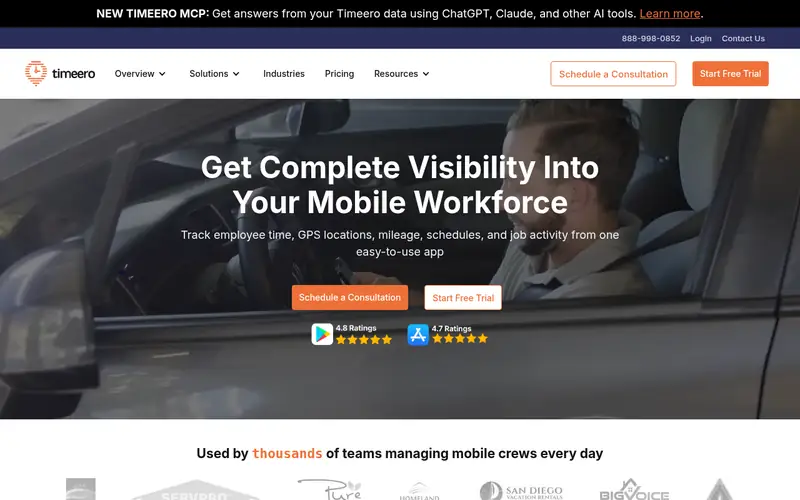
Timeero

GPS route and mileage tracking for mobile crews
See vendor pricing page
timeero.comHomepage, Nov 2026
Timeero homepage

Timeero focuses on GPS time and mileage tracking, which suits snow removal firms that want to see routes and confirm drivers reached each lot. Clock-ins can be tied to locations, and mileage logs help with vehicle records during storm runs. Pricing is per user, and some GPS and mileage functions sit on higher plans, so check the vendor page for the tier that includes them. The product is narrower than full workforce platforms, which keeps it simple but means scheduling and payroll may need separate tools.

Free plan: Free trial (14 days)

Website: timeero.com

Strengths

  • GPS tracking with route history
  • Mileage tracking for vehicles

Watch out for

  • Per-user pricing
  • GPS features may need a higher tier
6

Hubstaff

Firms wanting GPS time tracking with activity data
See vendor pricing page
hubstaff.comHomepage, Nov 2026
Hubstaff homepage

Hubstaff records time with GPS and location data and can tie hours to projects and clients, which helps snow removal companies bill each contract accurately. It also offers payroll and invoicing features on paid plans. The platform is priced per user, and the vendor publishes current rates on its site. Some monitoring features go beyond what a snow crew needs, so weigh whether you want that level of detail. It fits firms that want location-stamped hours and are comfortable with per-seat costs.

Free plan: Free trial (14 days)

Website: hubstaff.com

Strengths

  • GPS and location-based time tracking
  • Payroll and invoicing add-ons

Watch out for

  • Per-user pricing
  • Activity monitoring may be more than needed
7

Jibble

Low-cost mobile clock-in for small snow crews
See vendor pricing page
jibble.ioHomepage, Nov 2026
Jibble homepage

Jibble offers a free plan for small teams with mobile and kiosk clock-in, which suits a snow removal outfit that needs simple hour capture without a big software bill. Time can be grouped by project or client for reporting. Paid plans add payroll, scheduling and more reporting, with rates on the vendor site. The free plan caps the number of users, so growing crews will need to upgrade. It is a practical starting point for firms that want basic timesheets before investing in a larger platform.

Free plan: Yes

Website: jibble.io

Strengths

  • Free plan for small teams
  • Mobile and kiosk clock-in

Watch out for

  • Advanced payroll and scheduling cost extra
  • Free plan has user limits

Pre-purchase checklist

  • Confirm the mobile app works offline or with weak signal, since crews clock in at remote lots.
  • Check whether time entries can be assigned to jobs or clients for per-contract billing.
  • Verify GPS or location stamping is included on the plan you are pricing, not just a higher tier.
  • Confirm payroll export formats match your payroll provider or accountant's workflow.
  • Model per-user costs against the number of seasonal drivers and shovel crews you will add.

FAQ

Do snow removal companies need GPS time tracking?

GPS tracking helps confirm crews reached each lot and supports route and mileage records. It is optional. Firms that only need hours for payroll can use a simpler timer, while companies billing per site often find location-stamped entries useful.

Can these tools handle seasonal crews that change size?

Most tools here bill per user, so you add or remove seats as crews grow and shrink. Check each vendor's policy on adding and removing users mid-cycle, and confirm whether you are billed monthly or annually.

Is there free timesheet software for small snow crews?

Yes. Clockify offers a free plan for unlimited users, Homebase has a free plan for one location with up to 20 employees, and Jibble has a free plan for small teams. Free plans limit features, so confirm the functions you need are included.

How do timesheets connect to payroll?

Tools such as QuickBooks Time, Homebase and Hubstaff export approved hours to payroll or integrate with payroll providers. Confirm the export format or integration matches your payroll system before you commit.

What should I check before buying?

Check mobile clock-in, job or client hour tracking, GPS availability on your plan, payroll exports and per-user cost. Prices and limits change, so confirm current details on the vendor's pricing page.