How we rank
HR and Workforce · Researched comparison

Best Timesheet Software for Trampoline Parks in 2026

TaskReports may earn a fee from some links on this page, and some placements are paid and labelled. Neither one decides the order. See our disclosure.

The short answer

Homebase is the best starting point for most trampoline parks. Its free plan covers scheduling and timesheets for a single location, which fits a park with one front desk and a floor team. Deputy and When I Work are stronger choices if you run multiple locations or need shift reminders and GPS clock-in. QuickBooks Time suits parks that already use QuickBooks for payroll.

On this page

Key takeaways

  • Homebase is the top pick for most trampoline parks because its free plan covers scheduling and timesheets for one location.
  • Deputy, When I Work, and Sling suit parks that need shift reminders and mobile clock-in for court monitors and party hosts.
  • QuickBooks Time and Clockify fit parks that already run payroll or billing through those platforms.
  • Entry prices below come from vendor pricing pages as of 2025-2026; confirm current rates before you buy.

Quick comparison

ToolBest fitStarting price
HomebaseSingle-location parks that need free scheduling and timesheetsSee vendor pricing page
DeputyMulti-location parks that need shift reminders and GPS clock-inSee vendor pricing page

When I WorkParks that want simple mobile scheduling and time trackingSee vendor pricing page
SlingParks that need free scheduling with time tracking add-onsSee vendor pricing page
QuickBooks TimeParks that already run payroll in QuickBooksSee vendor pricing page
ClockifyParks that want a free time tracker with simple reportsSee vendor pricing page
HubstaffParks that need GPS and location-based clock-inSee vendor pricing page

How we chose

We picked tools that list timesheets, time clock, or shift scheduling and that fit a trampoline park with part-time and shift-based staff. Criteria were fit for the use case, published entry price, free access, and main limits such as location caps or per-user pricing. Sources are vendor websites and public pricing pages. Prices change, so confirm current rates on the vendor site before you buy.

Best overall

Homebase

Single-location parks that need free scheduling and timesheets

  • Free plan for one location
  • mobile clock-in with break tracking
PriceSee vendor pricing page
See Homebase pricing
joinhomebase.comHomepage, Nov 2026
Homebase homepage

Homebase combines employee scheduling, time clock, and timesheets in one app. Staff clock in from a phone or a shared tablet at the front desk. Managers see hours by employee and by role, which helps separate court monitors from party hosts. The free plan covers one location with core scheduling and timesheets. Paid plans add payroll, hiring, and more controls. A park with several locations or complex payroll rules should compare the paid tiers before committing.

Price: See vendor pricing page

Free plan: Yes

Website: joinhomebase.com

Watch out for

  • Paid tiers needed for advanced payroll
  • limited multi-location tools on free plan
2

Deputy

Multi-location parks that need shift reminders and GPS clock-in
See vendor pricing page
deputy.comHomepage, Nov 2026
Deputy homepage

Deputy handles scheduling and timesheets for teams that work in shifts. Court monitors and party hosts get shift reminders, and managers can require clock-in from a set location or kiosk. Timesheets feed into payroll exports. Deputy offers a free trial rather than a free plan, so a small park should confirm the cost per active employee on the pricing page. It fits parks with two or more sites or a large weekend roster.

Free plan: Free trial (31 days)

Website: deputy.com

Strengths

  • Strong shift scheduling with reminders
  • GPS and kiosk clock-in options

Watch out for

  • No permanent free plan
  • pricing scales with active staff
3

When I Work

Parks that want simple mobile scheduling and time tracking
See vendor pricing page
wheniwork.comHomepage, Nov 2026
When I Work homepage

When I Work focuses on shift scheduling with a mobile app staff can use to check shifts, swap hours, and clock in. Timesheets and attendance reports show late arrivals and missed shifts, which matters when a party host is late for a booked party. The trial runs 14 days. Pricing depends on the plan and staff count, so check the vendor page. It suits parks that want a simple app and do not need deep payroll features.

Free plan: Free trial (14 days)

Website: wheniwork.com

Strengths

  • Clean mobile app for staff
  • attendance and timesheet reports

Watch out for

  • No free plan
  • some features cost extra
4

Sling

Parks that need free scheduling with time tracking add-ons
See vendor pricing page
getsling.comHomepage, Nov 2026
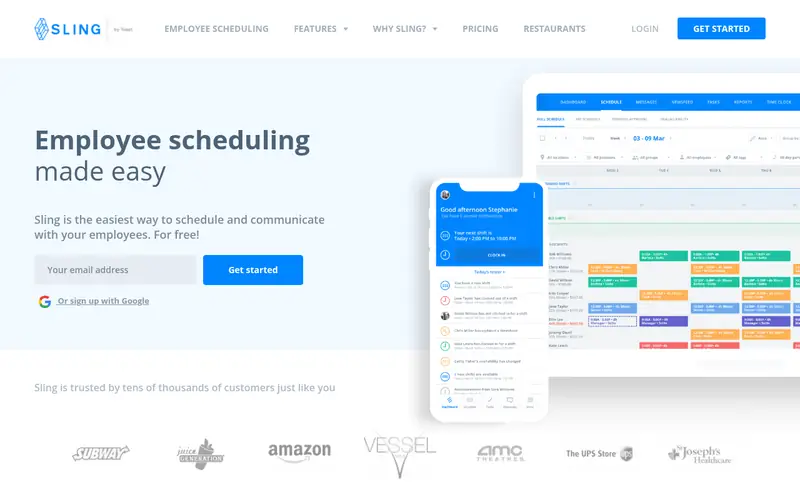
Sling homepage

Sling offers free scheduling, shift swaps, and team messaging. Time clock and timesheet features are available, but the exact set depends on the plan, so confirm what the free tier includes. For a trampoline park, Sling works well for posting weekend shifts and letting staff swap hours. It is a lighter option than Deputy or When I Work and fits a park that mainly needs scheduling plus basic hour records.

Free plan: Yes

Website: getsling.com

Strengths

  • Free plan for scheduling and messaging
  • time clock available

Watch out for

  • Time tracking features vary by plan
  • payroll integration is limited
5

QuickBooks Time

Parks that already run payroll in QuickBooks
See vendor pricing page
quickbooks.intuit.comHomepage, Nov 2026
QuickBooks Time homepage

QuickBooks Time tracks hours by employee, job, and location. A park can set up a kiosk at the front desk and let staff clock in with a PIN. Hours move into QuickBooks payroll, which saves re-entry if the park already uses QuickBooks. The trial runs 30 days. Parks that do not use QuickBooks should compare standalone tools first, since the value comes from the payroll link.

Free plan: Free trial (30 days)

Website: quickbooks.intuit.com/time-tracking

Strengths

  • Timesheets flow into QuickBooks payroll
  • mobile and kiosk clock-in

Watch out for

  • Best value only if you use QuickBooks
  • no free plan
6

Clockify

Parks that want a free time tracker with simple reports
See vendor pricing page
clockify.meHomepage, Nov 2026
Clockify homepage

Clockify is a time tracker first. Staff start and stop a timer or enter hours on a timesheet. Reports show hours by person, project, or tag, so a park can group hours by role or by party booking. The free plan supports unlimited users, which helps a park with many part-time staff. It is weaker on shift scheduling and payroll than Homebase or Deputy, so it fits parks that mainly need hour records.

Free plan: Yes

Website: clockify.me

Strengths

  • Free plan with unlimited users
  • simple timesheet reports

Watch out for

  • Scheduling is basic
  • payroll features are limited
7

Hubstaff

Parks that need GPS and location-based clock-in
See vendor pricing page
hubstaff.comHomepage, Nov 2026
Hubstaff homepage

Hubstaff tracks time with GPS and geofencing, so a manager can confirm staff clocked in at the park. Timesheets and reports show hours by team and location. The trial runs 14 days. Pricing is per user, which can add up for a park with many weekend staff. It fits parks that want location checks on clock-in and do not mind paying per seat.

Free plan: Free trial (14 days)

Website: hubstaff.com

Strengths

  • GPS and geofence clock-in
  • activity and timesheet reports

Watch out for

  • No free plan
  • per-user pricing adds up for large part-time teams

Which timesheet software for trampoline parks should I use if I run more than one location?

Deputy is the best fit for multi-location parks because it supports GPS and kiosk clock-in per site and shift reminders. If you run one site on a budget, Homebase's free plan covers scheduling and timesheets. If payroll already runs in QuickBooks, QuickBooks Time avoids double entry. If you mainly need hour records and not scheduling, Clockify's free plan supports unlimited users.

Is Homebase better than Deputy for timesheet software for trampoline parks?

Homebase is better for a single-location park that wants a free plan. Deputy is better for multi-location parks that need shift reminders and GPS or kiosk clock-in. Homebase offers a free plan for one location; Deputy offers a 31-day trial and prices per active staff. Choose Homebase to start free, and Deputy when location controls matter more than a free tier.

Pre-purchase checklist

  • Confirm the free plan's location limit, since most free tiers cover one site.
  • Check whether clock-in works on a shared front desk tablet or kiosk.
  • Confirm timesheets export to your payroll provider.
  • Check per-user pricing against your peak weekend staff count.
  • Test shift reminders and shift swaps with a small staff group first.

FAQ

What is the best timesheet software for a small trampoline park?

Homebase is the usual pick for a small park because its free plan covers scheduling and timesheets for one location. Sling and Clockify also have free plans. Deputy and When I Work offer trials instead of free plans. Match the tool to whether you need scheduling, payroll, or just hour records.

Can trampoline park staff clock in from a phone?

Yes. Homebase, Deputy, When I Work, and Hubstaff all support mobile clock-in. Deputy and Hubstaff add GPS or geofence checks so a manager can confirm the clock-in happened at the park. A shared kiosk at the front desk is another common option for staff who do not carry a phone on shift.

Do these tools track hours for party hosts separately from court monitors?

Most do. Homebase, Deputy, and Clockify let you group hours by role, job, or tag, so party host hours can be reported apart from court monitor hours. Set up roles or jobs before the first shift so reports stay clean from the start.

Is a free plan enough for a trampoline park?

It can be for one location. Homebase and Sling offer free plans with scheduling and basic time tracking, and Clockify's free plan supports unlimited users. Free tiers usually limit locations, payroll features, or advanced controls. A park with several sites or payroll needs will likely move to a paid tier.

How much does timesheet software for trampoline parks cost?

Prices vary by plan and staff count, and most vendors list rates on their pricing pages. Homebase, Sling, and Clockify have free plans. Deputy, When I Work, QuickBooks Time, and Hubstaff offer trials and charge per user or per plan. Confirm current rates on each vendor site before you buy.