AI Tools · Researched comparison

AI Tools to Generate Images: 7 Options Side by Side (2026)

TaskReports may earn a fee from some links on this page, and some placements are paid and labelled. Neither one decides the order. See our disclosure.

The short answer

Our first pick is Google Gemini, best for Google app users. Adobe Firefly fits commercial and brand work; Leonardo AI fits game and design assets. Details, prices and limits for the rest of the 7 tools are below.

On this page

Key takeaways

  • Top of the list is Google Gemini, which targets Google app users.
  • A fair warning about Leonardo AI: interface can feel busy.
  • Pricing for Google Gemini, Adobe Firefly, Leonardo AI and others is quote-based, which adds a sales step before you can compare cost.
  • Stable Diffusion fits local control and privacy.
  • 6 of the 7 tools have a free plan, including Google Gemini, Adobe Firefly, Leonardo AI and ChatGPT.

Quick comparison

ToolIdeal forFree accessWatch out for
------------
Google GeminiGoogle app usersYesLimits on free tier
Adobe FireflyCommercial and brand workYesCredit limits apply
Leonardo AIGame and design assetsYesInterface can feel busy
ChatGPTConversational image editingYesArtistic style can feel generic
MidjourneyArtistic and cinematic imagesNoNo free tier
IdeogramText inside imagesYesArtistic range is narrower
Stable DiffusionLocal control and privacyYesSetup is technical
★ Best overall

Google Gemini

Google app users

  • Simple for casual users
  • Solid photorealistic results
PriceSee website
See Google Gemini pricing

Where Google Gemini fits: Google app users. Google Gemini brings image generation to users who already work in Google apps, with photorealistic results and straightforward prompting. Specialist users will miss fine controls, like model choice and in-depth style settings, found in Midjourney or Stable Diffusion. In practice, for everyday images, though, Gemini is a capable, low friction pick. For everyday use, check the current limits and licence terms for your plan, since free and premium use can differ. Check the vendor site for Google Gemini pricing; none is listed in this comparison. Google Gemini has a free plan. Points against: Less fine control than specialist tools.

Price: See website

Free plan: Yes

Website: gemini.google.com

Watch out for

  • Output rights vary by plan
2

Adobe Firefly

Commercial and brand work
See website

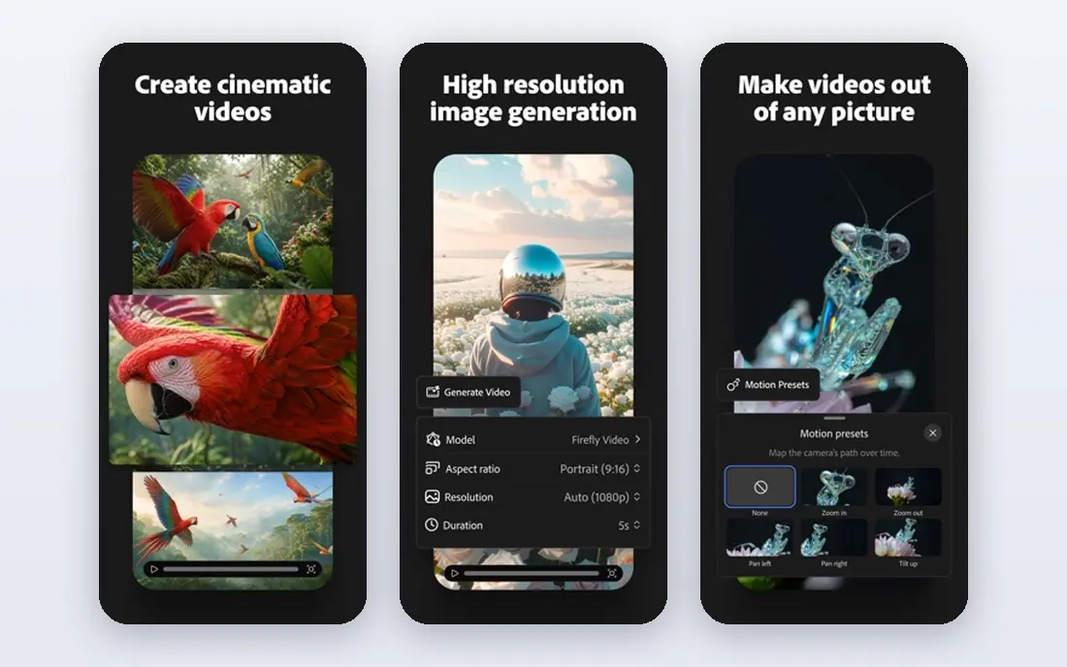
Adobe Firefly works best for commercial and brand work. Generative Fill in Photoshop lets users extend and edit photos in place, which is a real workflow gain for designers. Credit systems also need watching, since heavy use can run out quick. On top of that, for agencies and brand teams, the licence position frequently outweighs those limits. Adobe Firefly shows no starting price here, so confirm the cost on the vendor site. A free plan is available with Adobe Firefly. What to check first: Best features need a premium Adobe plan.

Free plan: Yes

Website: adobe.com

Strengths

  • Photoshop and Illustrator integration
  • Free credits to start

Watch out for

  • Credit limits apply
3

Leonardo AI

Game and design assets
See website

In short, Leonardo AI is for game and design assets. The interface packs in a lot, so new users need time to learn it. More specifically, Leonardo AI fits game designers and creators who require plenty of related assets, like characters, environments and props. Points against: Interface can feel busy. For asset heavy work, the control is worth the ramp-up time. Custom model training lets teams keep a consistent look across a project, and the free level hands enough credits to learn the tool. This comparison lists no price for Leonardo AI; ask the vendor. Free access exists with Leonardo AI.

Free plan: Yes

Website: leonardo.ai

Strengths

  • Custom model training
  • Decent control for game assets

Watch out for

  • Best quality needs premium credits
4

ChatGPT

Conversational image editing
See website

ChatGPT serves conversational image editing. As for the details, you can describe a scene, ask for a change, and refine the lead to the next message, which makes iteration quick. Honest limits: Image work sits inside a chat product. It also manages multi element prompts and readable text better than numerous artistic generators. Free and premium levels both cap image use, and the output can look refined but generic compared to Midjourney. No starting price is listed for ChatGPT here; confirm pricing on the vendor site. ChatGPT includes a free tier.

Free plan: Yes

Website: chatgpt.com

Strengths

  • Edit images by chatting in plain language
  • Readable text in numerous cases

Watch out for

  • Usage limits on premium plans
5

Midjourney

Artistic and cinematic images
See website

Midjourney makes the most sense for artistic and cinematic images. Midjourney remains the benchmark for images that look like art, with refined lighting, composition and style control. The web app now lets users work without Discord, and style references and character consistency tools help keep a series of images coherent. Where it is weaker: Weaker at exact text rendering. Beyond that, the limits are practical. Prompt following can also drift toward beauty over accuracy, so product shots that require exact details may need another tool. Pricing for Midjourney is not stated here, so ask the vendor for current figures. Midjourney does not include a free plan.

Free plan: No

Website: midjourney.com

Strengths

  • Capable style control
  • Striking artistic quality

Watch out for

  • Prompt following can be loose
6

Ideogram

Text inside images
See website

Where Ideogram fits: text inside images. Ideogram solves the problem that trips up plenty of generators: readable words inside an image. For everyday use, Posters, logos, book spans and social graphics with headlines come out far cleaner here than with most rivals. That single strength makes it the best second tool for plenty of creators, even if another tool takes care of the central art. Check the vendor site for Ideogram pricing; none is listed in this comparison. A free plan is available with Ideogram. Honest limits: Free outputs may have limits.

Free plan: Yes

Website: ideogram.ai

Strengths

  • Free level to test
  • Capable for posters and logos

Watch out for

  • Smaller community than rivals
7

Stable Diffusion

Local control and privacy
Free

Stable Diffusion is aimed squarely at local control and privacy. The model can run on your own computer, so images never have to leave your machine. The open ecosystem gives you many custom models and tools. Strengths: Private. In practice, there is no subscription for the model itself, though cloud graphics hardware costs money if you rent it. Also, setup is the barrier. For developers, researchers and privacy conscious creators, the freedom is unmatched. What you pay to start with Stable Diffusion: Free. Stable Diffusion offers a free plan. What to check first: Quality relies on model choice.

Free plan: Yes

Website: stability.ai

Strengths

  • No cloud upload needed
  • Free to run locally

Watch out for

  • Needs a capable graphics card

FAQ

Can I try these tools before paying?

Often, yes. Google Gemini, Adobe Firefly, Leonardo AI and others have a free plan. Use your own data and a real task during the test, and check what the free tier or trial limits before you rely on it.

How are the tools for AI tools to generate images ordered?

The order follows typical fit for AI tools to generate images, with Google Gemini first and Stable Diffusion last, then price clarity and free access. It is editorial judgement, not a score, so another team could rank the tools differently.

Do these tools publish their prices?

Not all of them. Google Gemini, Adobe Firefly, Leonardo AI and others publish no starting price, so expect a quote request for those. The rest, Stable Diffusion included, show a starting price, though seats and billing terms still change the final cost.

Which ai image generator is a good match for commercial use?

Google Gemini comes first here and is built for Google app users. Buyers with other needs may prefer Adobe Firefly (for commercial and brand work) or Leonardo AI (for game and design assets). Compare costs and limits first.

Which options for AI tools to generate images have a free plan?

On this list, 6 of 7 tools include a free plan, among them Google Gemini, Adobe Firefly, Leonardo AI and ChatGPT. Caps on seats, usage or features are common, so test the free plan against your real workload.