How we rank
Productivity · Researched comparison

Best Time Tracking for Todoist in 2026

TaskReports may earn a fee from some links on this page, and some placements are paid and labelled. Neither one decides the order. See our disclosure.

The short answer

Toggl Track is the best starting point for most people who want time tracking for Todoist. It has a free plan, a browser extension, and a simple timer that works next to your task list. If you bill clients by the hour, Harvest or Everhour fit better because they tie hours to budgets and invoices. If you want a free plan for a whole team, Clockify is the stronger choice.

On this page

Key takeaways

  • Toggl Track is the simplest pick for solo Todoist users, with a free plan and a paid entry price of $9 per user per month.
  • Clockify has a free plan with unlimited users and a paid entry price of $5.49 per user per month for more features.
  • Everhour and Harvest connect to Todoist through a browser extension and a timer, and both are built around project budgets.
  • Todoist has no native time tracking, so every option here is a separate third-party tool.

Quick comparison

ToolBest fitStarting price
Toggl TrackSolo users who want a simple timer next to Todoist$9 per user per month
ClockifyTeams that want a free plan with no user limit$5.49 per user per month

TimelyPeople who prefer automatic time capture over manual timersSee vendor pricing page
HarvestFreelancers who bill clients from tracked hours$12 per user per month
EverhourTeams that track time against project budgetsSee vendor pricing page
TrackingTimeSmall teams that want a shared timer and task viewSee vendor pricing page
Time DoctorRemote teams that need detailed activity reportsSee vendor pricing page

How we chose

We picked tools that run a timer alongside Todoist through a browser extension, desktop app or mobile app, since Todoist has no built-in time tracking. We compared entry prices, free plan limits and the main feature gaps between plans. Sources are vendor homepages, pricing pages and public documentation. Prices change, so confirm the current figure on the vendor site before you buy.

★ Best overall

Toggl Track

Solo users who want a simple timer next to Todoist

  • Simple one-click timer
  • free plan for up to 5 users
Price$9 per user per month
See Toggl Track pricing
toggl.comHomepage, Nov 2026
Toggl Track homepage

Toggl Track is a time tracking tool with a browser extension, desktop apps and mobile apps. You start a timer when you begin a Todoist task and stop it when you finish. The free plan covers up to 5 users and includes basic reports. Paid plans add billable rates, rounding and more detailed reports. The tool does not sync tasks from Todoist automatically. You either type the task name into the timer or use the browser extension to start a timer from the current page. For solo users and small teams this is enough. Teams that need task-level sync and budget alerts should look at Everhour or Harvest instead.

Price: $9 per user per month

Free plan: Yes

Website: toggl.com/track

Watch out for

  • Limited project budgeting
  • reports are basic on the free plan
2

Clockify

Teams that want a free plan with no user limit
$5.49 per user per month
clockify.meHomepage, Nov 2026
Clockify homepage

Clockify offers a free plan with unlimited users and unlimited tracking. You can start a timer from the browser extension while working in Todoist, or log time after the fact in a timesheet view. Paid plans add billable rates, approvals, and more report options. The free plan covers the basics: a timer, projects, and a summary report. Larger teams often move to a paid plan for approvals and invoicing data. The tool does not read your Todoist tasks directly, so you set up matching projects in Clockify. It suits teams that want a low-cost shared tool more than solo users who want the tightest possible Todoist link.

Free plan: Yes

Website: clockify.me

Strengths

  • Free plan with unlimited users
  • browser extension for quick timers

Watch out for

  • Interface has many screens
  • some reports sit behind paid plans
3

Timely

People who prefer automatic time capture over manual timers
See vendor pricing page
TimelyHomepage image unavailable

Timely records what you work on in the background and builds a draft timesheet. You review the entries at the end of the day and assign them to projects. That suits people who forget to start a timer while working through a Todoist list. There is no free plan, only a trial. Timely does not connect to Todoist directly, so you match captured time to your tasks by hand or by project name. It fits freelancers and small teams who value automatic capture. Users who want a strict start-and-stop timer tied to a task should pick Toggl Track or Clockify instead.

Free plan: Free trial (14 days)

Website: timelyapp.com

Strengths

  • Automatic time capture from apps
  • memory-based day view

Watch out for

  • No free plan
  • automatic capture can need editing
4

Harvest

Freelancers who bill clients from tracked hours
$12 per user per month
getharvest.comHomepage, Nov 2026
Harvest homepage

Harvest is a time tracking and invoicing tool. You track hours against projects and clients, then turn those hours into invoices. A browser extension and desktop app let you start a timer while you work in Todoist. Harvest has no free plan, only a 30-day trial. The entry price is $12 per user per month. It does not sync Todoist tasks, so you create matching projects in Harvest. It suits freelancers and small agencies that bill by the hour and want invoicing in the same tool. Teams that only need internal reporting can spend less with Clockify.

Free plan: Free trial (30 days)

Website: getharvest.com

Strengths

  • Strong invoicing from tracked time
  • clean timer and reports

Watch out for

  • No free plan
  • per-user price is higher than some rivals
5

Everhour

Teams that track time against project budgets
See vendor pricing page
everhour.comHomepage, Nov 2026
Everhour homepage

Everhour is built around time tracking for teams and projects. It offers a timer, timesheets, budgets and reports. A browser extension lets you start a timer while you work in Todoist, and you can log time against projects that match your task lists. Everhour has no free plan, only a trial, and the vendor sets pricing by team size, so check the pricing page. Budget alerts help agencies spot projects that are running over. The setup is heavier than a standalone timer. Solo users who just want to count hours should start with Toggl Track and move to Everhour only when budgets matter.

Free plan: Free trial (14 days)

Website: everhour.com

Strengths

  • Budget tracking and alerts
  • browser extension for quick timers

Watch out for

  • No free plan
  • setup takes more time than a simple timer
6

TrackingTime

Small teams that want a shared timer and task view
See vendor pricing page
trackingtime.coHomepage, Nov 2026
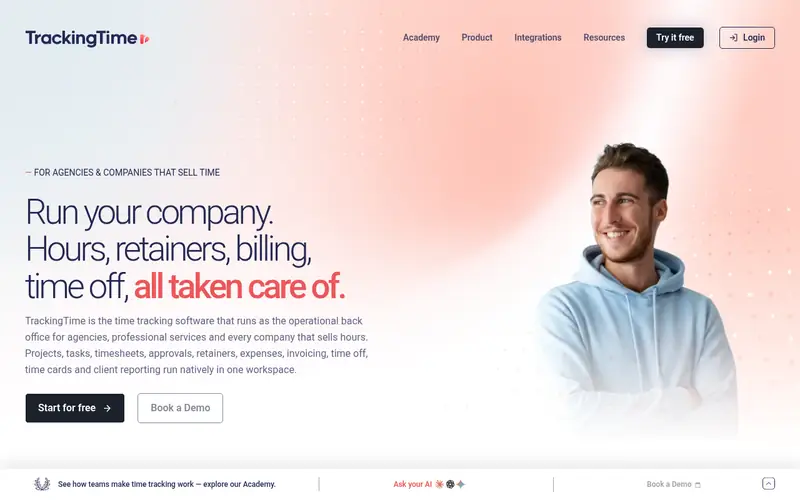
TrackingTime homepage

TrackingTime is a time tracking tool with a timer, timesheets and project views. It has a free plan for small teams and paid plans for more users and features. A browser extension and apps let you start a timer while working in Todoist. The free plan covers a limited number of users, so check the current limit on the vendor site before you commit a team. TrackingTime does not sync Todoist tasks automatically. It suits small teams that want one shared place for timers and reports. Solo users may find Toggl Track faster to set up.

Free plan: Yes

Website: trackingtime.co

Strengths

  • Free plan for small teams
  • task and project views

Watch out for

  • Paid tiers add cost quickly
  • integrations need setup
7

Time Doctor

Remote teams that need detailed activity reports
See vendor pricing page
timedoctor.comHomepage, Nov 2026
Time Doctor homepage

Time Doctor tracks time and also records activity, app use and optional screenshots. Managers get reports on where time goes. It is aimed at remote and distributed teams rather than solo users. There is no free plan, only a trial, and pricing depends on the plan and team size, so confirm on the vendor page. Time Doctor does not connect to Todoist directly. You track time against projects that match your task lists. The monitoring features are useful for some teams and unwelcome in others, so agree on policy before you roll it out.

Free plan: Free trial (14 days)

Website: timedoctor.com

Strengths

  • Detailed activity and app reports
  • screenshots optional

Watch out for

  • No free plan
  • heavy monitoring may not suit all teams

Pre-purchase checklist

  • Confirm the tool has a browser extension or app that works with your browser and Todoist setup.
  • Check the free plan limits, such as user count and report access, on the vendor pricing page.
  • Decide whether you need billable rates and invoicing, or only internal hours.
  • Check whether the tool syncs tasks or only projects, since most do not read Todoist tasks.
  • Confirm the current entry price and billing unit before you sign up.

FAQ

Does Todoist have built-in time tracking?

No. Todoist does not include a native timer or timesheet. You add time tracking with a separate tool such as Toggl Track, Clockify or Harvest, usually through a browser extension or app that runs next to your task list.

Which time tracking tool is best for Todoist for solo users?

Toggl Track is the simplest fit for most solo users. It has a free plan, a one-click timer and a browser extension. You type or select the task name in the timer. Paid plans start at $9 per user per month for billable rates and fuller reports.

Can I track time for free with Todoist?

Yes, if you use a free plan from a tracking tool. Toggl Track has a free plan for up to 5 users. Clockify has a free plan with unlimited users. TrackingTime also has a free plan for small teams. Check current limits on each vendor site.

Do these tools sync my Todoist tasks automatically?

Most do not. Toggl Track, Clockify, Harvest and Time Doctor track time against projects you set up in their own apps. You match project names to your Todoist lists. Check the vendor documentation for any task-level integration before you rely on it.

What should freelancers pick for billing by the hour?

Harvest is built for hourly billing. It tracks time against clients and projects, then creates invoices from those hours. The entry price is $12 per user per month, and there is a 30-day trial but no free plan. Everhour is an alternative if budgets matter more than invoices.