How we rank
Productivity · Researched comparison

Best Time Tracking Software for Content Agencies in 2026

TaskReports may earn a fee from some links on this page, and some placements are paid and labelled. Neither one decides the order. See our disclosure.

The short answer

Harvest is the first pick for content agencies that bill by the hour. It tracks time against client and project budgets and turns hours into invoices on the entry plan. Toggl Track is a lighter choice with a free plan for up to 5 users. Clockify fits teams that want unlimited users on a free plan. Teams that need project management and time tracking in one tool should look at Teamwork.

On this page

Key takeaways

  • Harvest suits content agencies that bill by the hour, with project budgets and client reports on the entry plan.
  • Toggl Track has a free plan for up to 5 users, which fits small content teams starting out.
  • Clockify has a free plan with unlimited users and tracks billable hours per client and project.
  • Most tools here charge per user per month, so cost rises with headcount, not with client count.

Quick comparison

ToolBest fitStarting price
HarvestAgencies that bill clients by the hour$12 per user per month
Toggl TrackSmall content teams that want simple time trackingSee vendor pricing page
ClockifyTeams that want unlimited users on a free planSee vendor pricing page
TeamworkAgencies that want projects and time in one toolSee vendor pricing page
HubstaffAgencies tracking remote and freelance contributorsSee vendor pricing page
EverhourTeams that already plan work in another toolSee vendor pricing page
PaymoSmall agencies that want tracking, tasks and invoicingSee vendor pricing page
TimeCampAgencies that want automatic time capture optionsSee vendor pricing page

How we chose

We picked tools that support hourly billing, client and project reporting, and budget tracking, which content agencies need. We looked at entry price, free access, and main limits, and we checked each vendor's public pricing page and documentation. We did not run hands-on tests or collect user reviews. Prices and plan limits change, so confirm details on the vendor site before you buy.

★ Best overall

Harvest

Agencies that bill clients by the hour

  • Built-in invoicing from tracked hours
  • project budgets with alerts
Price$12 per user per month
See Harvest pricing
getharvest.comHomepage, Nov 2026
Harvest homepage

Harvest is built around billable hours. You track time to a client and project, set a budget in hours or money, and the tool warns you when a project runs past it. Reports show hours by client, project, and team member. Invoices can be created from tracked time, which removes a manual step for agencies that bill hourly. The entry plan covers time tracking, reporting, and invoicing. Higher plans add capacity and features such as deeper approvals. Pricing is per user per month, so a content agency with many freelancers and editors pays more as the team grows. There is a 30-day free trial but no free plan. Skip Harvest if you need task management and time tracking in one place. It is a time and billing tool, not a project management suite.

Price: $12 per user per month

Free plan: Free trial (30 days)

Website: getharvest.com

Watch out for

  • No free plan
  • per-user cost adds up for large teams
2

Toggl Track

Small content teams that want simple time tracking

See vendor pricing page
toggl.comHomepage, Nov 2026
Toggl Track homepage

Toggl Track is a straightforward timer. A writer or editor starts a timer, assigns it to a client and project, and the entry is saved. Reports group hours by client, project, and person. That covers the basic need for a content agency that bills by the hour and wants clean records. The free plan supports up to 5 users and covers core tracking and reporting. Paid plans add features such as billable rates, project estimates, and more detailed reports. Toggl Track does not create invoices, so agencies pair it with their own billing process. It suits small teams and freelancers who want low setup effort. Larger agencies with many billable projects and budget alerts may find the free plan too limited and should compare paid tiers on the vendor site.

Free plan: Yes

Website: toggl.com/track

Strengths

  • Free plan for up to 5 users
  • Fast timer and simple reports

Watch out for

  • Limited features on the free plan
  • Invoicing is not built in
3

Clockify

Teams that want unlimited users on a free plan
See vendor pricing page
clockify.meHomepage, Nov 2026
Clockify homepage

Clockify offers a free plan with unlimited users, which is unusual among time trackers. For a content agency, that means the whole team, including freelancers, can log hours without a per-seat charge. You can mark time as billable, set hourly rates, and report hours by client and project. Paid plans add features such as invoicing, approvals, and more detailed reporting. The free plan covers basic tracking and reporting, which is enough for many small agencies. Teams that need budget alerts and invoicing should check the paid tiers. The tool has many settings, and the interface can feel busy at first. It suits agencies that value a low cost per seat and can work within the free plan limits.

Free plan: Yes

Website: clockify.me

Strengths

  • Free plan with unlimited users
  • Billable hours and client reports

Watch out for

  • Advanced features sit on paid plans
  • Interface can feel busy
4

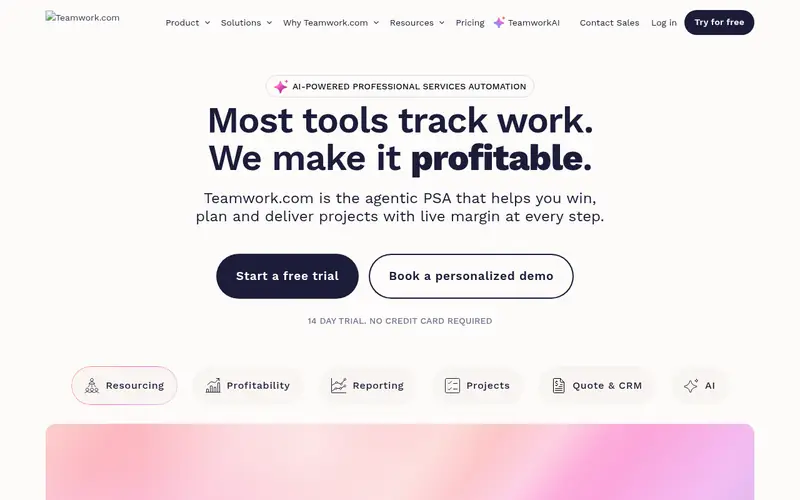
Teamwork

Agencies that want projects and time in one tool
See vendor pricing page
teamwork.comHomepage, Nov 2026
Teamwork homepage

Teamwork combines project management with time tracking. A content agency can plan work as tasks, assign them to writers and editors, and track time against each task. That keeps hours tied to the work that produced them, which helps when clients ask for detail. Reports show time by project, client, and team member, and billable hours can be flagged. The tool is larger than a standalone timer, so setup takes more effort. It suits agencies that want one place for project plans and hours. There is a 30-day free trial but no free plan. Pricing is per user per month, and the entry price depends on the plan and billing term, so check the vendor pricing page.

Free plan: Free trial (30 days)

Website: teamwork.com

Strengths

  • Time tracking inside project tasks
  • Client and project reporting

Watch out for

  • No free plan
  • More setup than a standalone timer
5

Hubstaff

Agencies tracking remote and freelance contributors
See vendor pricing page
hubstaff.comHomepage, Nov 2026
Hubstaff homepage

Hubstaff tracks time and can add optional activity data such as screenshots and app use. For a content agency with remote writers and freelancers, that gives a record of hours worked on client projects. Time can be assigned to projects and clients, and budgets can be set. The tool is often used by agencies that manage distributed teams and want more visibility into work patterns. Activity tracking is optional, but some teams and freelancers prefer not to use it. Decide on a policy before rolling it out. There is a 14-day free trial and no free plan. Pricing is per user per month, and the entry price depends on the plan, so confirm on the vendor site.

Free plan: Free trial (14 days)

Website: hubstaff.com

Strengths

  • Time tracking with optional activity data
  • Client and project budgets

Watch out for

  • No free plan
  • Activity tracking may not suit every team
6

Everhour

Teams that already plan work in another tool
See vendor pricing page
everhour.comHomepage, Nov 2026
Everhour homepage

Everhour adds time tracking to project tools such as Asana, Trello, and Basecamp. A content agency that already plans work in one of those tools can track hours without switching apps. Time entries roll up into reports by client, project, and team member. The tool supports estimates and budgets, so you can see how hours compare with the plan. That helps agencies spot projects that are running over. Because it plugs into another tool, its value depends on which project tool you use. There is a 14-day free trial and no free plan. Pricing is per user per month, and the entry price depends on the plan, so check the vendor page.

Free plan: Free trial (14 days)

Website: everhour.com

Strengths

  • Time tracking inside popular project tools
  • Budget and estimate tracking

Watch out for

  • No free plan
  • Best value only if you use a supported tool
7

Paymo

Small agencies that want tracking, tasks and invoicing
See vendor pricing page
paymoapp.comHomepage, Nov 2026
Paymo homepage

Paymo combines time tracking, task management, and invoicing. A content agency can track hours against client projects, manage tasks, and create invoices from billable time. That covers a common agency workflow in one tool. There is a free plan for small teams, with limits on users and features. Paid plans add capacity and features such as more detailed reporting and budgeting. The tool suits small agencies that want one system for work and billing. The feature set can be more than a team needs if it only wants a timer. Check the free plan limits and paid tiers on the vendor site before committing.

Free plan: Yes

Website: paymoapp.com

Strengths

  • Time tracking with tasks and invoicing
  • Free plan for small teams

Watch out for

  • Free plan has limits
  • Feature set can be more than needed
8

TimeCamp

Agencies that want automatic time capture options
See vendor pricing page
timecamp.comHomepage, Nov 2026
TimeCamp homepage

TimeCamp tracks time with manual timers and optional automatic capture that records activity by app and website. For a content agency, that can help capture hours that would otherwise be missed, such as research and editing time. Entries can be assigned to clients and projects for reporting. The free plan has limits on users and features. Paid plans add billing rates, invoicing, and more detailed reports. Automatic capture should be reviewed, since it records activity rather than intent, and not every minute belongs to a client. It suits agencies that want a record of work patterns alongside billable hours. Teams that prefer simple manual timers may find it more than they need.

Free plan: Yes

Website: timecamp.com

Strengths

  • Automatic time capture alongside manual timers
  • Client and project reporting

Watch out for

  • Free plan has limits
  • Automatic capture needs review

Pre-purchase checklist

  • Confirm the plan supports billable rates and client-level reports, not just project timers.
  • Check whether invoicing is included or needs a separate billing tool.
  • Count users, including freelancers, since most tools charge per seat.
  • Review free plan limits on users, projects, and report history.
  • Test budget alerts on a sample client project during the trial.

FAQ

What is the best time tracking software for content agencies?

Harvest is a strong fit for agencies that bill by the hour because it tracks time against client budgets and creates invoices. Toggl Track and Clockify are good lower-cost options, and Teamwork suits agencies that want project management and time tracking together.

Do content agencies need billable hour tracking?

Yes, if clients are billed by the hour or by project with hourly estimates. Billable hour tracking links time to clients and projects, which supports invoices and helps you see whether a project stayed within budget.

Is there free time tracking software for a small content agency?

Yes. Toggl Track has a free plan for up to 5 users, and Clockify has a free plan with unlimited users. Paymo and TimeCamp also offer free plans with limits. Check current limits on each vendor site.

Can these tools create client invoices?

Harvest and Paymo can create invoices from tracked time. Toggl Track and Clockify focus on tracking and reporting, and Clockify adds invoicing on paid plans. Teamwork, Hubstaff, Everhour, and TimeCamp vary by plan, so confirm on the vendor page.

How much does time tracking software cost for an agency?

Most tools here charge per user per month, so cost depends on team size. Harvest lists an entry price of $12 per user per month. Other vendors list prices by plan, so check the vendor pricing page for current rates.