How we rank
Productivity · Researched comparison

Best Time Tracking Software for Ecommerce Agencies in 2026

TaskReports may earn a fee from some links on this page, and some placements are paid and labelled. Neither one decides the order. See our disclosure.

The short answer

Harvest is the first pick for ecommerce agencies that bill clients by the hour and want time, budgets and invoices together. Toggl Track suits small teams that want a free start for up to 5 users. Clockify suits agencies that need many seats on a free plan and can accept fewer advanced controls. All three track billable hours; the choice comes down to invoicing, budget alerts and seat cost.

On this page

Key takeaways

  • Harvest fits ecommerce agencies that bill hourly client work and need project budgets and invoicing in one place.
  • Toggl Track has a free plan for up to 5 users, which suits very small shops before they commit to a paid seat.
  • Clockify has a free plan with no user cap, but some reporting and admin features sit behind paid tiers.
  • Most tools here charge per user per month, so seat count drives cost more than project volume.

Quick comparison

ToolBest fitStarting price
HarvestAgencies billing hourly client work with budgets and invoicesSee vendor pricing page
Toggl TrackSmall ecommerce agencies wanting a free startSee vendor pricing page
ClockifyAgencies needing many seats on a free planSee vendor pricing page
HubstaffAgencies tracking remote ecommerce work with activity dataSee vendor pricing page
ClickUpAgencies running ecommerce projects and time in one toolSee vendor pricing page
EverhourAgencies adding time tracking to existing project toolsSee vendor pricing page
Time DoctorAgencies monitoring productivity on distributed ecommerce teamsSee vendor pricing page
PaymoSmall agencies combining time, tasks and invoicingSee vendor pricing page

How we chose

We picked tools that support billable client hours, project budgets and reporting for ecommerce agency work. Criteria were fit for the use case, published entry price, free access and the main limits of each plan. Details come from vendor websites and public documentation, not hands-on testing. Prices and plan limits change, so confirm them on the vendor site before buying.

★ Best overall

Harvest

Agencies billing hourly client work with budgets and invoices

  • Built-in invoicing tied to tracked hours
  • project budgets with alerts
PriceSee vendor pricing page
See Harvest pricing
getharvest.comHomepage, Nov 2026
Harvest homepage

Harvest is built around billable time. Agency staff start a timer against a client and project, and the tracked hours feed timesheets, budget tracking and invoices. For ecommerce work this suits store builds, monthly retainers and ad management billed by the hour. Project budgets can be set and alerts fire as hours approach the limit, which helps on fixed-fee store projects. The plan structure is per seat, with higher tiers adding more team and reporting features. Harvest offers a free trial rather than a free plan, so a small agency should confirm current seat pricing on the vendor page before committing. Teams that do not invoice from the same tool may find the billing features more than they need.

Price: See vendor pricing page

Free plan: Free trial (30 days)

Website: getharvest.com

Watch out for

  • Per-seat pricing adds up for large teams
  • no permanent free plan
2

Toggl Track

Small ecommerce agencies wanting a free start

See vendor pricing page
toggl.comHomepage, Nov 2026
Toggl Track homepage

Toggl Track is a straightforward timer. A team member picks a client and project, starts the clock and the entry lands in reports. For ecommerce agencies this covers task-level tracking on store builds, campaign work and support retainers without much setup. Reports can be filtered by client and project, which helps when preparing monthly hour summaries. The free plan covers up to 5 users with core tracking and reporting. Paid tiers add features such as billable rates, rounding and more detailed reporting. Toggl Track does not aim to be a full invoicing system, so agencies that want time and invoices in one place should look at Harvest instead. It suits small teams that already invoice through accounting software.

Free plan: Yes

Website: toggl.com/track

Strengths

  • Free plan for up to 5 users
  • simple one-click timers across devices

Watch out for

  • Invoicing is limited compared with billing-first tools
  • advanced features need paid tiers

3

Clockify

Agencies needing many seats on a free plan
See vendor pricing page
clockify.meHomepage, Nov 2026
Clockify homepage

Clockify offers a free plan with unlimited users, which suits ecommerce agencies with large or fluctuating teams. Staff can log hours against clients and projects, and timesheets give a weekly view for payroll and client billing. For ecommerce work this covers store maintenance, campaign sprints and ongoing support hours. Paid tiers add features such as more detailed reporting, invoicing and admin controls. The free plan is generous on seats but narrower on reporting, so agencies that need deep client reports should check which tier includes them. Clockify is a practical fit when seat count matters more than advanced billing features.

Free plan: Yes

Website: clockify.me

Strengths

  • Free plan with no user cap
  • timesheets and project tracking included

Watch out for

  • Some reporting and admin controls are paid-only
  • interface can feel busy
4

Hubstaff

Agencies tracking remote ecommerce work with activity data
See vendor pricing page
hubstaff.comHomepage, Nov 2026
Hubstaff homepage

Hubstaff combines time tracking with optional activity monitoring, screenshots and app usage data. For ecommerce agencies with distributed contractors, this can support accountability on store builds and campaign work. Projects can have budgets, and timesheets feed payroll and client billing. The monitoring features are optional but can affect team trust, so agencies should set clear policy before turning them on. Pricing is per seat, and a free trial is offered rather than a free plan. Teams that only need simple timers will find Hubstaff heavier than needed.

Free plan: Free trial (14 days)

Website: hubstaff.com

Strengths

  • Time tracking with optional activity and screenshot data
  • project budgets

Watch out for

  • Activity monitoring can feel intrusive to staff
  • per-seat pricing
5

ClickUp

Agencies running ecommerce projects and time in one tool
See vendor pricing page
clickup.comHomepage, Nov 2026
ClickUp homepage

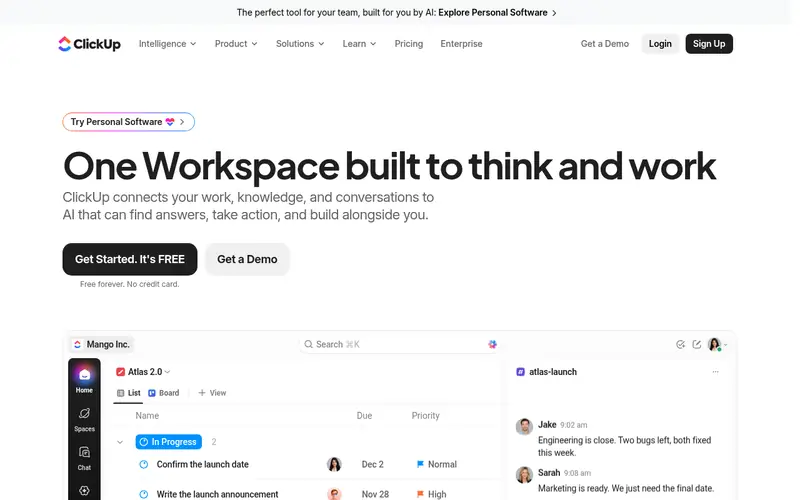
ClickUp is a work platform with tasks, docs and time tracking. Ecommerce agencies can track hours against tasks inside a store build or campaign project, so time sits next to the work itself. This suits teams that want one tool for project management and hours rather than two. The free plan covers a limited number of users and storage, with paid tiers adding more. Time tracking is included but is not as deep as a dedicated billing tool, so agencies that invoice from tracked hours may still need a separate system. Setup takes effort because the platform has many options.

Free plan: Yes

Website: clickup.com

Strengths

  • Tasks, docs and time tracking in one workspace
  • free plan for small teams

Watch out for

  • Time tracking is one part of a large platform
  • setup takes time
6

Everhour

Agencies adding time tracking to existing project tools
See vendor pricing page
everhour.comHomepage, Nov 2026
Everhour homepage

Everhour adds time tracking and budget tracking on top of project management tools such as Asana, Trello and Jira. For ecommerce agencies already running work in one of those tools, this avoids a second place to manage tasks. Staff log hours against existing tasks, and reports roll up by client and project. Budget tracking shows hours against estimates, which helps on fixed-fee store projects. Everhour is priced per seat and offers a free trial rather than a free plan. It only makes sense if the agency already uses a supported project tool; otherwise a standalone tracker is simpler.

Free plan: Free trial (14 days)

Website: everhour.com

Strengths

  • Integrates with popular project management tools
  • budget tracking per project

Watch out for

  • Requires an existing project tool to be useful
  • no free plan
7

Time Doctor

Agencies monitoring productivity on distributed ecommerce teams
See vendor pricing page
timedoctor.comHomepage, Nov 2026
Time Doctor homepage

Time Doctor tracks time and adds productivity reporting, optional screenshots and alerts for distracting apps. For ecommerce agencies managing remote contractors across time zones, this gives visibility into hours spent on store work and campaigns. Reports can be grouped by client and project for billing. The monitoring angle is stronger than in simple timers, so agencies should decide whether that level of detail fits their culture. Pricing is per seat, and a free trial is offered rather than a free plan. Teams that want lightweight tracking should look at Toggl Track or Clockify instead.

Free plan: Free trial (14 days)

Website: timedoctor.com

Strengths

  • Detailed time and productivity reporting
  • optional screenshots and alerts

Watch out for

  • Monitoring focus may not suit all teams
  • per-seat pricing
8

Paymo

Small agencies combining time, tasks and invoicing
See vendor pricing page
paymoapp.comHomepage, Nov 2026
Paymo homepage

Paymo combines time tracking, task management and invoicing. For a small ecommerce agency, this means tracking hours on a store build, managing the task list and sending the client invoice from one place. Timesheets and reports support monthly billing on retainers. The free plan is limited to a small number of users and core features, with paid tiers adding invoicing, budgets and more. Agencies that grow past the free limits should compare paid tiers against Harvest. Paymo suits small shops that want an all-in-one tool without a large platform.

Free plan: Yes

Website: paymoapp.com

Strengths

  • Time tracking, tasks and invoicing in one tool
  • free plan for small teams

Watch out for

  • Free plan is limited in users and features
  • less known than larger rivals

Pre-purchase checklist

  • Confirm the plan covers billable rates, budgets and client-ready reports, not just timers.
  • Check the per-seat price at your real team size, including contractors.
  • Verify what the free plan includes and its user cap before relying on it.
  • Check whether the tool integrates with your project management and accounting software.
  • Confirm how hours export for invoicing and payroll.

FAQ

What is the best time tracking software for ecommerce agencies?

Harvest is a strong fit for agencies that bill hourly and want invoicing in the same tool. Toggl Track suits small teams that want a free start for up to 5 users. Clockify suits agencies that need many seats on a free plan. The right pick depends on whether you invoice from the tool or elsewhere.

Do these tools have free plans?

Toggl Track, Clockify, ClickUp and Paymo offer free plans, with limits on users or features. Harvest, Hubstaff, Everhour and Time Doctor offer free trials rather than free plans. Check each vendor page for current limits because they change.

Can I track time by client and project?

Yes. All the tools listed support tracking hours against clients and projects, and most offer reports grouped that way. This matters for ecommerce agencies billing store builds, campaigns and retainers separately.

Which tool is best for remote ecommerce teams?

Hubstaff and Time Doctor add activity and productivity reporting for distributed teams. They can help with accountability but may feel intrusive, so set a clear policy first. Toggl Track and Clockify are lighter options without monitoring.

How much does time tracking software cost for an agency?

Most tools here charge per user per month, so cost depends on seat count. Entry prices vary by vendor and change over time. Confirm current pricing on each vendor page before choosing a plan.