How we rank
Productivity · Researched comparison

Best Time Tracking Software for Game Developers in 2026

TaskReports may earn a fee from some links on this page, and some placements are paid and labelled. Neither one decides the order. See our disclosure.

The short answer

Clockify is the first pick for most game developers because its free plan covers unlimited users and tracks billable hours per task and project. Harvest suits small studios and contractors that invoice clients directly. Toggl Track is a simpler alternative for solo developers and small teams that mainly need clean time reports. Larger studios with complex production schedules should look at Wrike or ClickUp, which pair time tracking with project planning.

On this page

Key takeaways

  • Clockify has a free plan with unlimited users and tracks billable hours, which suits small studios billing publisher or client milestones.
  • Harvest combines time tracking with invoicing and starts at a published per-seat rate, so it fits contractors and small teams that bill by the hour.
  • Toggl Track and Clockify both offer free tiers, while Wrike and ClickUp bundle time tracking into broader project management plans.
  • Most tools here track hours per task and project; few handle art, code and QA pipelines out of the box, so plan your project structure first.

Quick comparison

ToolBest fitStarting price
ClockifySmall studios billing milestones by the hourSee vendor pricing page
HarvestContractors and small teams that invoice clientsSee vendor pricing page

Toggl TrackSolo developers and small teams needing simple reportsSee vendor pricing page
WrikeMid-size studios with complex production schedulesSee vendor pricing page
ClickUpTeams that want tracking and task management in one toolSee vendor pricing page
HubstaffStudios tracking remote contractors and outsourced workSee vendor pricing page
PaymoSmall studios that need tracking, tasks and invoicingSee vendor pricing page

How we chose

We compared tools on fit for game development work: tracking hours against tasks, projects and client milestones, plus budgets and reporting. We also weighed entry price, free access and main limits. Sources are vendor homepages, pricing pages and public documentation. We did not run hands-on tests or benchmarks. Prices and plan limits change, so confirm details on each vendor site before buying.

★ Best overall

Clockify

Small studios billing milestones by the hour

  • Free plan with unlimited users
  • billable hours and project budgets
PriceSee vendor pricing page
See Clockify pricing
clockify.meHomepage, Nov 2026
Clockify homepage

Clockify tracks time per task and project, which maps well to game development work broken into art, code and QA tasks. You can mark hours as billable and attach hourly rates, so a studio billing a publisher for a milestone can pull a report by project or client. The free plan covers unlimited users, which matters for small teams adding contractors. Paid tiers add features such as invoicing, scheduling and more detailed reporting. The vendor publishes current limits and prices on its pricing page, so check those before committing a team. Solo developers may find the interface heavier than needed, and studios that need deep production scheduling should pair it with a dedicated project tool.

Price: See vendor pricing page

Free plan: Yes

Website: clockify.me

Watch out for

  • Reporting depth varies by plan
  • interface can feel busy for solo users
2

Harvest

Contractors and small teams that invoice clients
See vendor pricing page
getharvest.comHomepage, Nov 2026
Harvest homepage

Harvest pairs time tracking with invoicing, which suits game developers doing contract work for publishers, porting houses or outsourcing studios. You log hours against projects and tasks, then turn them into invoices. Budget and retainer tracking helps a small studio see how much of a fixed-fee milestone has been used. The product is priced per seat, so a growing team pays more as it adds artists, engineers and producers. There is a free trial but no permanent free plan. Teams that only need internal time reports without invoicing may prefer a lighter tool. Confirm current seat pricing and trial length on the vendor site.

Free plan: Free trial (30 days)

Website: getharvest.com

Strengths

  • Time tracking tied to invoicing
  • clear project budgets and retainer tracking

Watch out for

  • Per-seat pricing adds up for larger teams
  • limited free access after trial
3

Toggl Track

Solo developers and small teams needing simple reports
See vendor pricing page
toggl.comHomepage, Nov 2026
Toggl Track homepage

Toggl Track is a straightforward timer. A developer can start a timer for a coding task, tag it to a project, and later pull a report by project, client or tag. That fits indie developers and small teams that want clean hour data without a full production suite. The free plan covers basic tracking for small teams, and paid plans add features such as billable rates and more reporting. It does not manage tasks, sprints or asset pipelines, so studios with complex production schedules will need another tool for planning. Check the vendor pricing page for current free-plan limits and paid tiers.

Free plan: Yes

Website: toggl.com/track

Strengths

  • Fast timer and simple reports
  • works across desktop and mobile

Watch out for

  • Limited project management features
  • advanced features need paid plans
4

Wrike

Mid-size studios with complex production schedules
See vendor pricing page
wrike.comHomepage, Nov 2026
Wrike homepage

Wrike combines project management with time tracking, so a studio can plan milestones, assign tasks to artists and engineers, and log hours against them. Dashboards and reports help producers see where time goes across a project. That suits mid-size studios juggling multiple projects and external partners. The free plan is limited, and paid tiers scale with team size and features. Setup takes effort, so small indie teams may find it heavier than needed. Studios that mainly need a timer should look at Clockify or Toggl Track instead. Confirm plan limits and prices on the vendor pricing page.

Free plan: Yes

Website: wrike.com

Strengths

  • Time tracking inside project and task management
  • strong reporting and dashboards

Watch out for

  • Higher tiers get expensive
  • setup takes time for new teams
5

ClickUp

Teams that want tracking and task management in one tool
See vendor pricing page
clickup.comHomepage, Nov 2026
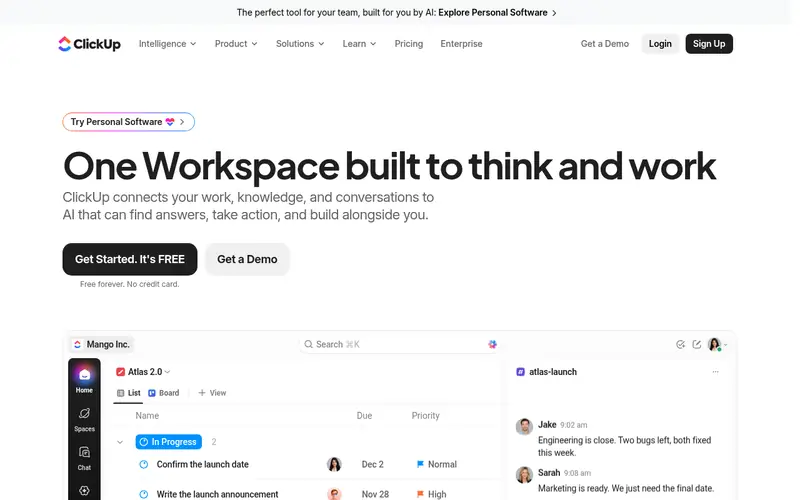
ClickUp homepage

ClickUp includes time tracking inside its task and project system. A game team can estimate tasks, log time against them, and view reports by list, project or assignee. That helps studios that want planning and hour tracking in one place rather than two separate tools. The free plan has limits on storage and some features, and paid tiers add more. The product is broad, which can slow down a small team that only needs a timer. Larger teams with a producer managing schedules may get more value. Check the vendor pricing page for current free-plan limits and paid pricing.

Free plan: Yes

Website: clickup.com

Strengths

  • Time tracking built into tasks and lists
  • broad feature set on paid plans

Watch out for

  • Many features can overwhelm new users
  • free plan has storage and usage limits
6

Hubstaff

Studios tracking remote contractors and outsourced work
See vendor pricing page
hubstaff.comHomepage, Nov 2026
Hubstaff homepage

Hubstaff tracks time and can record activity data for remote workers, which some studios use when managing outsourced art or QA teams across time zones. It supports project budgets, reports and payroll integrations, so a producer can see hours against a fixed-fee contract. The monitoring features are optional but can feel intrusive to some developers, so set expectations before rolling it out. Pricing is per seat, and there is a free trial rather than a permanent free plan. Confirm trial length and seat pricing on the vendor site. Teams that dislike monitoring should skip it.

Free plan: Free trial (14 days)

Website: hubstaff.com

Strengths

  • Time tracking with activity data for remote teams
  • project budgets and payroll options

Watch out for

  • Activity monitoring can feel intrusive
  • per-seat pricing
7

Paymo

Small studios that need tracking, tasks and invoicing
See vendor pricing page
paymoapp.comHomepage, Nov 2026
Paymo homepage

Paymo combines time tracking, task management and invoicing, which fits small game studios that bill clients and need one tool for hours and bills. You can log time against tasks, set budgets and generate invoices from tracked hours. The free plan suits very small teams, and paid plans add features. It is not built for large production schedules or asset pipelines, so bigger studios may outgrow it. Confirm current free-plan limits and paid pricing on the vendor pricing page before choosing it for a team.

Free plan: Yes

Website: paymoapp.com

Strengths

  • Time tracking, tasks and invoicing in one place
  • free plan for small teams

Watch out for

  • Less suited to large production schedules
  • feature depth varies by plan

Pre-purchase checklist

  • Check whether the free plan covers your team size and whether billable rates are included.
  • Confirm the tool can track hours by project, task and client, matching how you bill milestones.
  • Review reporting options for producers and finance, including export formats.
  • Check per-seat pricing against your current and planned headcount.
  • Decide whether you need invoicing and payroll, or only internal time reports.

FAQ

Do game developers need time tracking software?

Many do. Studios billing publisher milestones or client work need hour records for invoices and budgets. Internal teams use time data to estimate tasks and plan production. Solo developers may only need a simple timer, while larger studios often want tracking inside project management.

Which tool is best for a small indie studio?

Clockify is a common pick because its free plan covers unlimited users and tracks billable hours. Toggl Track is a simpler alternative for solo developers. Harvest suits studios that invoice clients directly. The right choice depends on whether you need invoicing and how many people log time.

Can these tools track hours by task and milestone?

Most can track hours by project and task. Clockify, Wrike and ClickUp support task-level tracking with reporting. Harvest and Paymo tie hours to invoices. Mapping milestones to projects or tasks takes setup, so plan your structure before rolling a tool out to the team.

Do any of these tools have a free plan?

Clockify, Toggl Track, Wrike, ClickUp and Paymo list free plans, though limits vary. Harvest and Hubstaff offer free trials rather than permanent free plans. Free-plan limits change, so check each vendor pricing page before you rely on one for a team.

What about tracking remote contractors?

Hubstaff is built for remote teams and can record activity data alongside hours. Clockify and Harvest also work for contractors if you only need hours and billing. Activity monitoring can be sensitive, so agree on rules with contractors before you enable it.