How we rank
Productivity · Researched comparison

Best Time Tracking Software for Home Inspectors in 2026

TaskReports may earn a fee from some links on this page, and some placements are paid and labelled. Neither one decides the order. See our disclosure.

The short answer

Clockify is the first pick for most home inspectors because its free plan covers unlimited users and its timer can be tied to a client and a job. Harvest suits inspectors who want time tracking and invoicing in one place. QuickBooks Solopreneur fits solo inspectors who need mileage and expense records next to their hours. Larger multi-inspector firms should look at Jobber or Housecall Pro for scheduling.

On this page

Key takeaways

  • Clockify has a free plan with unlimited users and a per-job timer that suits inspectors who bill by the hour.
  • QuickBooks Solopreneur combines time tracking with mileage and expense records for solo inspectors who invoice from the same tool.
  • Harvest and Toggl Track both bill per user, so a one-inspector office pays for a single seat.
  • Jobber and Housecall Pro add scheduling and dispatch, which matter when inspections are booked by clients rather than tracked alone.

Quick comparison

ToolBest fitStarting price
ClockifyInspectors who bill hourly and want a free startSee vendor pricing page
HarvestInspectors who want time tracking and invoicing togetherSee vendor pricing page

Toggl TrackSolo inspectors who want a fast, simple timerSee vendor pricing page
QuickBooks SolopreneurSolo inspectors who need time, mileage, and expensesSee vendor pricing page
JobberInspection firms that book jobs and track timeSee vendor pricing page
Housecall ProInspection teams that need scheduling and job trackingSee vendor pricing page
HubstaffFirms that want time tracking with location and activity dataSee vendor pricing page
TimeCampInspectors who want automatic time capture alongside manual timersSee vendor pricing page

How we chose

The picks were judged on fit for inspection work: per-job timers, client and project grouping, mobile use in the field, and whether time data can feed invoices. Entry price and free access were checked against vendor pricing pages, and limits were taken from public documentation. No hands-on testing or user surveys were done. Prices and plan limits change, so confirm current details on each vendor site before buying.

★ Best overall

Clockify

Inspectors who bill hourly and want a free start

  • Free plan with unlimited users
  • timer can be assigned to clients and projects
PriceSee vendor pricing page
See Clockify pricing
clockify.meHomepage, Nov 2026
Clockify homepage

Clockify is a general time tracker that works well for inspection work because a timer can be started against a client and a project for each property. An inspector can create a project per job, log travel time separately, and export the totals for invoicing. The free plan supports unlimited users, which helps a small firm where several inspectors log their own hours. Paid tiers add features such as billable rates, rounding, and more detailed reporting. The tool does not handle scheduling, inspection reports, or mileage logs, so it is best treated as the time layer of a wider workflow. Inspectors who need dispatch and client booking should pair it with a scheduling tool or choose one of the field service products below.

Price: See vendor pricing page

Free plan: Yes

Website: clockify.me

Watch out for

  • Advanced features sit behind paid tiers
  • no built-in inspection report tools
2

Harvest

Inspectors who want time tracking and invoicing together
See vendor pricing page
getharvest.comHomepage, Nov 2026
Harvest homepage

Harvest pairs a timer with invoicing, which suits an inspector who finishes a job and wants to turn the logged hours into a client invoice without moving data to another app. Each inspection can be a project, and time entries can be marked billable or not, so travel and admin work stay separate from billable inspection time. The plan is billed per user, so a solo inspector pays for one seat. There is a free trial but no permanent free plan. Harvest does not schedule appointments or store inspection findings. It is a good fit for inspectors whose main need is clean hourly billing, and a weaker fit for firms that need dispatch and routing.

Free plan: Free trial (30 days)

Website: getharvest.com

Strengths

  • Invoices can be built from tracked time
  • simple per-project budgets

Watch out for

  • Billed per user
  • no field service scheduling
3

Toggl Track

Solo inspectors who want a fast, simple timer
See vendor pricing page
toggl.comHomepage, Nov 2026
Toggl Track homepage

Toggl Track is built around a simple start and stop timer, which fits the way an inspector moves between properties. A project can represent a client or a property, and tags can separate inspection time from travel and report writing. Reports group hours by client and project, which helps when quoting repeat work. The free plan covers core tracking for individuals and small teams, with paid tiers adding more reporting and admin controls. Toggl Track does not issue invoices or manage appointments, so it works best as a focused time tool next to separate billing and scheduling software. Inspectors who want one app for everything should look at the field service options.

Free plan: Yes

Website: toggl.com/track

Strengths

  • Quick one-click timer on web and mobile
  • clear reports by client and project

Watch out for

  • Free plan limits some reporting features
  • no invoicing
4

QuickBooks Solopreneur

Solo inspectors who need time, mileage, and expenses
See vendor pricing page
quickbooks.intuit.comHomepage, Nov 2026
QuickBooks Solopreneur homepage

QuickBooks Solopreneur is aimed at one-person businesses, which describes many home inspectors. It combines time tracking with mileage tracking and expense capture, so the drive between inspections and the hours on site can be recorded in one place and used for invoices and tax records. There is no free plan, and pricing should be checked on the vendor page because Intuit changes its tiers. The product is not built for multi-inspector scheduling or dispatch. An inspector who already uses QuickBooks for accounting gets the most value, since the time and mileage data feed the same books. Firms with several inspectors should look at a field service tool instead.

Free plan: No

Website: quickbooks.intuit.com

Strengths

  • Time tracking sits next to mileage and expense records
  • invoices come from the same account

Watch out for

  • No free plan
  • aimed at solo operators rather than teams
5

Jobber

Inspection firms that book jobs and track time
See vendor pricing page
JobberHomepage image unavailable

Jobber is field service software with scheduling, quoting, invoicing, and time tracking. For an inspection business, a job can be created for each property, assigned to an inspector, and timed from arrival to completion. Client records and quotes sit alongside the time data, which helps when a client asks for a breakdown of hours. Plans are tiered and priced for service businesses, so it is more than a pure time tracker. There is a free trial but no free plan. Small solo inspectors who only need a timer may find it heavy, while firms with several inspectors and a booking pipeline get scheduling and time records in one place. Check the vendor page for current plan limits.

Free plan: Free trial (14 days)

Website: getjobber.com

Strengths

  • Scheduling, dispatch, and time tracking in one app
  • client records and quotes

Watch out for

  • Priced for service businesses, not single-task tracking
  • no free plan
6

Housecall Pro

Inspection teams that need scheduling and job tracking
See vendor pricing page
housecallpro.comHomepage, Nov 2026
Housecall Pro homepage

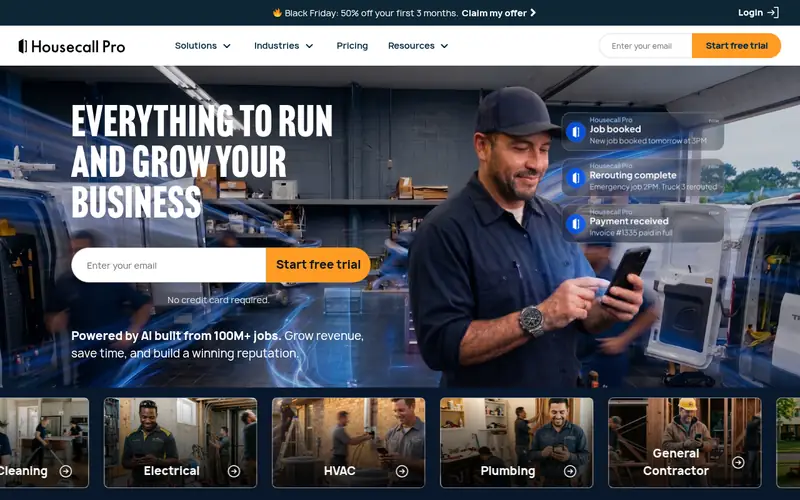
Housecall Pro is built for home service companies and includes scheduling, job management, and time tracking. An inspection firm can schedule a visit, assign it to an inspector, and record time against the job. The mobile app lets an inspector update status and hours from the property. The product is broader than time tracking and is priced accordingly, with tiers that add features. There is a free trial but no free plan. It suits inspection businesses that already run on scheduled jobs and want time records attached to each one. A solo inspector who only needs a timer will likely pay for features they do not use.

Free plan: Free trial (14 days)

Website: housecallpro.com

Strengths

  • Job scheduling with time tracking
  • mobile app for field use

Watch out for

  • No free plan
  • feature set aimed at home service companies
7

Hubstaff

Firms that want time tracking with location and activity data
See vendor pricing page
hubstaff.comHomepage, Nov 2026
Hubstaff homepage

Hubstaff tracks time with optional location and activity data, which can help an inspection firm confirm when an inspector arrived at a property and how long the visit took. Timesheets roll up across the team, and projects can be set up per client or per region. Pricing is per user, and there is a free trial rather than a free plan. The activity monitoring features go beyond what many inspection businesses need, and some inspectors may object to them. It fits firms with several field inspectors where proof of arrival time matters. Solo inspectors should compare it with simpler and cheaper timers first.

Free plan: Free trial (14 days)

Website: hubstaff.com

Strengths

  • GPS and location tracking on mobile
  • timesheets for a team of inspectors

Watch out for

  • Per-user pricing
  • activity monitoring is more than some firms need
8

TimeCamp

Inspectors who want automatic time capture alongside manual timers
See vendor pricing page
timecamp.comHomepage, Nov 2026
TimeCamp homepage

TimeCamp offers manual timers and automatic time capture, which can help an inspector who forgets to start a timer when a job begins. Projects can be set up per client, and reports show hours by project for billing or review. A free plan is available for basic use, with paid tiers for more features. Automatic tracking depends on how the inspector works and needs some setup to be useful. TimeCamp has no inspection-specific fields, so job details live in project names or notes. It suits inspectors who want a backup to manual timers. Firms that need scheduling and dispatch should look at Jobber or Housecall Pro instead.

Free plan: Yes

Website: timecamp.com

Strengths

  • Automatic tracking can fill gaps in manual logs
  • reports by client and project

Watch out for

  • Automatic capture needs setup
  • no inspection-specific fields

Pre-purchase checklist

  • Confirm the timer can be tied to a client and a single property or job.
  • Check whether travel time can be logged separately from inspection time.
  • Verify mobile apps work offline, since many properties have weak signal.
  • Confirm whether invoicing is included or needs a separate tool.
  • Check per-user pricing against the number of inspectors who will log time.

FAQ

Do home inspectors need dedicated time tracking software?

Not always. A general timer such as Clockify or Toggl Track covers per-job hours for a solo inspector. Dedicated field service software becomes useful when the firm also needs scheduling, dispatch, and client records in the same system.

Can I track mileage and time in one app?

QuickBooks Solopreneur includes both time tracking and mileage tracking for solo businesses. Most pure time trackers do not log mileage, so inspectors who need both should check the vendor's feature list or use a separate mileage app.

Is there free time tracking for inspectors?

Clockify offers a free plan with unlimited users, and TimeCamp has a free plan for basic use. Harvest, Jobber, Housecall Pro, and Hubstaff offer free trials rather than free plans. Check current limits on each vendor page.

How much does time tracking software cost for a small inspection firm?

Prices vary by vendor and are billed per user on most plans. This guide does not quote figures because tiers change. Compare the published entry price on each vendor's pricing page against the number of inspectors who will log time.

What should I check before choosing a tool?

Confirm that timers can be assigned to clients and jobs, that mobile use works in the field, and that reports can be exported for invoicing. If scheduling matters, choose a field service product rather than a standalone timer.