Design · Researched comparison

8 Audio Editing Software Options Compared on Price and Fit

TaskReports may earn a fee from some links on this page, and some placements are paid and labelled. Neither one decides the order. See our disclosure.

The short answer

GarageBand comes first here, mainly for free Mac and iOS recording studio. For a different need, Reaper covers best-value full DAW for any system and Pro Tools covers industry-standard studio recording. All 8 tools are compared below on price, free plan and limits.

On this page

Key takeaways

  • Top of the list is GarageBand, which targets free Mac and iOS recording studio.
  • One limit worth knowing about Reaper: sparse default interface needs setup.
  • For light free editor, Ocenaudio is worth a look.
  • Free plans exist at 4 of 8 tools (GarageBand, Pro Tools, Audacity, Ocenaudio).

Quick comparison

ToolBest forStarts atFree plan
------------
GarageBandFree Mac and iOS recording studioFreeYes
ReaperBest-value full DAW for any system$60 one-timeFree trial
Pro ToolsIndustry-standard studio recording$9.99/monthYes
AudacityFree editing and recording for everyoneFreeYes
Adobe AuditionPro broadcast and podcast post-production$22.99/monthFree trial
FL StudioBeat making and electronic production$99 one-timeFree trial
Logic ProFull Mac DAW, one-time price$199.99 one-timeNo
OcenaudioLight free editorFreeYes
★ Best overall

GarageBand

Free Mac and iOS recording studio

  • Projects open straight in Logic Pro
  • Surprisingly decent virtual instruments and loops

Where GarageBand fits: free Mac and iOS recording studio. It comes free with every Mac, iPhone and iPad. Strengths: iPhone and iPad. It is a real multitrack studio: software instruments, guitar amp modeling, drummers that play along, and enough loops to sketch full songs. Worth adding: Songwriters, podcasters and students produce releasable work in GarageBand every day. GarageBand cost at the entry level: Free. You can start on GarageBand without paying. Points against: Apple devices only.

Price: Free

Free plan: Yes

Website: apple.com

Watch out for

  • Track and plugin limits frustrate as projects grow
2

Reaper

Best-value full DAW for any system
$60 one-time

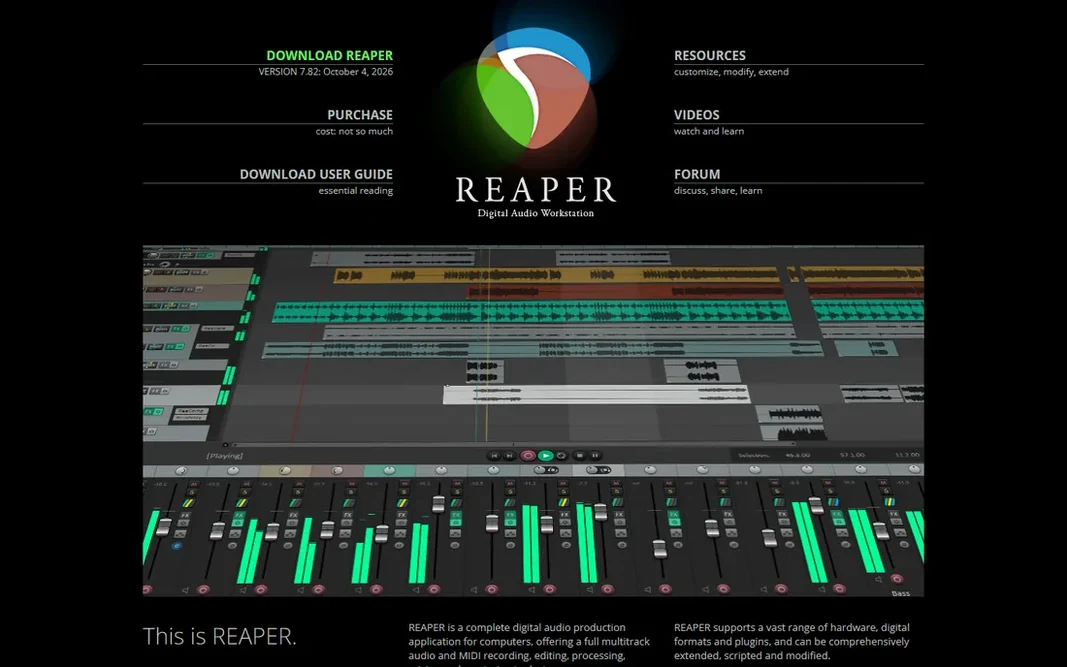
Reaper is a good fit for best-value full DAW for any system. Reaper is the audio world's best-kept open secret. It is a complete, professional multitrack DAW, recording, editing, mixing, MIDI, video support, for a $60 discounted license, with a 60-day evaluation that never locks features. If you want one budget-friendly DAW that manages any audio job, Reaper is it. The starting price for Reaper: $60 one-time. Free access: Free trial. Where it is weaker: Fewer included instruments than Logic or FL Studio.

Free plan: Free trial

Website: reaper.fm

Strengths

  • Runs on Windows
  • Deeply configurable and scriptable

Watch out for

  • Sparse default interface needs setup
3

Pro Tools

Industry-standard studio recording
$9.99/month

Pro Tools is designed for industry-standard studio recording. When a band records in a commercial facility, the session is almost certainly in Pro Tools, and that compatibility matters: sessions move between studios, engineers and mixers without conversion. For home recordists, Reaper or Logic do 90 percent of the job for far less money. Where it is weaker: Subscriptions add up. But if you plan to work in or with professional studios, learning Pro Tools is career infrastructure. From a buyer's view, the ecosystem has friction: Avid's licensing, the iLok system and the upsell ladder to Studio and Ultimate levels. On top of that, the Artist level at $9.99 a month or $99 a year puts the real software within reach. The free Intro level teaches the workflow. The free Intro level is the right place to start. Pro Tools cost at the entry level: $9.99/month. Free access exists with Pro Tools.

Free plan: Yes

Website: avid.com

Strengths

  • Free Intro level for learning
  • Rock-solid with large track counts

Watch out for

  • Hardware and iLok requirements annoy on lower levels
4

Audacity

Free editing and recording for everyone
Free

Audacity is built with free editing and recording for everyone in mind. Audacity is the reason "free audio editor" is a solved problem. It records live audio, edits multitrack projects, applies noise reduction, EQ, compression and dozens of other effects, and exports to every format that matters. Downsides: Destructive editing workflow feels dated. Podcasters cut interviews in it, musicians demo ideas, teachers clean up lecture recordings. It does all of this at no cost, on every major desktop system, with a plugin ecosystem built over two decades. Audacity pricing: Free. Audacity includes a free tier.

Free plan: Yes

Website: audacityteam.org

Strengths

  • Mac and Linux
  • Runs on Windows

Watch out for

  • MIDI and virtual instrument support is restricted
5

Adobe Audition

Pro broadcast and podcast post-production
$22.99/month (annual, billed monthly)

Adobe Audition serves pro broadcast and podcast post-production. Adobe Audition is the professional's choice for cleaning up and finishing recorded audio. Its noise reduction, de-reverb and spectral editing tools rescue recordings that other software cannot fix, which is why broadcast, film and podcast producers keep it in the toolkit. Drawbacks to consider: Subscription only, no buy-once choice. For straightforward recording and entry-level edits, Audacity or GarageBand do the job free. As for the details, Audition earns its price when audio quality is the product. In practice, the $22.99 monthly subscription on the annual plan is the primary objection, and there is no perpetual license. A 7-day trial lets you test it on your worst recording, which is honestly the best demo: run its noise reduction on a noisy interview and compare. Price to start with Adobe Audition: $22.99/month. As for free access: Free trial.

Free plan: Free trial

Website: adobe.com

Strengths

  • Tight Creative Cloud integration
  • Multitrack and waveform views in one app

Watch out for

  • Overkill for straightforward voice recording
6

FL Studio

Beat making and electronic production
$99 one-time

Pick FL Studio if this describes you: beat making and electronic production. FL Studio built its reputation on the step sequencer and piano roll, and it is still the fastest way to get a beat out of your head and into speakers. On top of that, for producers whose music starts with drums and synths instead of a microphone, FL Studio is the natural home. Worth adding: the workflow is pattern-based, which fits hip-hop, EDM and loop-driven production perfectly, and the included instruments and effects are solid from the Fruity edition's $99 upward. FL Studio pricing: $99 one-time. As for free access: Free trial. Where it is weaker: Recording and comping audio lags behind.

Free plan: Free trial

Website: image-line.com

Strengths

  • Fruity edition begins at $99
  • Piano roll is the best in the business

Watch out for

  • The interface divides opinion
7

Logic Pro

Full Mac DAW, one-time price
$199.99 one-time

Logic Pro is aimed squarely at full Mac DAW, one-time price. Apple has never charged for an update, so the 2013 purchase price still handles the 2026 version. It records bands, produces electronic music, scores film and mixes podcasts with equal comfort. On top of that, for Mac users choosing between subscriptions, Logic's buy-once model against Pro Tools' or Audition's monthly fees is a straightforward win over two years. Logic Pro cost at the entry level: $199.99 one-time. No free plan comes with Logic Pro. Limits to weigh: Mac only, no Windows version.

Free plan: No

Website: apple.com

Strengths

  • Pro-grade DAW for a single $199.99 payment
  • Huge instrument and loop library included

Watch out for

  • No free level or trial beyond the 90-day offer
8

Ocenaudio

Light free editor
Free

For light free editor, Ocenaudio is a natural candidate. It is a free, cross-platform audio editor that opens quick, previews effects in live as you adjust them, and takes care of the everyday jobs, trimming interviews, normalizing levels, converting formats, removing noise, without a ramp-up time. Points against: Smaller community than Audacity. On top of that, as a free audio editing app for quick, straightforward jobs, it deserves a place on every shortlist. On top of that, for quick edits it is noticeably more pleasant than Audacity. Price to start with Ocenaudio: Free. Ocenaudio has a free plan.

Free plan: Yes

Website: ocenaudio.com

Strengths

  • Cross-platform and light
  • Live effect previews

Watch out for

  • Single-track focus limits complicated projects

FAQ

What is the best audio recording software for beginners?

GarageBand is the pick this page puts first, mainly for free Mac and iOS recording studio. If your situation differs, Reaper suits best-value full DAW for any system, and Pro Tools suits industry-standard studio recording. Compare price and limits before you decide.

Which options for audio editing software have a free plan?

GarageBand, Pro Tools, Audacity and Ocenaudio offer a free plan in this list. Free plans usually cap users, projects or features, so check the limits on the vendor page. Several others offer a trial instead.

What computer do I need for audio editing?

Less than you think. Audacity, Ocenaudio and Reaper run well on modest machines. Logic Pro and GarageBand need a Mac but are efficient. The demanding tools are the big sample libraries and heavy plugin chains in any DAW.

Is GarageBand the right pick for everyone comparing audio editing software?

No single tool suits every team. GarageBand comes first because it fits free Mac and iOS recording studio, while Reaper suits best-value full DAW for any platform and Pro Tools suits industry-standard studio recording. Match the tool to your own size, budget and workflow before deciding.

What is the cheapest option for audio editing software in this list?

On published monthly entry prices, Pro Tools is the lowest here at $9.99/month. Entry price is only part of the cost, because seats, add-ons and billing terms can change the total.

What is the best free audio editing software?

GarageBand comes first here and is built for free Mac and iOS recording studio. Buyers with other needs may prefer Reaper (for best-value full DAW for any system) or Pro Tools (for industry-standard studio recording). Compare costs and limits first.